Set up speakers (Audyssey® Setup)
the
Setup
and
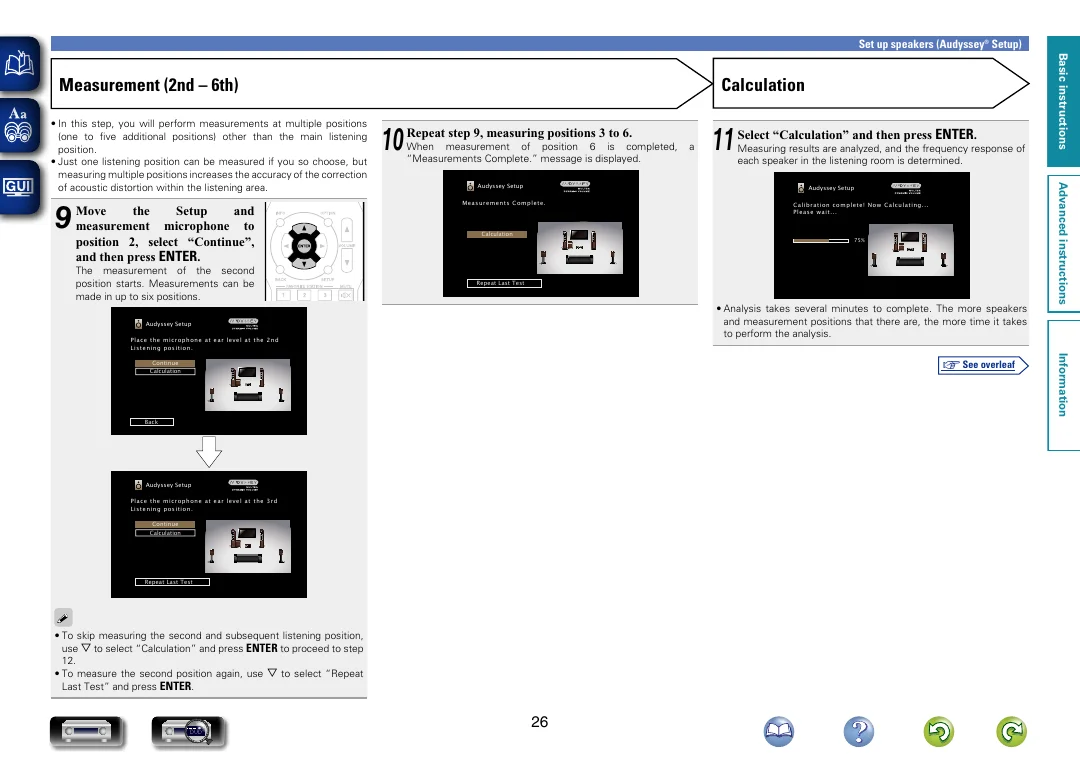
9 Move
measurement microphone to
position 2, select “Continue”,
and then press ENTER .
The measurement of the second
position starts. Measurements can be
made in up to six positions.
10 Repeat step 9, measuring positions 3 to 6.
When measurement of position 6 is completed,
“Measurements Complete.” message is displayed.
Audyssey Setup
a
11 Select “Calculation” and then press ENTER .
Measuring results are analyzed, and the frequency response of
each speaker in the listening room is determined.
Audyssey Setup
Mea surements C o mp lete.
Calculation
Calibrat ion c omple t e ! Now Calc ulat ing ...
Ple as e wait ...
75%
Repeat Last Test
• Analysis takes several minutes to complete. The more speakers
and measurement positions that there are, the more time it takes
to perform the analysis.
Audyssey Setup
P l a c e the micr ophone at e ar le ve l at t he 2 nd
L i s te n i n g p os it ion.
v See overleaf
Back
Audyssey Setup
P l a c e the micr ophone at e ar le ve l at t he 3 r d
L i s te n i n g p os it ion.
Continue
Calculation
Repeat Last Test
• To skip measuring the second and subsequent listening position,
use i to select “Calculation” and press ENTER to proceed to step
12.
• To measure the second position again, use i to select “Repeat
Last Test” and press ENTER .
DVD
26
Information
Continue
Calculation
Advanced instructions
• In this step, you will perform measurements at multiple positions
(one to five additional positions) other than the main listening
position.
• Just one listening position can be measured if you so choose, but
measuring multiple positions increases the accuracy of the correction
of acoustic distortion within the listening area.
Basic instructions
Calculation
Measurement (2nd – 6th)