Listening to FM/AM broadcasts
Your favorite broadcast stations can be preset so that you can tune
them in easily. Up to 56 stations can be preset.
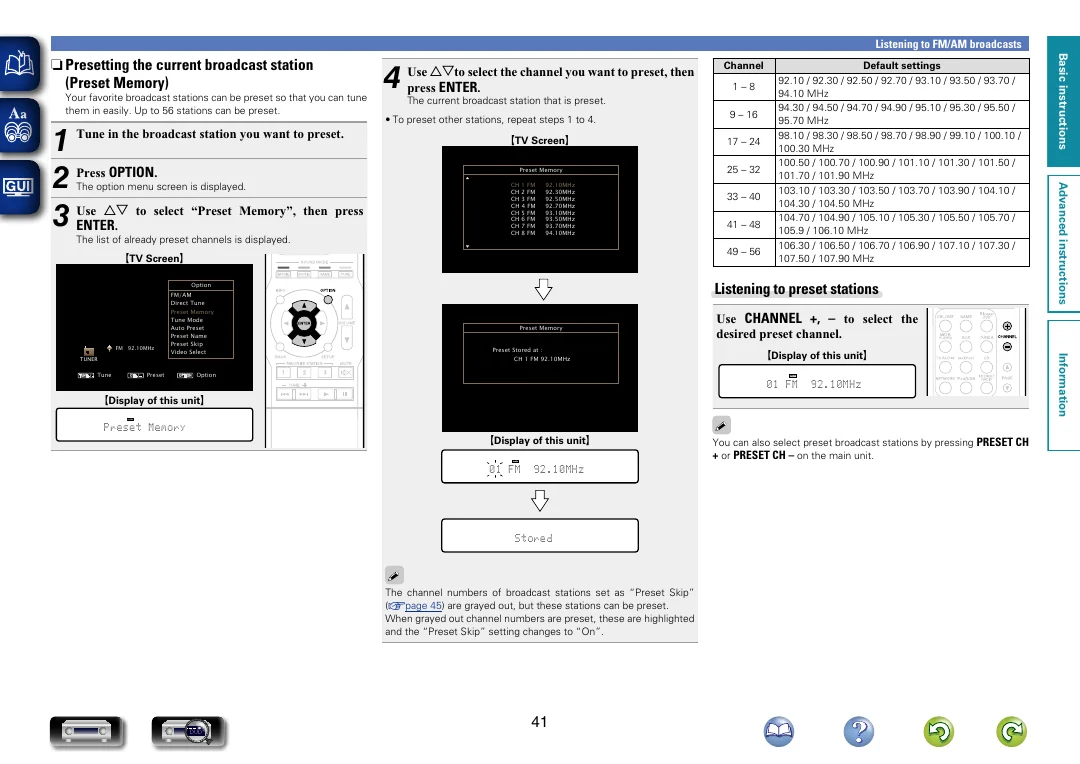
The option menu screen is displayed.
The list of already preset channels is displayed.
• To preset other stations, repeat steps 1 to 4.
17 – 24
Preset Memory
25 – 32
CH 1 FM
CH 2 FM
CH 3 FM
CH 4 FM
CH 5 FM
CH 6 FM
CH 7 FM
CH 8 FM
92.10MHz
92.30MHz
92.50MHz
92.70MHz
93.10MHz
93.50MHz
93.70MHz
94.10MHz
TUNE+/-
Tune
CH+/-
Preset
OPTION
33 – 40
41 – 48
49 – 56
Default settings
92.10 / 92.30 / 92.50 / 92.70 / 93.10 / 93.50 / 93.70 /
94.10 MHz
94.30 / 94.50 / 94.70 / 94.90 / 95.10 / 95.30 / 95.50 /
95.70 MHz
98.10 / 98.30 / 98.50 / 98.70 / 98.90 / 99.10 / 100.10 /
100.30 MHz
100.50 / 100.70 / 100.90 / 101.10 / 101.30 / 101.50 /
101.70 / 101.90 MHz
103.10 / 103.30 / 103.50 / 103.70 / 103.90 / 104.10 /
104.30 / 104.50 MHz
104.70 / 104.90 / 105.10 / 105.30 / 105.50 / 105.70 /
105.9 / 106.10 MHz
106.30 / 106.50 / 106.70 / 106.90 / 107.10 / 107.30 /
107.50 / 107.90 MHz
Listening to preset stations
Preset Memory
Preset Stored at :
CH 1 FM 92.10MHz
Use CHANNEL +, – to select the
desired preset channel.
GDisplay of this unitH
Option
01 FM
92.10MHz
GDisplay of this unitH
Preset Memory
GDisplay of this unitH
You can also select preset broadcast stations by pressing PRESET CH
+ or PRESET CH – on the main unit.
01 FM
92.10MHz
Stored
The channel numbers of broadcast stations set as “Preset Skip”
(vpage 45) are grayed out, but these stations can be preset.
When grayed out channel numbers are preset, these are highlighted
and the “Preset Skip” setting changes to “On”.
DVD
41
Information
FM 92.10MHz
9 – 16
GTV ScreenH
Option
TUNER
1 – 8
The current broadcast station that is preset.
GTV ScreenH
FM/AM
Direct Tune
Preset Memory
Tune Mode
Auto Preset
Preset Name
Preset Skip
AUTO
Video Select CH 1
Channel
Advanced instructions
1 Tune in the broadcast station you want to preset.
2 Press OPTION .
ui to select “Preset Memory”, then press
3 Use
ENTER .
4
Use ui to select the channel you want to preset, then
press ENTER .
Basic instructions