100
Video
HDMI Setup
Default settings are underlined.
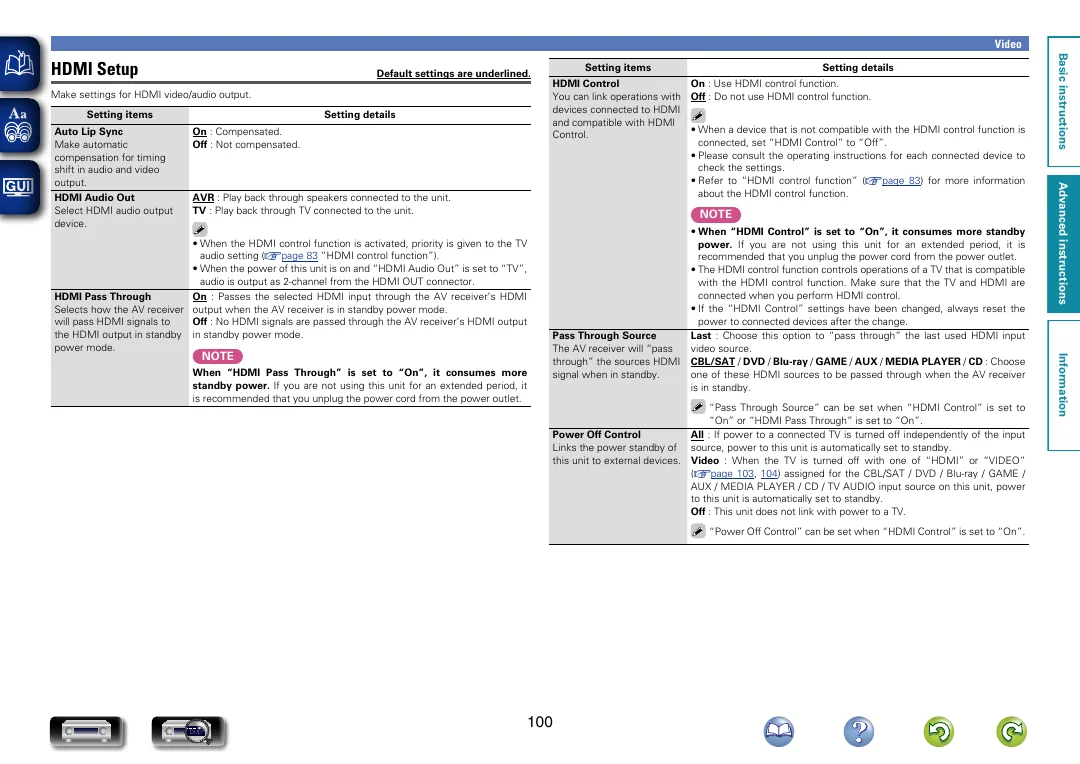
Make settings for HDMI video/audio output.
Setting items
Setting details
Auto Lip Sync
Make automatic
compensation for timing
shift in audio and video
output.
On
: Compensated.
Off
: Not compensated.
HDMI Audio Out
Select HDMI audio output
device.
AVR
: Play back through speakers connected to the unit.
TV
: Play back through TV connected to the unit.
•
When the HDMI control function is activated, priority is given to the TV
audio setting (
v
page 83
“HDMI control function”).
•
When the power of this unit is on and “HDMI Audio Out” is set to “TV”,
audio is output as 2-channel from the HDMI OUT connector.
HDMI Pass Through
Selects how the AV receiver
will pass HDMI signals to
the HDMI output in standby
power mode.
On
: Passes the selected HDMI input through the AV receiver’s HDMI
output when the AV receiver is in standby power mode.
Off
: No HDMI signals are passed through the AV receiver’s HDMI output
in standby power mode.
NOTE
When “HDMI Pass Through” is set to “On”, it consumes more
standby power.
If you are not using this unit for an extended period, it
is recommended that you unplug the power cord from the power outlet.
Setting items
Setting details
HDMI Control
You can link operations with
devices connected to HDMI
and compatible with HDMI
Control.
On
: Use HDMI control function.
Off
: Do not use HDMI control function.
•
When a device that is not compatible with the HDMI control function is
connected, set “HDMI Control” to “Off”.
•
Please consult the operating instructions for each connected device to
check the settings.
•
Refer to “HDMI control function” (
v
page 83
) for more information
about the HDMI control function.
NOTE
•
When “HDMI Control” is set to “On”, it consumes more standby
power.
If you are not using this unit for an extended period, it is
recommended that you unplug the power cord from the power outlet.
•
The HDMI control function controls operations of a TV that is compatible
with the HDMI control function. Make sure that the TV and HDMI are
connected when you perform HDMI control.
•
If the “HDMI Control” settings have been changed, always reset the
power to connected devices after the change.
Pass Through Source
The AV receiver will “pass
through” the sources HDMI
signal when in standby.
Last
: Choose this option to “pass through” the last used HDMI input
video source.
CBL/SAT
/
DVD
/
Blu-ray
/
GAME
/
AUX
/
MEDIA PLAYER
/
CD
: Choose
one of these HDMI sources to be passed through when the AV receiver
is in standby.
“Pass Through Source” can be set when “HDMI Control” is set to
“On” or “HDMI Pass Through” is set to “On”.
Power Off Control
Links the power standby of
this unit to external devices.
All
: If power to a connected TV is turned off independently of the input
source, power to this unit is automatically set to standby.
Video
: When the TV is turned off with one of “HDMI” or “VIDEO”
(
v
page 103
,
104
) assigned for the CBL/SAT / DVD / Blu-ray / GAME /
AUX / MEDIA PLAYER / CD / TV AUDIO input source on this unit, power
to this unit is automatically set to standby.
Off
: This unit does not link with power to a TV.
“Power Off Control” can be set when “HDMI Control” is set to “On”.
Basic instructions
Advanced instructions
Information
Advanced instructions
DVD