n n Searching content with keywords
(Text Search) (vpage 65)
Searching content with keywords
(Text Search)
USB
Internet Radio
Performing repeat playback (Repeat)
USB
Media Server
Spotify
Media Server
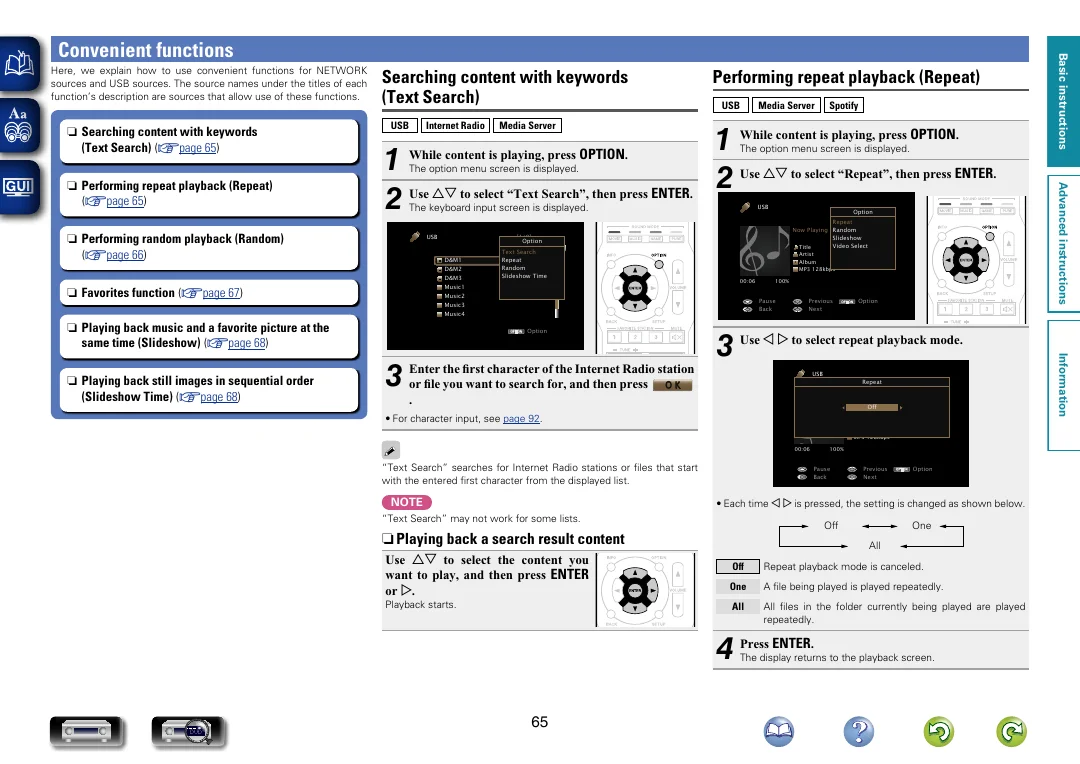
While content is playing, press OPTION .
1
1 While content is playing, press OPTION .
Use ui to select “Repeat”, then press ENTER .
2
2 Use ui to select “Text Search”, then press ENTER .
The option menu screen is displayed.
Basic instructions
Convenient functions
Here, we explain how to use convenient functions for NETWORK
sources and USB sources. The source names under the titles of each
function’s description are sources that allow use of these functions.
The option menu screen is displayed.
The keyboard input screen is displayed.
n n Performing random playback (Random)
(vpage 66)
USB
USB
[1/9]
Option
D&M1
D&M2
D&M3
Text Search
Repeat
Random
Slideshow Time
Artist
Album
MP3 128kbps
00:06
Music1
n n Favorites function (vpage 67)
Music2
Music4
n n Playing back music and a favorite picture at the
same time (Slideshow) (vpage 68)
100%
Pause
Back
Music3
OPTION
Option
the first character of the Internet Radio station
3 Enter
or file you want to search for, and then press
Previous
Next
Option
3 Use o p to select repeat playback mode.
USB
O K
.
OPTION
Repeat
Now Playing
Off
Title
Artist
Album
MP3 128kbps
• For character input, see page 92.
00:06
“Text Search” searches for Internet Radio stations or files that start
with the entered first character from the displayed list.
NOTE
100%
Pause
Back
Previous
Next
OPTION
Option
• Each time o p is pressed, the setting is changed as shown below.
“Text Search” may not work for some lists.
Off
n n Playing back a search result content
Use ui to select the content you
want to play, and then press ENTER
or p .
Playback starts.
One
All
Off
Repeat playback mode is canceled.
One
A file being played is played repeatedly.
All
All files in the folder currently being played are played
repeatedly.
4 Press ENTER .
The display returns to the playback screen.
DVD
65
Information
n n Playing back still images in sequential order
(Slideshow Time) (vpage 68)
Option
Repeat
Now Playing Random
Slideshow
Video Select
Title
Advanced instructions
n n Performing repeat playback (Repeat)
(vpage 65)