66
Convenient functions
Performing random playback (Random)
USB
Media Server
Spotify
1
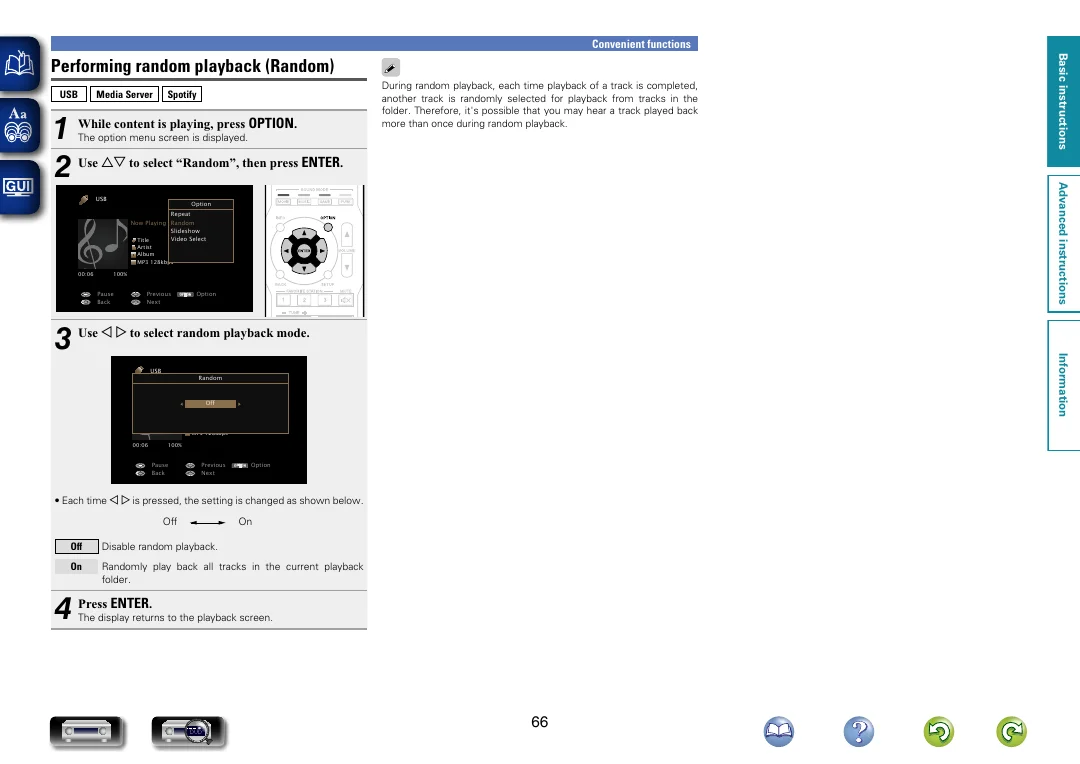
While content is playing, press
OPTION
.
The option menu screen is displayed.
2
Use
ui
to select “Random”, then press
ENTER
.
OPTION
USB
Title
Now Playing
Artist
Album
00:06
100%
Previous
Option
Pause
Next
Back
MP3 128kbps
Repeat
Option
Random
Slideshow
Video Select
3
Use
o
p
to select random playback mode.
OPTION
USB
Title
Now Playing
Artist
Album
00:06
100%
Previous
Option
Pause
Next
Back
MP3 128kbps
Off
Random
•
Each time
o
p
is pressed, the setting is changed as shown below.
Off
On
Off
Disable random playback.
On
Randomly play back all tracks in the current playback
folder.
4
Press
ENTER
.
The display returns to the playback screen.
During random playback, each time playback of a track is completed,
another track is randomly selected for playback from tracks in the
folder. Therefore, it's possible that you may hear a track played back
more than once during random playback.
Basic instructions
Advanced instructions
Information
Basic instructions
DVD