68
Convenient functions
n
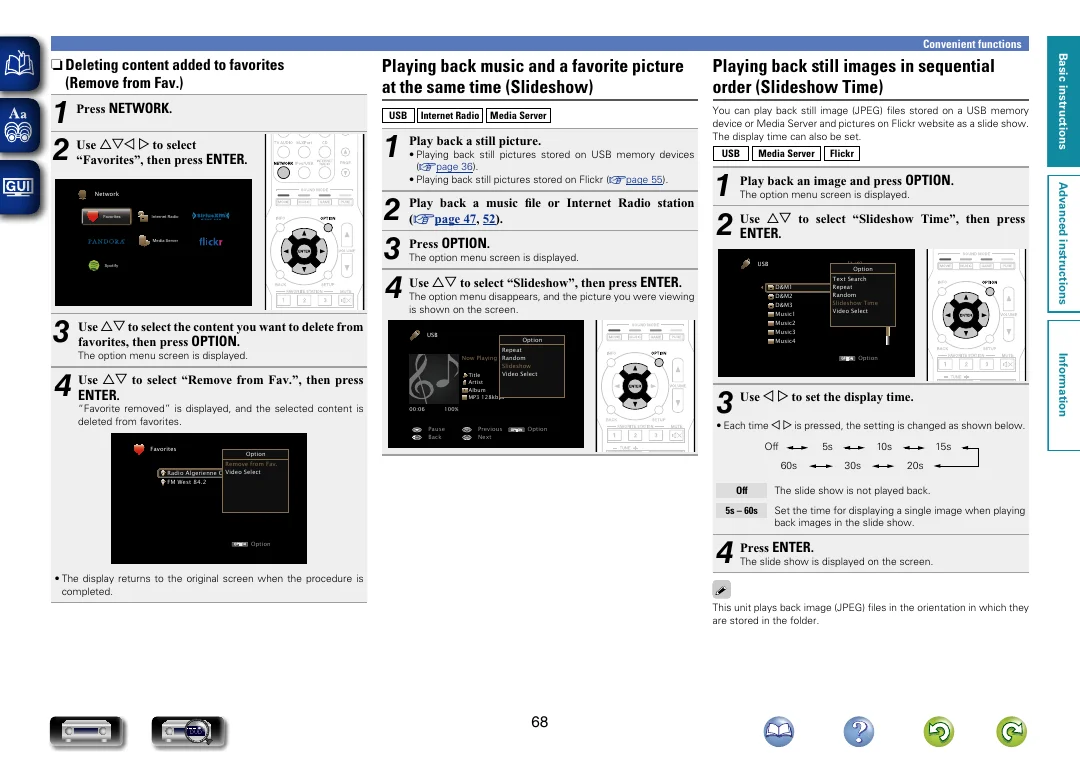
Deleting content added to favorites
(Remove from Fav.)
1
Press
NETWORK
.
2
Use
uio
p
to select
“Favorites”, then press
ENTER
.
Favorites
Internet Radio
Media Server
Spotify
Network
3
Use
ui
to select the content you want to delete from
favorites, then press
OPTION
.
The option menu screen is displayed.
4
Use
ui
to select “Remove from Fav.”, then press
ENTER
.
“Favorite removed” is displayed, and the selected content is
deleted from favorites.
OPTION
Favorites
Option
Radio Algerienne Chaine 1
FM West 84.2
Remove from Fav.
Option
Video Select
•
The display returns to the original screen when the procedure is
completed.
Playing back music and a favorite picture
at the same time (Slideshow)
USB
Internet Radio
Media Server
1
Play back a still picture.
•
Playing back still pictures stored on USB memory devices
(
v
page 36
).
•
Playing back still pictures stored on Flickr (
v
page 55
).
2
Play back a music file or Internet Radio station
(
v
page 47
,
52
).
3
Press
OPTION
.
The option menu screen is displayed.
4
Use
ui
to select “Slideshow”, then press
ENTER
.
The option menu disappears, and the picture you were viewing
is shown on the screen.
OPTION
USB
Title
Now Playing
Artist
Album
00:06
100%
Previous
Option
Pause
Next
Back
MP3 128kbps
Repeat
Option
Random
Slideshow
Video Select
Playing back still images in sequential
order (Slideshow Time)
You can play back still image (JPEG) files stored on a USB memory
device or Media Server and pictures on Flickr website as a slide show.
The display time can also be set.
USB
Media Server
Flickr
1
Play back an image and press
OPTION
.
The option menu screen is displayed.
2
Use
ui
to select “Slideshow Time”, then press
ENTER
.
OPTION
USB
[1/9]
D&M1
D&M2
D&M3
Music1
Music2
Music3
Music4
Option
Option
Text Search
Repeat
Random
Video Select
Slideshow Time
3
Use
o
p
to set the display time.
•
Each time
o
p
is pressed, the setting is changed as shown below.
Off
5s
10s
15s
20s
60s
30s
Off
The slide show is not played back.
5s – 60s
Set the time for displaying a single image when playing
back images in the slide show.
4
Press
ENTER
.
The slide show is displayed on the screen.
This unit plays back image (JPEG) files in the orientation in which they
are stored in the folder.
Basic instructions
Advanced instructions
Information
Basic instructions
DVD