Selecting a listening mode
STEREO
AUTO z2
2-channel z1
DOLBY PLg Game z3
MULTI CH STEREO
VIRTUAL
Multi-channel
STEREO
z4
AUTO z2
Dolby Digital
DOLBY DIGITAL
Dolby TrueHD DOLBY TrueHD
Dolby Digital
DOLBY DIGITAL Plus
Plus
DTS SURROUND
DTS
DTS 96/24
DTS-HD HI RES
DTS-HD /
DTS-HD MSTR
DTS Express
DTS Express
PCM multi-
MULTI CH IN
channel
MULTI CH STEREO
VIRTUAL
DIRECT
All
PURE DIRECT
AUTO z2
DVD
z1 2-channel also includes analog input.
z2 When AUTO mode is selected, the sound mode that is compatible
with the input signal is used for playback.
z3 This mode plays back 2-channel sources in 5.1-channel playback.
It cannot be selected when headphones are used, or when only
front speakers are used.
z4 Some listening modes cannot be selected, depending on the
audio format or number of channels of the input signal. For
details, see “Types of input signals, and corresponding sound
modes” (vpage 128).
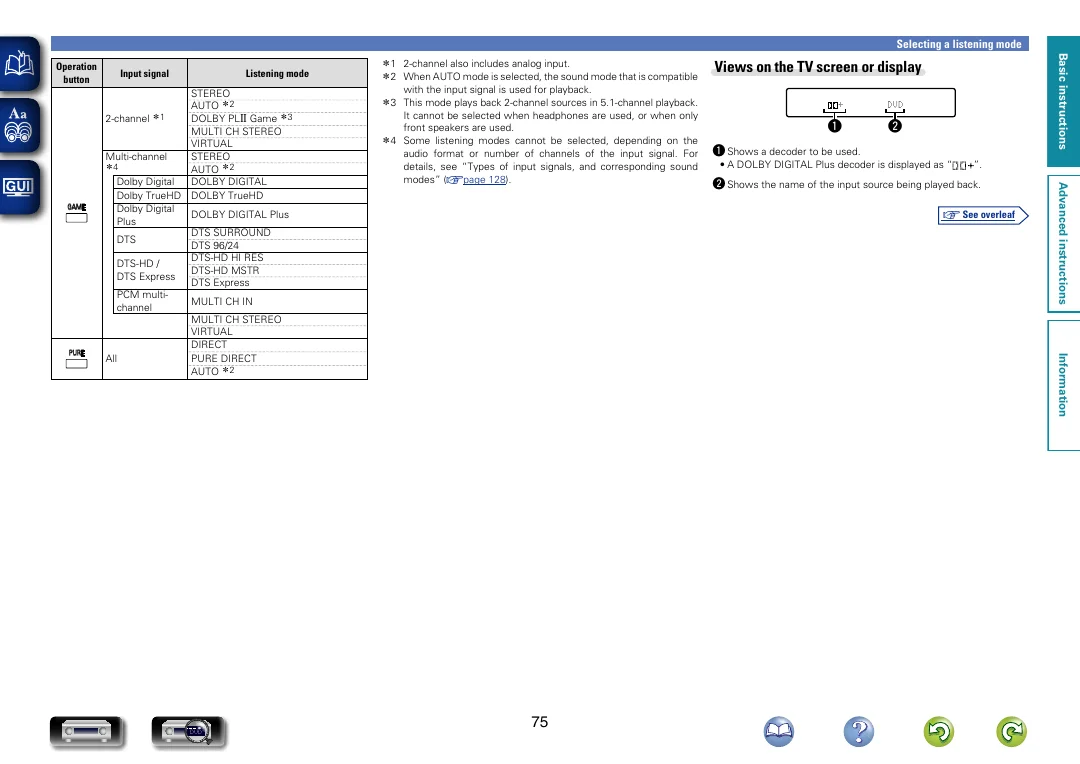
Views on the TV screen or display
+
DVD
q
w
q Shows a decoder to be used.
• A DOLBY DIGITAL Plus decoder is displayed as “
”.
w Shows the name of the input source being played back.
v See overleaf
Information
PURE
Listening mode
Advanced instructions
GAME
Input signal
Basic instructions
Operation
button
75