57
Using online services
Listening to Pandora®
1
Prepare for playback.
q
Check the network environment, then turn on this unit’s
power (
v
page 21
“Connecting to a home network
(LAN)”).
w
If settings are required, make the “Settings” (
v
page 112
).
e
Complete step 4 and obtain a Pandora account.
•
If you already have a Pandora account, you do not need to
obtain a new account. Use your existing Pandora account.
2
Press
NETWORK
.
3
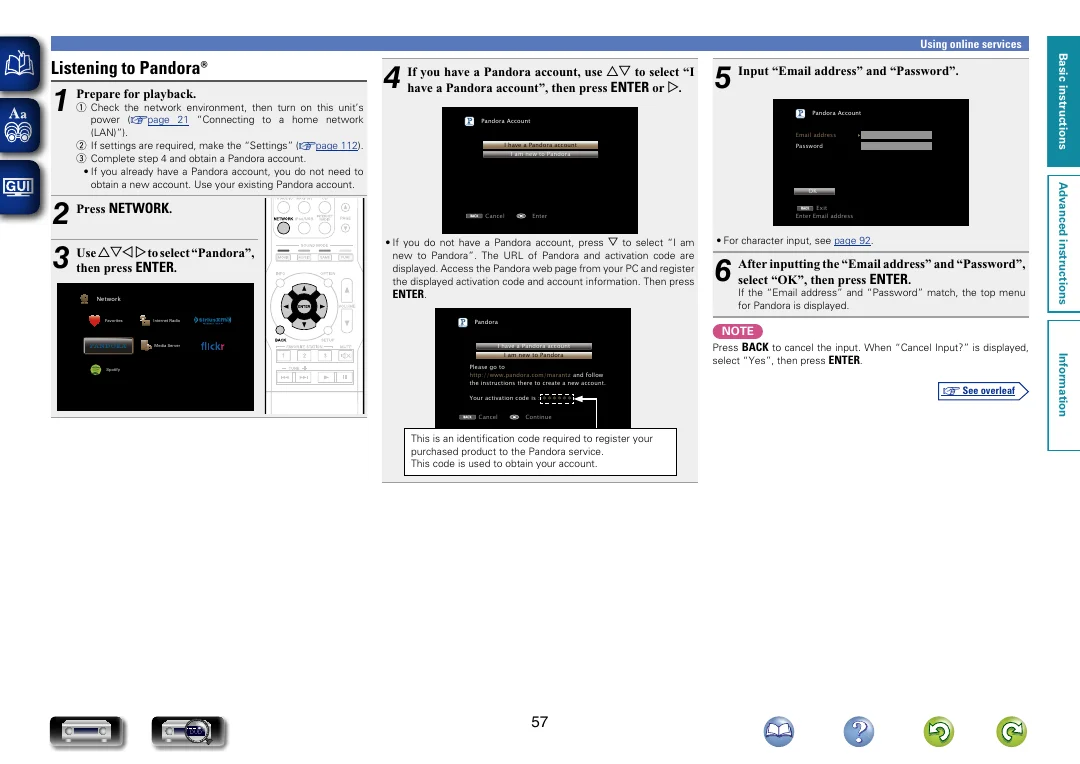
Use
uio
p
to select “Pandora”,
then press
ENTER
.
Favorites
Internet Radio
Media Server
Spotify
Network
4
If you have a Pandora account, use
ui
to select “I
have a Pandora account”, then press
ENTER
or
p
.
BACK
Pandora Account
I have a Pandora account
I am new to Pandora
Cancel
Enter
•
If you do not have a Pandora account, press
i
to select “I am
new to Pandora”. The URL of Pandora and activation code are
displayed. Access the Pandora web page from your PC and register
the displayed activation code and account information. Then press
ENTER
.
BACK
Pandora
I have a Pandora account
Please go to
http://www.pandora.com/marantz
and follow
the instructions there to create a new account.
Your activation code is :
zzzzzz
I am new to Pandora
Cancel
Continue
This is an identification code required to register your
purchased product to the Pandora service.
This code is used to obtain your account.
5
Input “Email address” and “Password”.
BACK
Pandora Account
Email address
Password
OK
Enter Email address
Exit
•
For character input, see
page 92
.
6
After inputting the “Email address” and “Password”,
select “OK”, then press
ENTER
.
If the “Email address” and “Password” match, the top menu
for Pandora is displayed.
NOTE
Press
BACK
to cancel the input. When “Cancel Input?” is displayed,
select “Yes”, then press
ENTER
.
Basic instructions
Advanced instructions
Information
Basic instructions
v
See overleaf
DVD