Listening to FM/AM broadcasts
How to tune in
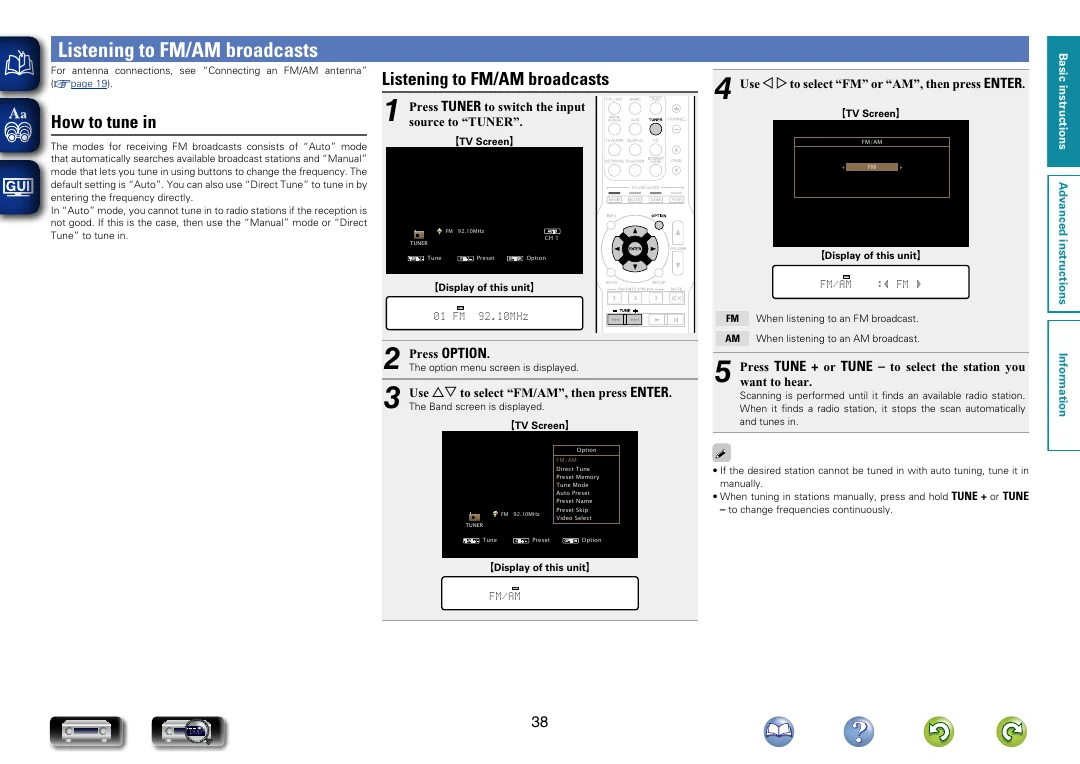
Press TUNER to switch the input
1 source
to “TUNER”.
GTV ScreenH
GTV ScreenH
FM/AM
FM
FM 92.10MHz
AUTO
CH 1
TUNER
TUNE+/-
Tune
CH+/-
Preset
OPTION
GDisplay of this unitH
Option
GDisplay of this unitH
01 FM
FM/AM
92.10MHz
The option menu screen is displayed.
The Band screen is displayed.
GTV ScreenH
FM
When listening to an FM broadcast.
AM
When listening to an AM broadcast.
TUNE + or TUNE – to select the station you
5 Press
want to hear.
Scanning is performed until it finds an available radio station.
When it finds a radio station, it stops the scan automatically
and tunes in.
Option
FM 92.10MHz
TUNER
TUNE+/-
Tune
CH+/-
Preset
FM/AM
Direct Tune
Preset Memory
Tune Mode
Auto Preset
Preset Name
Preset Skip
AUTO
Video Select CH 1
OPTION
Option
GDisplay of this unitH
FM/AM
DVD
38
• If the desired station cannot be tuned in with auto tuning, tune it in
manually.
• When tuning in stations manually, press and hold TUNE + or TUNE
– to change frequencies continuously.
Information
2
3 Use ui to select “FM/AM”, then press ENTER .
Press OPTION .
:• FM –
Advanced instructions
The modes for receiving FM broadcasts consists of “Auto” mode
that automatically searches available broadcast stations and “Manual”
mode that lets you tune in using buttons to change the frequency. The
default setting is “Auto”. You can also use “Direct Tune” to tune in by
entering the frequency directly.
In “Auto” mode, you cannot tune in to radio stations if the reception is
not good. If this is the case, then use the “Manual” mode or “Direct
Tune” to tune in.
4 Use o p to select “FM” or “AM”, then press ENTER .
Basic instructions
Listening to FM/AM broadcasts
For antenna connections, see “Connecting an FM/AM antenna”
(vpage 19).