Listening to FM/AM broadcasts
Up to 56 stations can be preset.
If “Auto Preset” is performed after performing “Preset Memory”,
the “Preset Memory” settings will be overwritten.
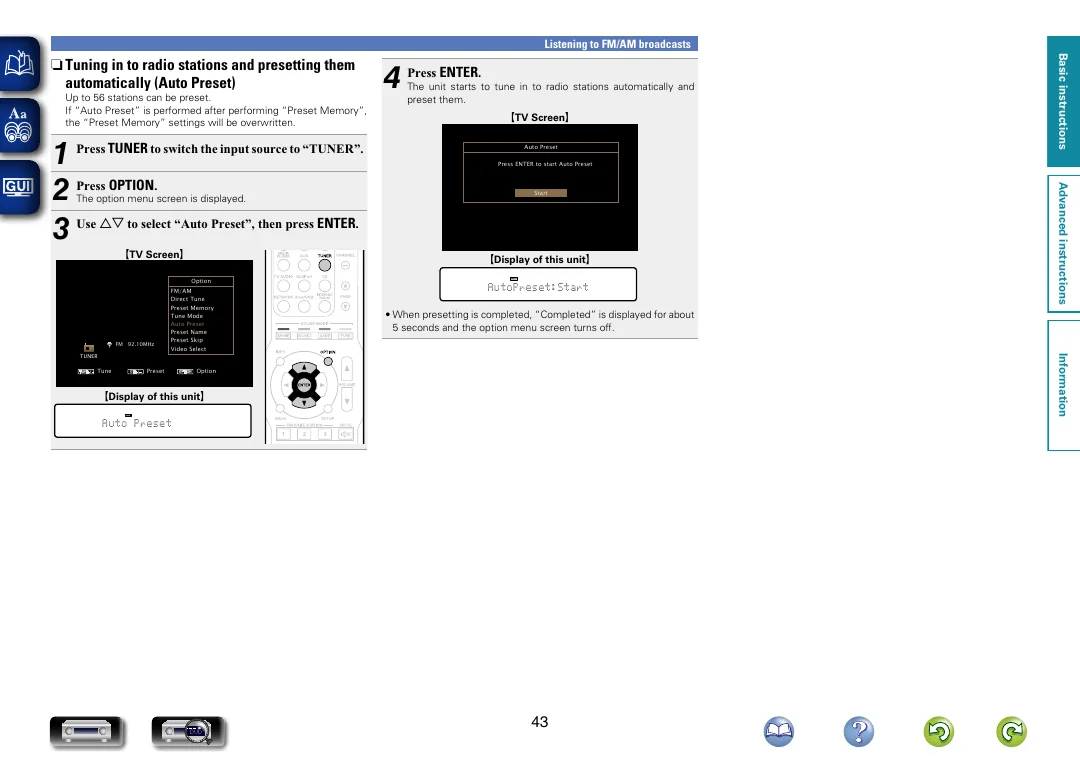
The option menu screen is displayed.
GTV ScreenH
FM 92.10MHz
Tune
CH+/-
FM/AM
Direct Tune
Preset Memory
Tune Mode
Auto Preset
Preset Name
Preset Skip
AUTO
Video Select CH 1
Preset
Auto Preset
Press ENTER to start Auto Preset
Start
OPTION
AutoPreset:Start
• When presetting is completed, “Completed” is displayed for about
5 seconds and the option menu screen turns off.
Information
TUNE+/-
GTV ScreenH
GDisplay of this unitH
Option
TUNER
The unit starts to tune in to radio stations automatically and
preset them.
Option
GDisplay of this unitH
Auto Preset
DVD
Advanced instructions
1 Press TUNER to switch the input source to “TUNER”.
2 Press OPTION .
3 Use ui to select “Auto Preset”, then press ENTER .
4 Press ENTER .
Basic instructions
n n Tuning in to radio stations and presetting them
automatically (Auto Preset)
43