Listening to FM/AM broadcasts
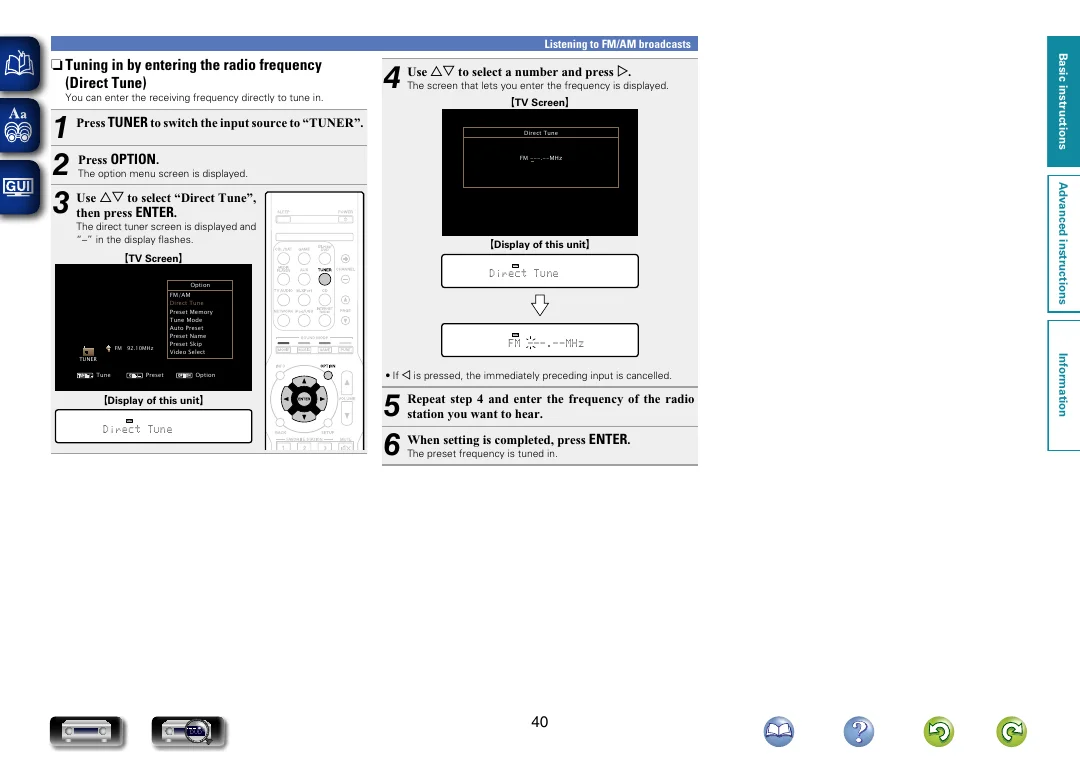
You can enter the receiving frequency directly to tune in.
1 Press TUNER to switch the input source to “TUNER”.
2 Press OPTION .
ui to select “Direct Tune”,
3 Use
then press ENTER .
4 Use ui to select a number and press p .
The screen that lets you enter the frequency is displayed.
GTV ScreenH
Direct Tune
Basic instructions
n n Tuning in by entering the radio frequency
(Direct Tune)
FM ---.--MHz
The option menu screen is displayed.
GTV ScreenH
Option
TUNE+/-
Tune
CH+/-
Preset
OPTION
Option
GDisplay of this unitH
Direct Tune
Direct Tune
FM ---.--MHz
• If o is pressed, the immediately preceding input is cancelled.
step 4 and enter the frequency of the radio
5 Repeat
station you want to hear.
6 When setting is completed, press ENTER .
The preset frequency is tuned in.
DVD
40
Information
FM 92.10MHz
TUNER
FM/AM
Direct Tune
Preset Memory
Tune Mode
Auto Preset
Preset Name
Preset Skip
AUTO
Video Select CH 1
GDisplay of this unitH
Advanced instructions
The direct tuner screen is displayed and
“–” in the display flashes.