34
Playing an iPod
n
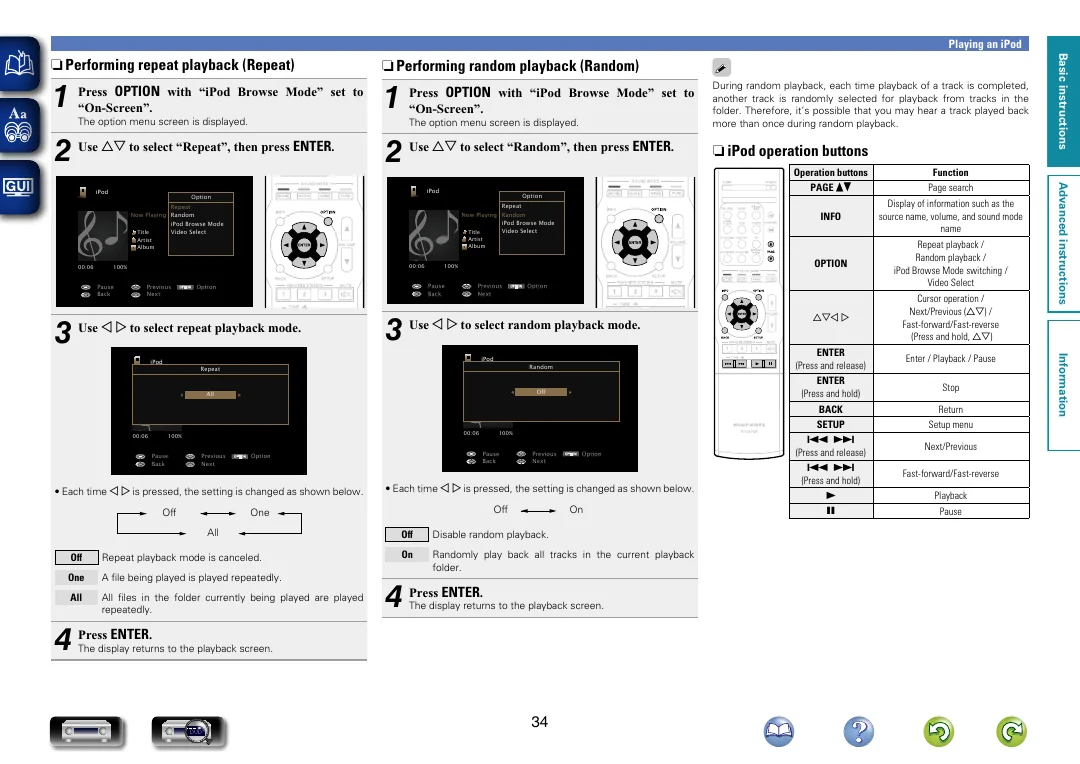
Performing repeat playback (Repeat)
1
Press
OPTION
with “iPod Browse Mode” set to
“On-Screen”.
The option menu screen is displayed.
2
Use
ui
to select “Repeat”, then press
ENTER
.
OPTION
iPod
Title
Now Playing
Artist
Album
00:06
100%
Previous
Option
Pause
Next
Back
Option
Repeat
Random
iPod Browse Mode
Video Select
3
Use
o
p
to select repeat playback mode.
OPTION
iPod
Title
Now Playing
Artist
Album
00:06
100%
Previous
Option
Pause
Next
Back
All
Repeat
•
Each time
o
p
is pressed, the setting is changed as shown below.
Off
One
All
Off
Repeat playback mode is canceled.
One
A file being played is played repeatedly.
All
All files in the folder currently being played are played
repeatedly.
4
Press
ENTER
.
The display returns to the playback screen.
n
Performing random playback (Random)
1
Press
OPTION
with “iPod Browse Mode” set to
“On-Screen”.
The option menu screen is displayed.
2
Use
ui
to select “Random”, then press
ENTER
.
OPTION
iPod
Title
Now Playing
Artist
Album
00:06
100%
Previous
Option
Pause
Next
Back
Option
Repeat
Random
iPod Browse Mode
Video Select
3
Use
o
p
to select random playback mode.
OPTION
iPod
Title
Now Playing
Artist
Album
00:06
100%
Previous
Option
Pause
Next
Back
Off
Random
•
Each time
o
p
is pressed, the setting is changed as shown below.
Off
On
Off
Disable random playback.
On
Randomly play back all tracks in the current playback
folder.
4
Press
ENTER
.
The display returns to the playback screen.
During random playback, each time playback of a track is completed,
another track is randomly selected for playback from tracks in the
folder. Therefore, it’s possible that you may hear a track played back
more than once during random playback.
n
iPod operation buttons
Operation buttons
Function
PAGE
df
Page search
INFO
Display of information such as the
source name, volume, and sound mode
name
OPTION
Repeat playback /
Random playback /
iPod Browse Mode switching /
Video Select
uio
p
Cursor operation /
Next/Previous (
ui
) /
Fast-forward/Fast-reverse
(Press and hold,
ui
)
ENTER
(Press and release)
Enter / Playback / Pause
ENTER
(Press and hold)
Stop
BACK
Return
SETUP
Setup menu
8 9
(Press and release)
Next/Previous
8 9
(Press and hold)
Fast-forward/Fast-reverse
1
Playback
3
Pause
Basic instructions
Advanced instructions
Information
Basic instructions
DVD