Playing an iPod
In this mode, various lists and screens during playback on the iPod
are displayed on the TV screen.
This section describes the steps up to playing back tracks on the
iPod in “On-Screen”.
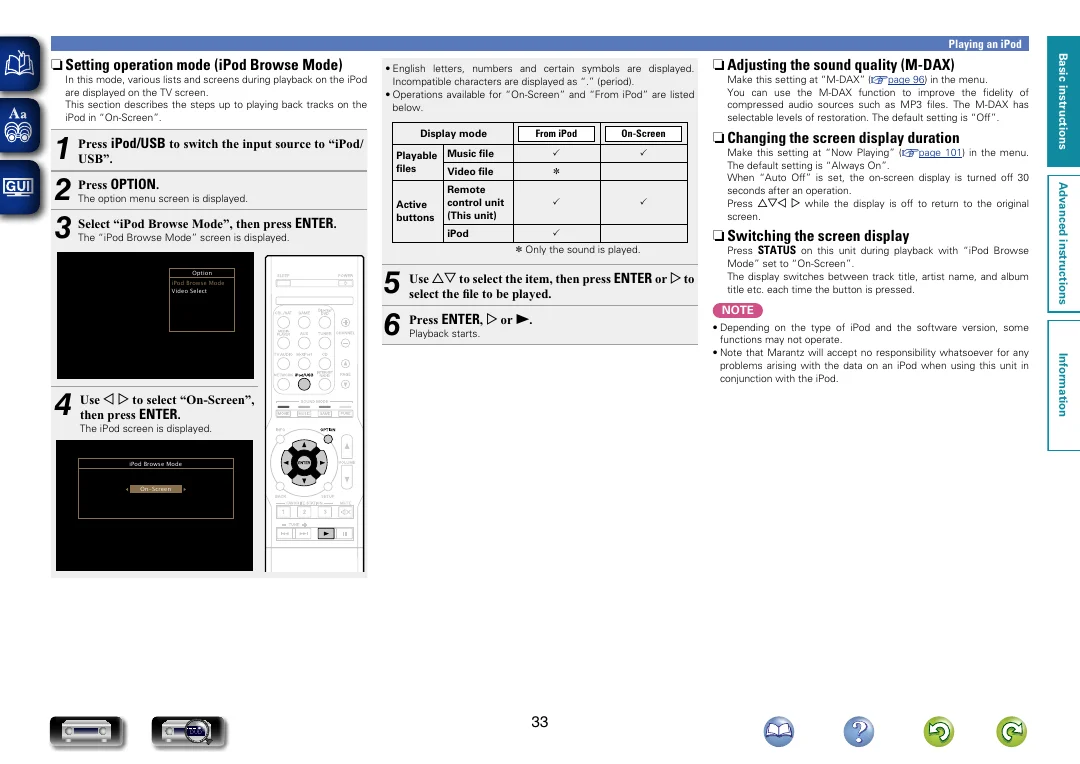
The option menu screen is displayed.
The “iPod Browse Mode” screen is displayed.
Option
iPod Browse Mode
Video Select
Display mode
From iPod
On-Screen
P
P
Playable Music file
files
Video file
Active
buttons
z
Remote
control unit
(This unit)
P
iPod
P
z z Only the sound is played.
Use ui to select the item, then press ENTER or p to
5 select
the file to be played.
6 Press ENTER , p or 1 .
Playback starts.
The iPod screen is displayed.
iPod Browse Mode
On-Screen
33
Make this setting at “M-DAX” (vpage 96) in the menu.
You can use the M-DAX function to improve the fidelity of
compressed audio sources such as MP3 files. The M-DAX has
selectable levels of restoration. The default setting is “Off”.
n n Changing the screen display duration
Make this setting at “Now Playing” (vpage 101) in the menu.
The default setting is “Always On”.
When “Auto Off” is set, the on-screen display is turned off 30
seconds after an operation.
Press uio p while the display is off to return to the original
screen.
n n Switching the screen display
Press STATUS on this unit during playback with “iPod Browse
Mode” set to “On-Screen”.
The display switches between track title, artist name, and album
title etc. each time the button is pressed.
NOTE
• Depending on the type of iPod and the software version, some
functions may not operate.
• Note that Marantz will accept no responsibility whatsoever for any
problems arising with the data on an iPod when using this unit in
conjunction with the iPod.
Information
o p to select “On-Screen”,
4 Use
then press ENTER .
DVD
P
n n Adjusting the sound quality (M-DAX)
Advanced instructions
1
2 Press OPTION .
3 Select “iPod Browse Mode”, then press ENTER .
Press iPod/USB to switch the input source to “iPod/
USB”.
• English letters, numbers and certain symbols are displayed.
Incompatible characters are displayed as “.” (period).
• Operations available for “On-Screen” and “From iPod” are listed
below.
Basic instructions