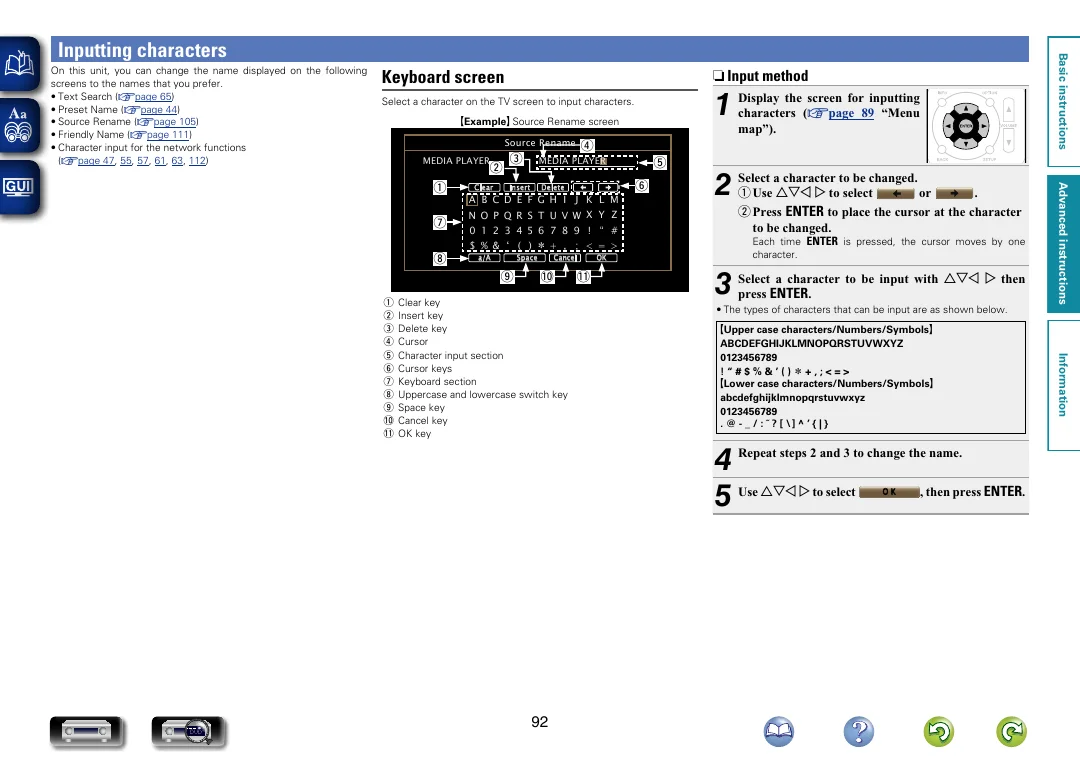
Keyboard screen
n n Input method
the screen for inputting
1 Display
characters (vpage 89 “Menu
Select a character on the TV screen to input characters.
GExampleH Source Rename screen
map”).
Source Rename r
MEDIA PLAYER
w
u
i
Clear
MEDIA PLAYER
Insert
Delete
A B C D E F G H I J K L M
N O P Q R S T U V W X Y Z
0 1 2 3 4 5 6 7 8 9 ! “ #
$ % & ‘ ( ) z + , ; < = >
a/A
Space
o
Cancel
Q0
Q1
y
a character to be changed.
2 Select
q Use uio p to select
or
.
w Press ENTER to place the cursor at the character
to be changed.
Each time ENTER is pressed, the cursor moves by one
character.
a character to be input with uio p then
3 Select
press ENTER .
• The types of characters that can be input are as shown below.
GUpper case characters/Numbers/SymbolsH
ABCDEFGHIJKLMNOPQRSTUVWXYZ
0123456789
! “ # $ % & ’ ( ) z + , ; < = >
GLower case characters/Numbers/SymbolsH
abcdefghijklmnopqrstuvwxyz
0123456789
. @ - _ / : ˜ ? [ \ ] ^ ’ { | }
4 Repeat steps 2 and 3 to change the name.
, then press ENTER .
5 Use uio p to select
O K
DVD
92
Information
q Clear key
w Insert key
e Delete key
r Cursor
t Character input section
y Cursor keys
u Keyboard section
i Uppercase and lowercase switch key
o Space key
Q0 Cancel key
Q1 OK key
OK
t
Advanced instructions
q
e
Basic instructions
Inputting characters
On this unit, you can change the name displayed on the following
screens to the names that you prefer.
• Text Search (vpage 65)
• Preset Name (vpage 44)
• Source Rename (vpage 105)
• Friendly Name (vpage 111)
• Character input for the network functions
(vpage 47, 55, 57, 61, 63, 112)