87
Panel lock function
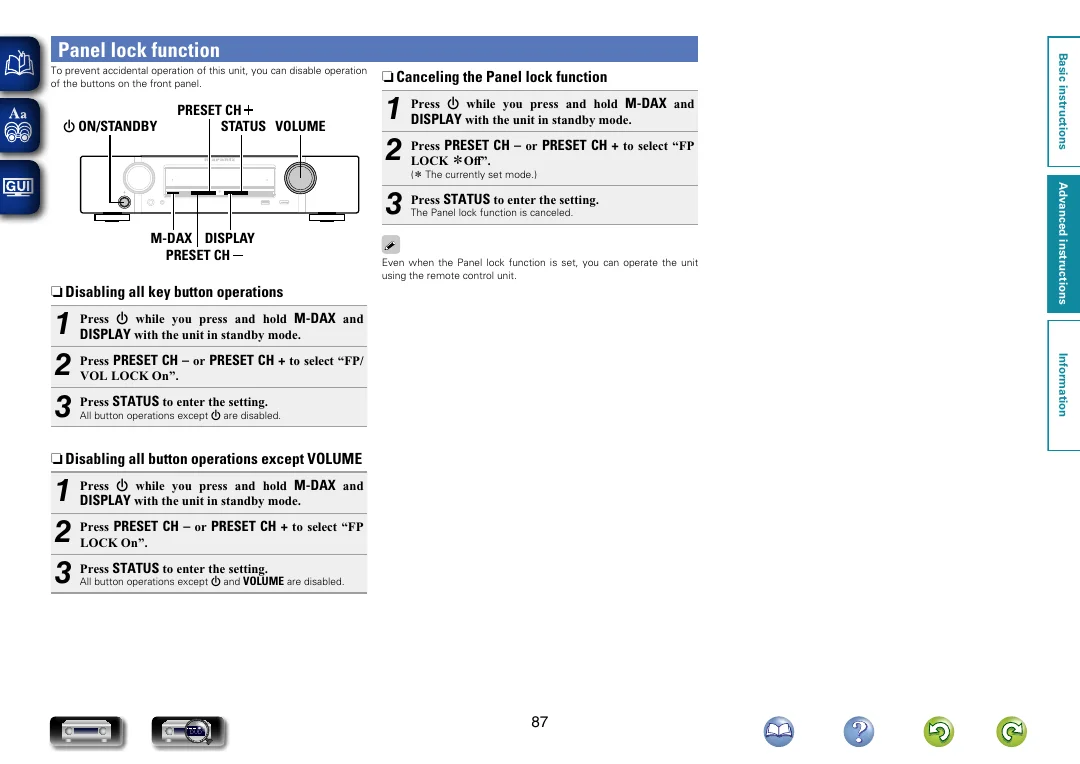
To prevent accidental operation of this unit, you can disable operation
of the buttons on the front panel.
VOLUME
X
ON/STANDBY
STATUS
DISPLAY
M-DAX
PRESET CH
PRESET CH
n
Disabling all key button operations
1
Press
X
while you press and hold
M-DAX
and
DISPLAY
with the unit in standby mode.
2
Press
PRESET CH –
or
PRESET CH +
to select “FP/
VOL LOCK On”.
3
Press
STATUS
to enter the setting.
All button operations except
X
are disabled.
n
Disabling all button operations except VOLUME
1
Press
X
while you press and hold
M-DAX
and
DISPLAY
with the unit in standby mode.
2
Press
PRESET CH –
or
PRESET CH +
to select “FP
LOCK On”.
3
Press
STATUS
to enter the setting.
All button operations except
X
and
VOLUME
are disabled.
n
Canceling the Panel lock function
1
Press
X
while you press and hold
M-DAX
and
DISPLAY
with the unit in standby mode.
2
Press
PRESET CH –
or
PRESET CH +
to select “FP
LOCK
z
Off”.
(
z
The currently set mode.)
3
Press
STATUS
to enter the setting.
The Panel lock function is canceled.
Even when the Panel lock function is set, you can operate the unit
using the remote control unit.
Basic instructions
Advanced instructions
Information
Advanced instructions
DVD