89
Menu map
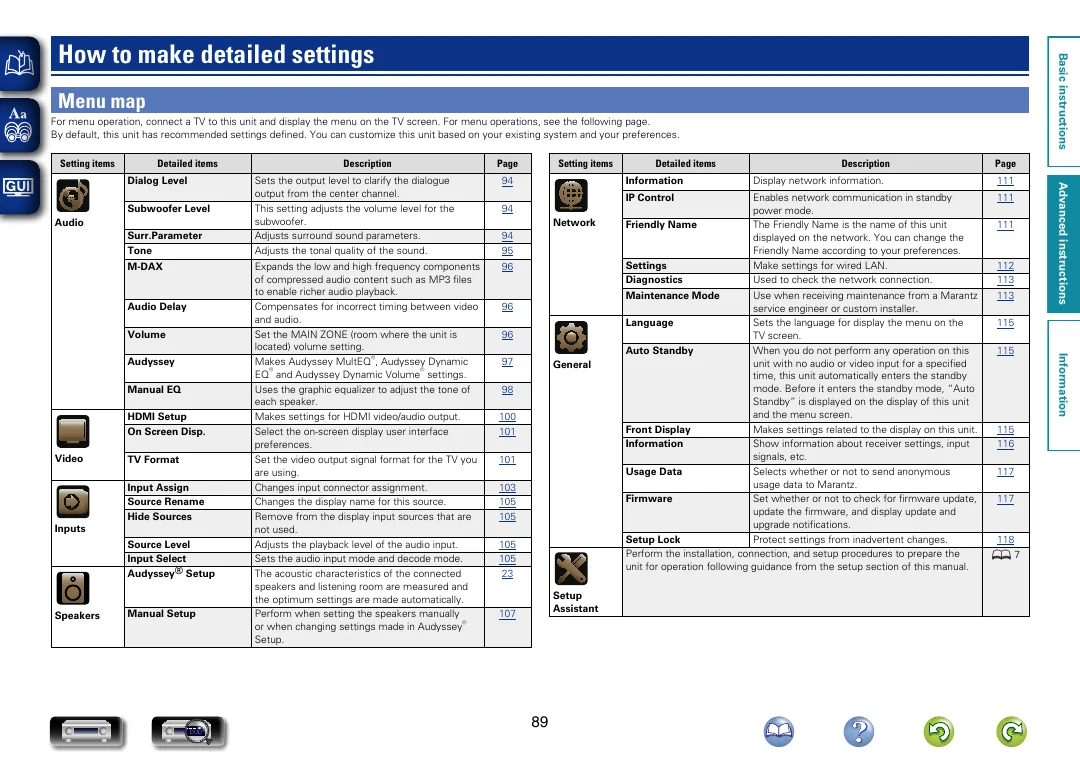
For menu operation, connect a TV to this unit and display the menu on the TV screen. For menu operations, see the following page.
By default, this unit has recommended settings defined. You can customize this unit based on your existing system and your preferences.
How to make detailed settings
Setting items
Detailed items
Description
Page
Audio
Dialog Level
Sets the output level to clarify the dialogue
output from the center channel.
94
Subwoofer Level
This setting adjusts the volume level for the
subwoofer.
94
Surr.Parameter
Adjusts surround sound parameters.
94
Tone
Adjusts the tonal quality of the sound.
95
M-DAX
Expands the low and high frequency components
of compressed audio content such as MP3 files
to enable richer audio playback.
96
Audio Delay
Compensates for incorrect timing between video
and audio.
96
Volume
Set the MAIN ZONE (room where the unit is
located) volume setting.
96
Audyssey
Makes Audyssey MultEQ®, Audyssey Dynamic
EQ® and Audyssey Dynamic Volume® settings.
97
Manual EQ
Uses the graphic equalizer to adjust the tone of
each speaker.
98
Video
HDMI Setup
Makes settings for HDMI video/audio output.
100
On Screen Disp.
Select the on-screen display user interface
preferences.
101
TV Format
Set the video output signal format for the TV you
are using.
101
Inputs
Input Assign
Changes input connector assignment.
103
Source Rename
Changes the display name for this source.
105
Hide Sources
Remove from the display input sources that are
not used.
105
Source Level
Adjusts the playback level of the audio input.
105
Input Select
Sets the audio input mode and decode mode.
105
Speakers
Audyssey® Setup
The acoustic characteristics of the connected
speakers and listening room are measured and
the optimum settings are made automatically.
23
Manual Setup
Perform when setting the speakers manually
or when changing settings made in Audyssey®
Setup.
107
Setting items
Detailed items
Description
Page
Network
Information
Display network information.
111
IP Control
Enables network communication in standby
power mode.
111
Friendly Name
The Friendly Name is the name of this unit
displayed on the network. You can change the
Friendly Name according to your preferences.
111
Settings
Make settings for wired LAN.
112
Diagnostics
Used to check the network connection.
113
Maintenance Mode
Use when receiving maintenance from a Marantz
service engineer or custom installer.
113
General
Language
Sets the language for display the menu on the
TV screen.
115
Auto Standby
When you do not perform any operation on this
unit with no audio or video input for a specified
time, this unit automatically enters the standby
mode. Before it enters the standby mode, “Auto
Standby” is displayed on the display of this unit
and the menu screen.
115
Front Display
Makes settings related to the display on this unit.
115
Information
Show information about receiver settings, input
signals, etc.
116
Usage Data
Selects whether or not to send anonymous
usage data to Marantz.
117
Firmware
Set whether or not to check for firmware update,
update the firmware, and display update and
upgrade notifications.
117
Setup Lock
Protect settings from inadvertent changes.
118
Setup
Assistant
Perform the installation, connection, and setup procedures to prepare the
unit for operation following guidance from the setup section of this manual.
C
7
Basic instructions
Advanced instructions
Information
Advanced instructions
DVD