iv
D
PLAYBACK MENU (
C
SHOOTING MENU (
Menu Options
Delete
Selected
Select date
All
Playback folder
ND610
(default)
All
Current
Hide image
Select/set
Select date
Deselect all?
Playback display
options
Done
Basic photo info
Focus point
Additional photo info
None (image only)
Highlights
RGB histogram
Shooting data
Overview
Copy image(s)
Select source
Select image(s)
Select destination folder
Copy image(s)?
Image review
On
Off
(default)
After delete
Show next
(default)
Show previous
Continue as before
Rotate tall
On
(default)
Off
Slide show
Start
Image type
Frame interval
DPOF print order
Select/set
Deselect all?
Reset shooting
menu
Yes
No
Storage folder
Select folder by number
Select folder from list
File naming
File naming
Role played by
card in Slot 2
Overflow
(default)
Backup
RAW Slot 1 - JPEG Slot 2
Image quality
NEF (RAW) + JPEG fine
NEF (RAW) + JPEG normal
NEF (RAW) + JPEG basic
NEF (RAW)
JPEG fine
JPEG normal
(default)
JPEG basic
Image size
Large
(default)
Medium
Small
Image area
Auto DX crop
Choose image area
JPEG
compression
Size priority
(default)
Optimal quality
NEF (RAW)
recording
Type
NEF (RAW) bit depth
White balance
Auto
(default)
Incandescent
Fluorescent
Direct sunlight
Flash
Cloudy
Shade
Choose color temp.
Preset manual
93)
95)
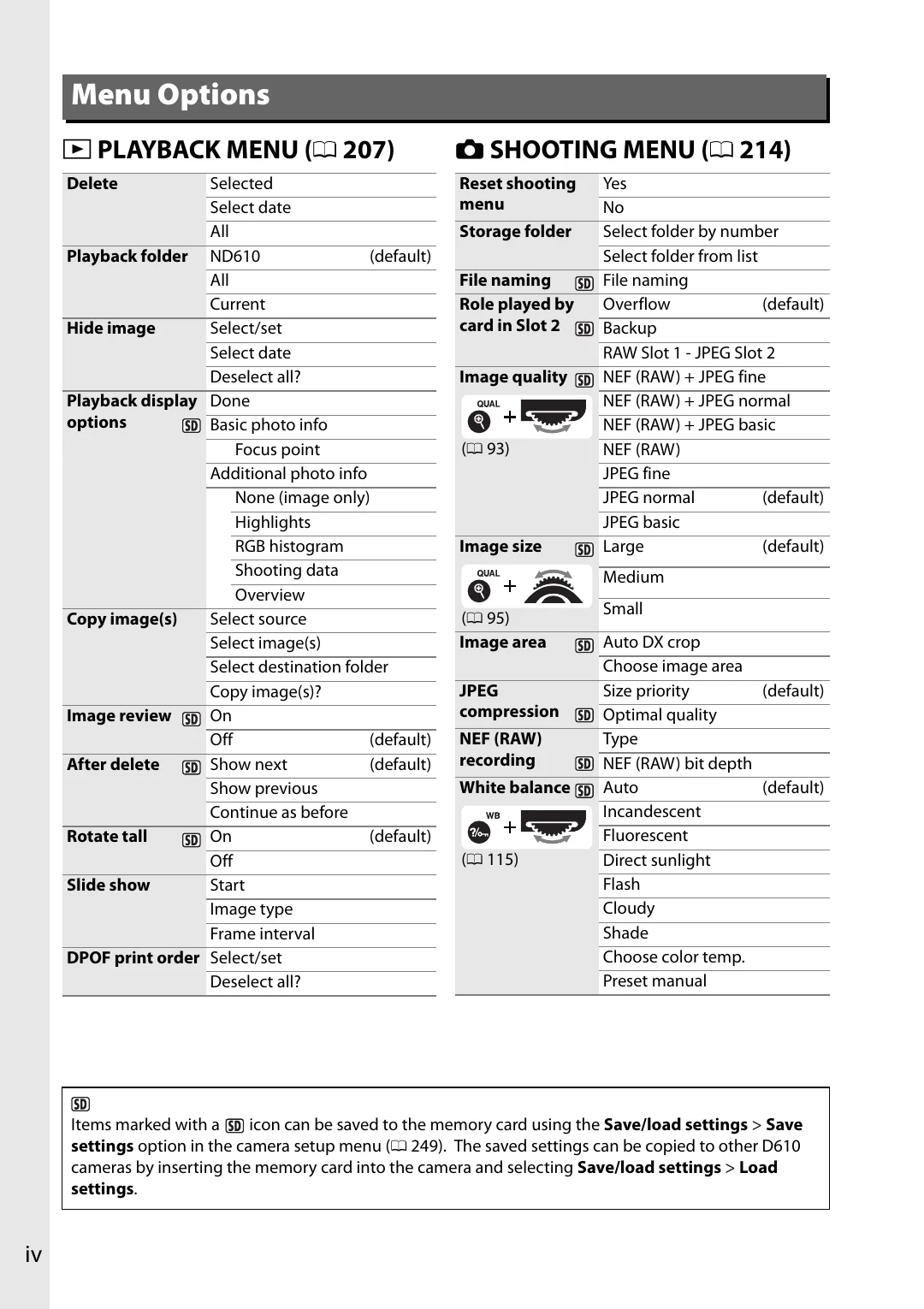
Items marked with a
icon can be saved to the memory card using the
Save/load settings
>
Save
settings
option in the camera setup menu (
249). The saved settings can be copied to other D610
cameras by inserting the memory card into the camera and selecting
Save/load settings
>
Load
settings
.