Digital Camera
Camera Settings
Product Documentation
Help
Digitutor
Package Contents
Table of Contents
Live View
For Your Safety
AKeep the sun out of the frame
D3200
Disposing of Data Storage Devices
Use Only Nikon Brand Accessories
Servicing the Camera and Accessories
Before Taking Important Pictures
Life-Long Learning
XIntroduction
Getting to Know the Camera
Camera Body
Power Switch
Microphone and Speaker
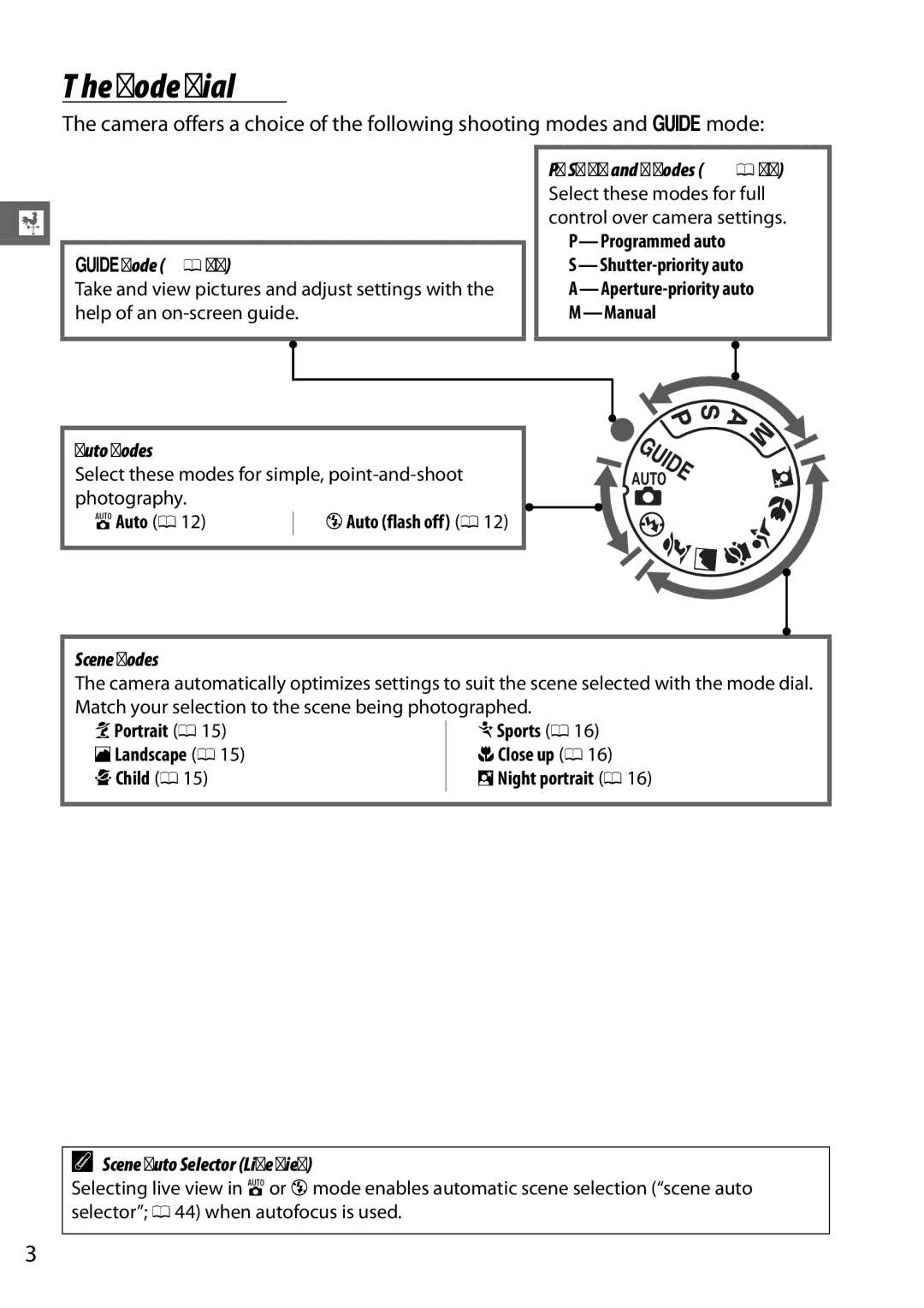
Mode Dial
Viewfinder
Viewfinder
Information Display
Pbutton
Charge the battery
Insert the battery
First Steps
Attach the strap
Autofocus is available with AF-S lenses. When using
Insert a memory card available separately
Attach a lens
Turn the camera on
Choose a language and set the camera clock
Focus the viewfinder
During Charging
Charging the Battery
Removing the Battery
Formatting Memory Cards
Memory Cards
Write Protect Switch
Adjusting Viewfinder Focus
Setup Menu
Removing Memory Cards
Battery Level and Card Capacity
Turn the camera on Check the battery level
SBasic Photography
Check the number of exposures remaining
Select i or j Mode
When framing photographs
Point-and-Shoot Photography i and j Modes
Ready the camera
Check the indicators in the viewfinder
When the focus operation is complete,
Press the shutter-release button halfway
Shoot
Standby Timer
Shutter-Release Button
Built-in Flash
Creative Photography Scene Modes
KPortrait
MSports
IPlayback and Deletion
Viewing Photographs
Display pictures
Press the K button
Press K. Once deleted, photographs can not be Recovered
Deleting Pictures
Thumbnail Playback
Calendar Playback
Guide Mode
Shoot View/delete Set up Take pictures
Change camera settings
Guide Mode Menus
More Settings
Shoot
Start Shooting
Set Up
Image quality Output settings Image size
Guide Mode
View/Delete
Using the Guide
Use
Release Mode
Choose a release mode
ZMore on Photography
Press IE/#
Continuous Release Mode
Memory Buffer
Buffer Size
Information Display
Self-Timer and Remote Control Modes
Select a release mode
Rest of the way down. The self-timer lamp will
Mount the camera on a tripod
Before Using the Remote Control
Using the Built-in Flash
Cover the Viewfinder
See Also
Focus Mode
Choose a focus mode
Focus
Place the cursor in the information display
Predictive Focus Tracking
Continuous-servo Autofocus
Getting Good Results with Autofocus
AF-Area Mode
Display AF-area mode options
Choose an AF-area mode
Option Description Single-point AF
Image Quality and Size
Image Quality
Display image quality options
Choose a file type
Image Size
Display image size options
Choose an image size
Using the Built-in Flash
Using the Built-in Flash i, k, p, n, and oModes
Using the Built-in Flash P, S, A, and M Modes
Choose a flash mode 0 Take pictures
Flash Mode
Display flash mode options
Choose a flash mode
Flash modes available vary with shooting mode
Mode Shutter speed
Flash Modes
Shutter Speeds Available with the Built-in Flash
N, P, a
Mode ISO sensitivity
ISO Sensitivity
Display ISO sensitivity options
Choose an ISO sensitivity
Mode P Programmed Auto
TP, S, A, and M Modes
Shutter Speed and Aperture
Mode S Shutter-Priority Auto
Mode a Aperture-Priority Auto
Mode M Manual
Exposure Indicator
XLive View
Framing Photographs in the Monitor
Focusing in Live View
Choosing a Focus Mode
Display focus options
Choose a focus option
Choosing an AF-Area Mode
Display AF-area modes
Choosing the Focus Point
Subject Tracking
Live View Display
Live View/Movie Recording Display Options
Automatic Scene Selection Scene Auto Selector
Auto flash off listed above Exposure
Shooting in Live View Mode
Count Down Display
Using Autofocus in Live View
Movies can be recorded in live view mode
Recording Movies
Start recording
0Icon
End recording
Taking Photographs During Movie Recording
Maximum Length
Recording Movies
Movie Settings
Adjustments to shutter speed and ISO sensitivity when
Camera is in mode M. Shutter speed can be set to values as
Fast as 1/4,000 s the slowest speed available varies with
Select Movie settings
Using an External Microphone
Choose movie options
Count-Down Display
Viewing Movies
Following operations can be performed
2Icon
Setup
To display the on-screen guide, rotate the mode dial to g 0
UMenu Guide
Menu Guide
Using Camera Menus
Display the menus
Highlight the icon for the current menu
Select a menu
Position the cursor in the selected menu
Highlight a menu item
Display options
Highlight an option
Installing ViewNX
Start the computer and insert the installer CD
Start the installer
QViewNX
Exit the installer
Remove the installer CD from the CD-ROM drive
System Requirements
Using ViewNX
Copy Pictures to the Computer
Choose how pictures will be copied to the computer
Start Nikon Transfer
View Pictures
Retouching Photographs
Editing Movies
Printing Pictures
NTechnical Notes
Compatible Lenses
Identifying CPU and Type G and D Lenses
IX Nikkor Lenses
Other Accessories
Power
Sources
Filters
Approved Memory Cards
Cleaning
Caring for the Camera
Storage
Lens
Caring for the Camera and Battery Cautions
Caring for the Camera
Caring for the Battery
Page
Error Messages
No Bulb in S mode
Flash error
Locked
Format card?
Representative Metering error
Button again
Cool
With NEF RAW processing
Specifications
Nikon D3200 Digital Camera
Release Release mode
Self-timer
Matrix or center-weighted metering 0-20 EV
Shutter Type
Flash mode
Accessory shoe
Focus Autofocus
Detection range
Live view Lens servo
Manual focus MF
Automatic scene
Selection Movie Metering
Power source Battery
Dimensions/weight
Weight
Temperature
MH-24 battery charger
EN-EL14 rechargeable Li-ion battery
AF-S DX Nikkor 18-55mm f/3.5-5.6G VR lens
AF-S DX Nikkor 18-55mm f/3.5-5.6G VR lens
Battery Life
Trademark Information
Page
SB2C0111