|
|
| Troubleshooting | |
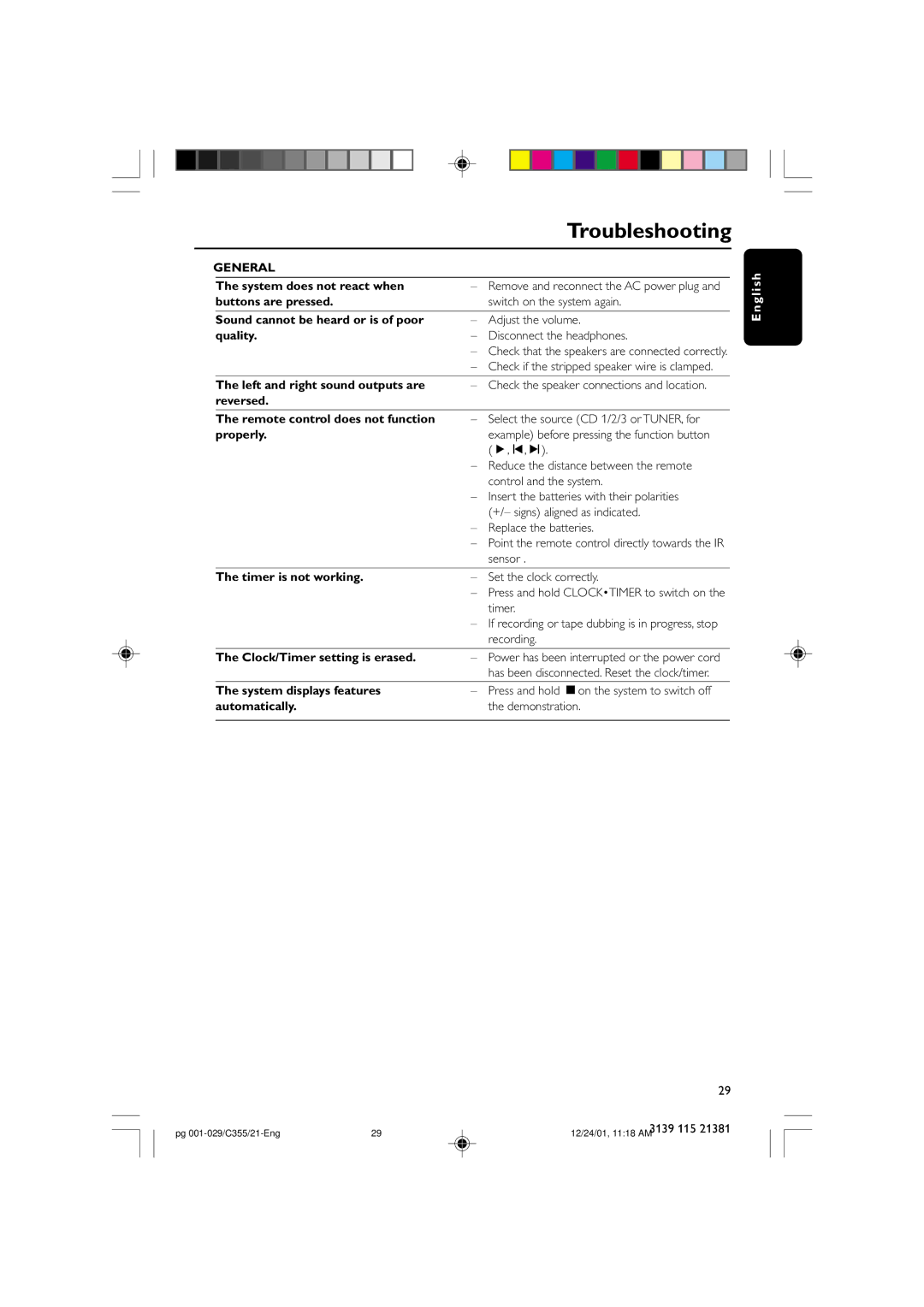
GENERAL |
|
|
| |
|
|
|
|
|
| The system does not react when | – | Remove and reconnect the AC power plug and | |
| buttons are pressed. |
| switch on the system again. | |
|
|
|
|
|
| Sound cannot be heard or is of poor | – | Adjust the volume. | |
| quality. | – | Disconnect the headphones. | |
|
| – Check that the speakers are connected correctly. | ||
|
| – Check if the stripped speaker wire is clamped. | ||
|
|
|
|
|
| The left and right sound outputs are | – | Check the speaker connections and location. | |
| reversed. |
|
|
|
|
|
|
|
|
| The remote control does not function | – | Select the source (CD 1/2/3 or TUNER, for | |
| properly. |
| example) before pressing the function button | |
|
|
| (É,í,ë). |
|
|
| – Reduce the distance between the remote | ||
|
|
| control and the system. | |
|
| – Insert the batteries with their polarities | ||
|
|
| (+/– signs) aligned as indicated. | |
|
| – | Replace the batteries. | |
|
| – Point the remote control directly towards the IR | ||
|
|
| sensor . | |
|
|
|
|
|
| The timer is not working. | – | Set the clock correctly. | |
|
| – Press and hold CLOCK•TIMER to switch on the | ||
|
|
| timer. | |
|
| – If recording or tape dubbing is in progress, stop | ||
|
|
| recording. | |
|
|
|
|
|
| The Clock/Timer setting is erased. | – | Power has been interrupted or the power cord | |
|
|
| has been disconnected. Reset the clock/timer. | |
|
|
|
|
|
| The system displays features | – | Press and hold Çon the system to switch off | |
| automatically. |
| the demonstration. | |
|
|
|
|
|
E n g l i s h
29
pg | 29 | 3139 115 21381 |
12/24/01, 11:18 AM |