BASIC TV/REMOTE OPERATIONS |
|
| |
TELEVISION |
|
| SMART |
BEGIN |
|
| HELP |
|
| Remember, | |
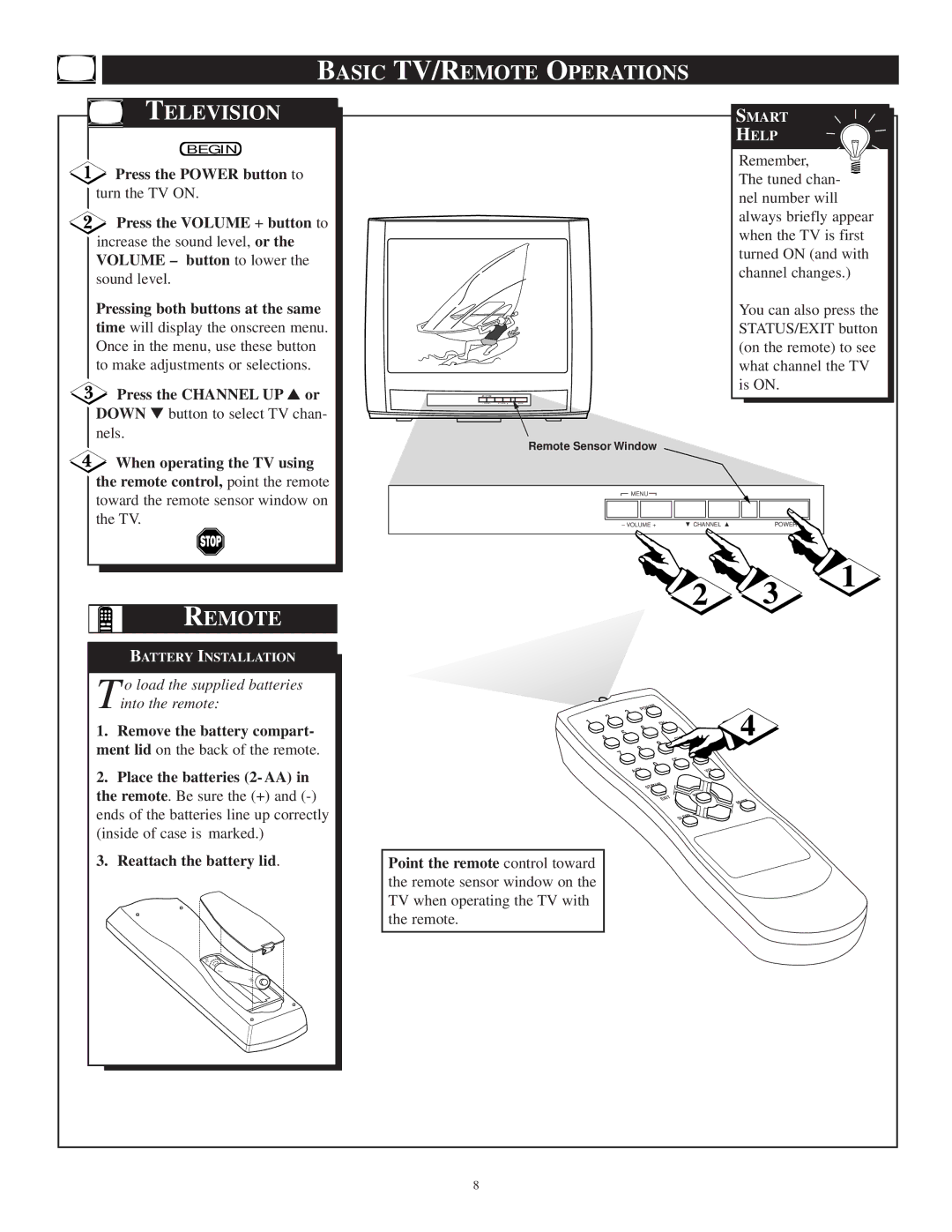
Press the POWER button to |
|
| |
|
| The tuned chan- | |
turn the TV ON. |
|
| |
|
| nel number will | |
|
|
| |
Press the VOLUME + button to |
|
| always briefly appear |
|
| when the TV is first | |
increase the sound level, or the |
|
| |
|
| turned ON (and with | |
VOLUME – button to lower the |
|
| |
|
| channel changes.) | |
sound level. |
|
| |
|
|
| |
Pressing both buttons at the same |
|
| You can also press the |
time will display the onscreen menu. |
|
| STATUS/EXIT button |
Once in the menu, use these button |
|
| (on the remote) to see |
to make adjustments or selections. |
|
| what channel the TV |
Press the CHANNEL UP ▲ or |
|
| is ON. |
|
|
| |
DOWN ▼ button to select TV chan- |
|
|
|
nels. | Remote Sensor Window |
|
|
|
|
| |
When operating the TV using |
|
|
|
the remote control, point the remote |
|
|
|
toward the remote sensor window on | MENU |
|
|
|
|
| |
the TV. | – VOLUME + | CHANNEL | POWER |
2 3
REMOTE
1
BATTERY INSTALLATION
T o load the supplied batteries into the remote:
1.Remove the battery compart- ment lid on the back of the remote.
2.Place the batteries (2- AA) in the remote. Be sure the (+) and
3.Reattach the battery lid.
3 | POWER | 4 | |
|
| ||
2 |
|
| |
1 |
| CH+ | |
5 | 6 | ||
|
| ||
4 |
| – | |
| CH | ||
| 8 | 9 |
|
7 |
|
| |
| VOL+ |
| |
|
| CC |
|
|
| 0 |
|
A/CH | – |
| |
VOL |
| ||
|
| STATUS |
|
|
| MENU |
|
|
| EXIT | MUTE |
|
|
| |
|
| SLEEP |
|
Point the remote control toward
the remote sensor window on the TV when operating the TV with the remote.
8