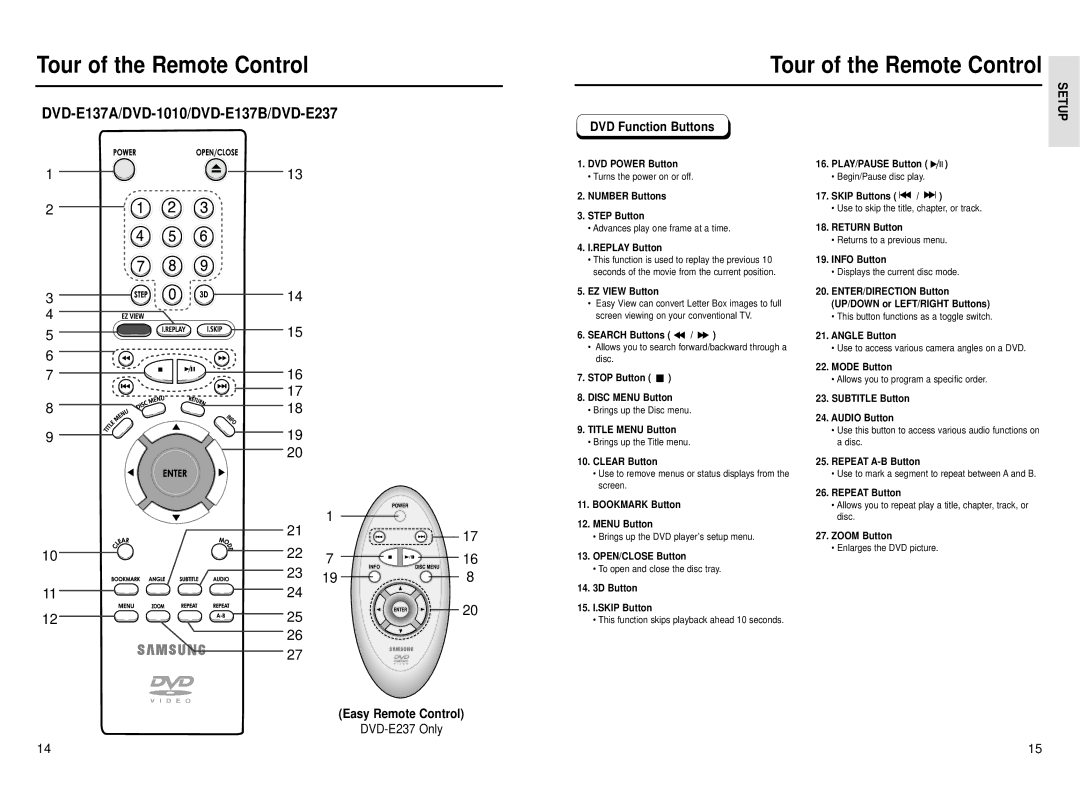
Tour of the Remote Control
1 | 13 |
2
Tour of the Remote Control
|
|
|
|
|
|
|
|
|
|
|
| SETUP |
| DVD Function Buttons |
|
|
|
|
|
|
|
|
|
| |
|
|
|
|
|
|
|
|
|
|
|
| |
1. | DVD POWER Button | 16. | PLAY/PAUSE Button ( |
|
|
|
| ) |
| |||
|
|
| ||||||||||
|
|
| ||||||||||
| • Turns the power on or off. |
| • Begin/Pause disc play. |
|
|
|
|
|
|
| ||
2. NUMBER Buttons | 17. | SKIP Buttons ( |
| / |
| ) |
|
| ||||
|
|
|
| |||||||||
|
|
|
| |||||||||
3. | STEP Button |
| • Use to skip the title, chapter, or track. | |||||||||
|
|
|
|
|
|
|
|
|
|
| ||
3 | 14 |
4 |
|
5 | 15 |
6 |
|
7 | 16 |
| 17 |
8 | 18 |
9 | 19 |
| 20 |
| 21 | 1 |
|
|
| 17 | |
|
|
| |
10 | 22 | 7 | 16 |
| 23 | 19 | 8 |
11 | 24 |
|
|
12 | 25 |
| 20 |
|
| ||
| 26 |
|
|
| 27 |
|
|
(Easy Remote Control)
DVD-E237 Only
•Advances play one frame at a time.
4.I.REPLAY Button
•This function is used to replay the previous 10 seconds of the movie from the current position.
5.EZ VIEW Button
•Easy View can convert Letter Box images to full screen viewing on your conventional TV.
6.SEARCH Buttons (  /
/  )
)
•Allows you to search forward/backward through a disc.
7.STOP Button (  )
)
8.DISC MENU Button
•Brings up the Disc menu.
9.TITLE MENU Button
•Brings up the Title menu.
10.CLEAR Button
•Use to remove menus or status displays from the screen.
11.BOOKMARK Button
12.MENU Button
•Brings up the DVD player’s setup menu.
13.OPEN/CLOSE Button
•To open and close the disc tray.
14.3D Button
15.I.SKIP Button
•This function skips playback ahead 10 seconds.
18.RETURN Button
•Returns to a previous menu.
19.INFO Button
•Displays the current disc mode.
20.ENTER/DIRECTION Button (UP/DOWN or LEFT/RIGHT Buttons)
•This button functions as a toggle switch.
21.ANGLE Button
•Use to access various camera angles on a DVD.
22.MODE Button
•Allows you to program a specific order.
23.SUBTITLE Button
24.AUDIO Button
•Use this button to access various audio functions on a disc.
25.REPEAT
•Use to mark a segment to repeat between A and B.
26.REPEAT Button
•Allows you to repeat play a title, chapter, track, or disc.
27.ZOOM Button
•Enlarges the DVD picture.
14 | 15 |