To aid reporting in case of loss or theft, please
Rear of the TV
Important Information
Dear Sharp Customer
Important Safety Precautions
Service Equipment
Contents
Supplied Accessories
AAA size UM/SUM-4 Dry Battery ⋅2
Antenna Cable AC Cord
AC Adapter
Using the Remote Control
Batteries for the Remote Control
Preparation
Preparation
Antenna Connection
Power Connection
Main Power
Menu TV/VIDEO Main Power
Remote control sensor
Display and Control Overview
VOL -/+
Display and Control Overview
Listening with Headphones
Removing the Back Cover
Remote Control
EZ Setup with Auto Clock Setting
EZ Setup during the First Power On
Enter
Menu
EZ Setup with Auto Clock Setting
To cancel EZ Setup Press c
Setting the Clock
Auto Clock Setting
Time reset for power outage, AC adapter disconnected
Press a/bto move the cursor to
Setting the Clock
Press c/dto select Auto or
Press a/bto move the cursor to START, and press Enter
Manual Clock Setting
Daylight Saving-Time DST Adjustment
Spring Autumn
TV signals in your region
Basic Operation
Turning on Power
Basic Operation
Standby
To turn off the LCD TV
Switching TV/VIDEO AV1/AV2/COMPONENT/TV Modes
Turn on the power of the con
OMP on E N T
TV/VIDEO
Sound Volume
To mute the sound
To select MTS Multichannel TV Sound
VOL +
Changing channels with CH / on the remote control
Changing Channels
Press the button Press the 5 button
To select a 3-digit channel number e.g., Channel
Selecting Menu Items
Selecting Menu Items
Adjustments
Adjusting Sleep Timer Settings
Directly setting the Sleep Timer
Setting the Sleep Timer on the Menu screen
Adjustments
Adjusting Brightness Settings
Bright Normal
Dark
Adjusting Picture Flip Settings
Directly setting the Picture Flip
Setting the Picture Flip on the Menu screen
You can set the orientation of the picture
Adjusting Preset Settings
ABC
Adjusting Language Settings
Adjusting Video Adjust Settings
Press a/bto move the cursor to Video ADJUST, and press
Press a/bto move the cursor to the desired item, and press
Selected item Press c Press d
Decrease contrast Increase contrast
Toward purple Toward green
Lower color intensity Higher color intensity
EZ Setup
Setting the AIR/CABLE
Press a/bto move the cursor to CH-SETTING, and press Enter
SET UP
Saving broadcast TV channels in the memory
Channel Select
Adjusting Blue Screen Settings
Blue Screen
Press a/ bto move the cursor
Adjusting Closed Caption Settings
Setting Closed Caption
Setting the Closed Caption on Menu screen
Press Enter to change the Closed Caption setting
Adjusting V-CHIP Settings
Chip
Mpaa Rating
TV Parental Guidelines
TV Parental Guidelines
Setting V-CHIP Mpaa Rating
Press a/bto move the cursor to V-CHIP BLOCK, and press
Setting TV Guidelines
TV Guidelines
Setting Block Content
Block CONTENT, and press
Repeat steps 1 to 3 of 1 Mpaa RATING. See
TV GUIDELINES, and press
Setting Status
Activating V-CHIP Block
Changing V-CHIP Block Settings
Changing or Clearing the Secret Number
Connecting External Devices
Example of external devices that can be connected
Example
Camcorder
Connecting External Devices
To AV-IN2 terminal Video Audio L Audio R
VCR
Audio L Audio R To Component input Audio terminal
Outputting video and audio video output
Bundling Cables with Clamps
Connect to a VCR, audio amplifier, etc
Troubleshooting
Problem Check item
Power outlet
Make sure the AC adapter is properly inserted
Troubleshooting
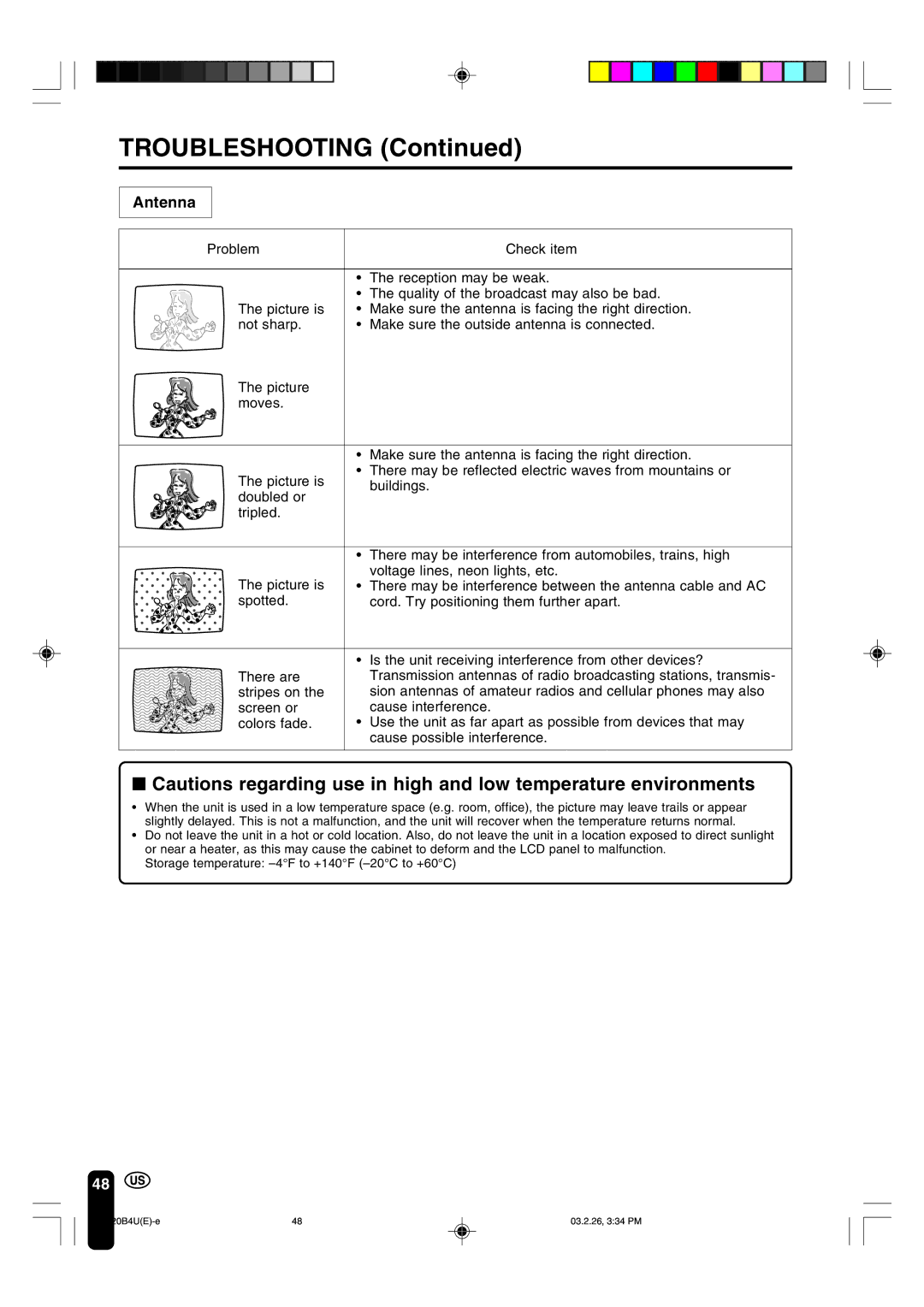
Antenna
Specifications
Items Model LC-20B4U
Dimensional Drawings
Unit inch mm
Sharp Electronics Corporation
Sharp Corporation
Limited Warranty