Disc Playback

Repeat Playback of a Title or Chapter

(Repeat Playback)

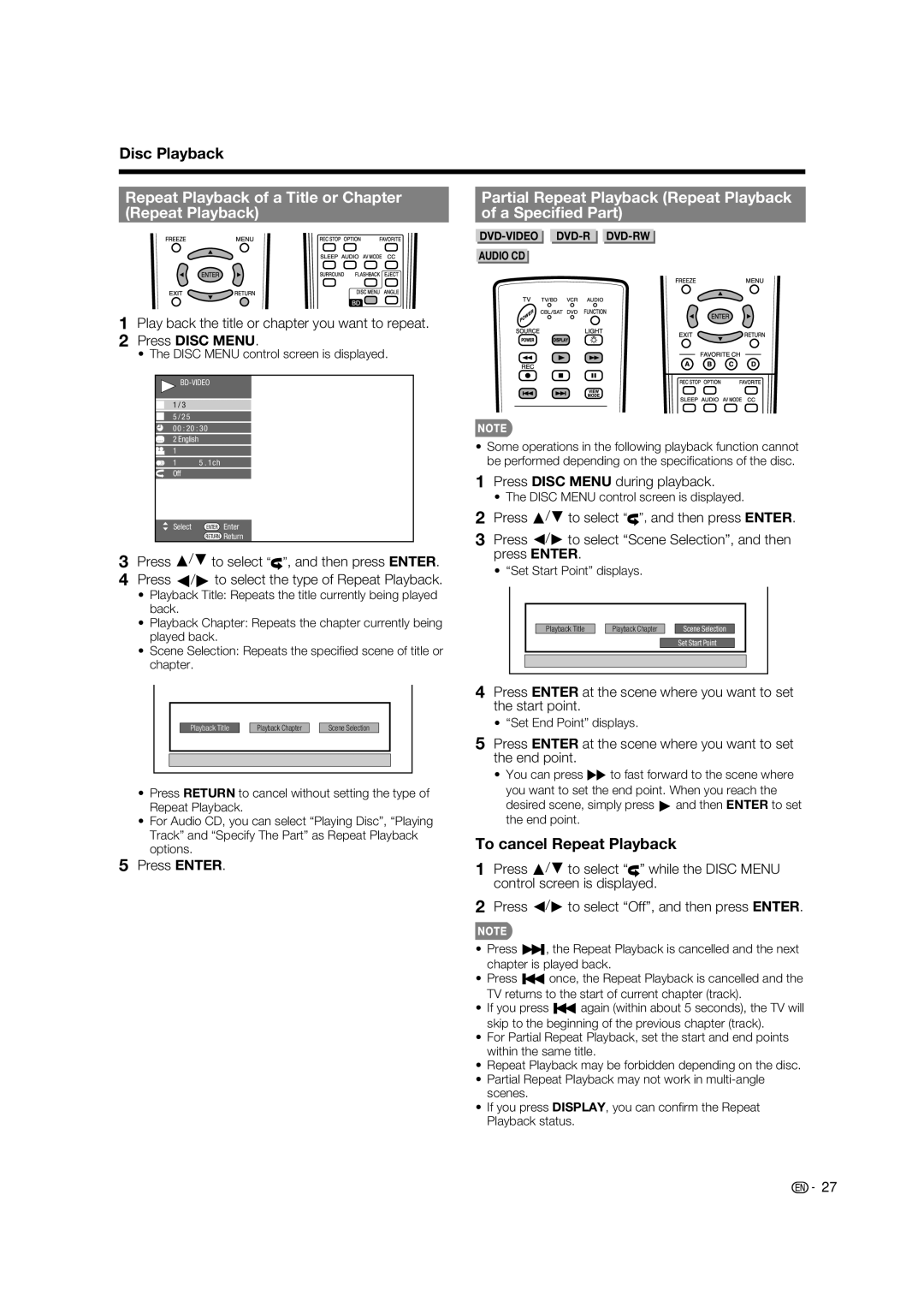
1Play back the title or chapter you want to repeat.

2Press DISC MENU.

• The DISC MENU control screen is displayed.
BD-VIDEO

1 / 3

5 / 2 5

00 : 20 : 30

2 English

1

1 5 . 1ch Off

Select

ENTER

Enter


RETURN

Return

3Press a/b to select , and then press ENTER.

4Press c/d to select the type of Repeat Playback.

Playback Title: Repeats the title currently being played back.

Playback Chapter: Repeats the chapter currently being played back.

Scene Selection: Repeats the specifi ed scene of title or chapter.


Playback Title


Playback Chapter


Scene Selection


Press RETURN to cancel without setting the type of Repeat Playback.

For Audio CD, you can select “Playing Disc”, “Playing Track” and “Specify The Part” as Repeat Playback options.

5Press ENTER.

Partial Repeat Playback (Repeat Playback

of a Specified Part)

DVD-VIDEO DVD-R DVD-RW

AUDIO CD

Some operations in the following playback function cannot be performed depending on the specifi cations of the disc.

1Press DISC MENU during playback.

The DISC MENU control screen is displayed.

2Press a/b to select ”, and then press ENTER.

3Press c/d to select “Scene Selection”, and then press ENTER.

“Set Start Point” displays.

Playback Title


Playback Chapter


Scene Selection

Set Start Point

4Press ENTER at the scene where you want to set the start point.

“Set End Point” displays.

5Press ENTER at the scene where you want to set the end point.

You can press J to fast forward to the scene where

you want to set the end point. When you reach the desired scene, simply press d and then ENTER to set the end point.

To cancel Repeat Playback

1Press a/b to select “” while the DISC MENU control screen is displayed.

2Press c/d to select “Off”, and then press ENTER.

Press U, the Repeat Playback is cancelled and the next chapter is played back.

Press T once, the Repeat Playback is cancelled and the TV returns to the start of current chapter (track).

If you press T again (within about 5 seconds), the TV will skip to the beginning of the previous chapter (track).

For Partial Repeat Playback, set the start and end points within the same title.

Repeat Playback may be forbidden depending on the disc.

Partial Repeat Playback may not work in multi-angle scenes.

If you press DISPLAY, you can confi rm the Repeat Playback status.

27

Page 29
Image 29
Sharp LC-37BD60U Repeat Playback of a Title or Chapter, Partial Repeat Playback Repeat Playback A Specified Part

LC-37BD60U specifications

The Sharp LC-37BD60U is a versatile and feature-rich LCD television that was designed to deliver high-quality entertainment experiences. With a sleek design and impressive specs, this model gained popularity among consumers seeking an affordable yet capable HD television.

One of the standout features of the LC-37BD60U is its 37-inch screen size, which strikes a balance between being compact enough for smaller spaces while still offering a large viewing area. The television boasts a native resolution of 1920 x 1080 pixels, making it a Full HD TV. This resolution allows for crisp, clear images with vibrant colors, enhancing the viewing experience for movies, sports, and video games.

The technology behind the LC-37BD60U includes Sharp's advanced LCD panel which incorporates a 120Hz refresh rate. This feature minimizes motion blur and improves the clarity of fast-moving images, making it ideal for action sequences and fast-paced gaming. Additionally, it supports a wide color gamut, delivering more lifelike images with shades that pop.

In terms of connectivity, the LC-37BD60U comes equipped with multiple HDMI inputs, enabling users to connect a variety of devices such as Blu-ray players, gaming consoles, and streaming devices. It also includes USB ports, allowing for the playback of multimedia files directly from compatible storage devices. The inclusion of a built-in tuner allows viewers to access over-the-air broadcasts with ease.

Audio performance is another important aspect of the LC-37BD60U, which features built-in speakers that deliver decent sound quality for everyday use. However, for audiophiles or those seeking a more immersive sound experience, the addition of an external sound system is recommended.

Energy efficiency is notable in the LC-37BD60U, with its Energy Star certification ensuring that it operates using less power than conventional models. This makes it an eco-friendly option that can help reduce electricity bills.

Overall, the Sharp LC-37BD60U is a practical choice for consumers seeking a reliable and feature-packed television. With its combination of Full HD resolution, advanced refresh rate technology, ample connectivity options, and energy efficiency, it offers a great value for both casual viewers and dedicated home theater enthusiasts.