Kyocera KX17 manual Quick reference to text entry

Page 25

Quick reference to text entry

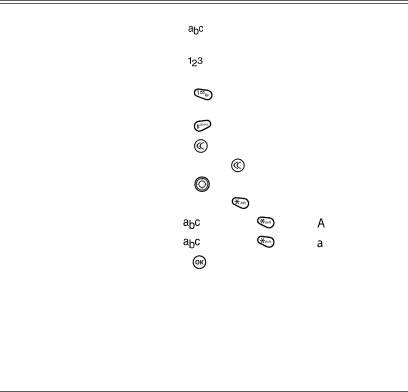
This table gives general instructions for entering letters, numbers, and symbols.

To...

Do this...


Enter a letter

Use

mode and press a key until you see the letter you


want. For more information, see page 15.


Enter a number

Use

mode and press a key once to enter its number.


For more options, see page 15.


Enter a symbol

Press

until you find the symbol you want. See


page 16.


Enter a space

Press

.


Erase a character

Press

.


Erase all characters

Press and hold

.


Move the cursor right or left

Press

up or down.


Change text entry modes

Press and hold


.


Change to uppercase

In

mode, press

. Choose

.


Change to lowercase

In

mode, press

. Choose .


Select soft options on the screen

Press

.


User Guide for the Kyocera Prisma Phone

17

Image 25
Contents Page FCC/IC Notice User Guide for the Kyocera Prisma PhoneAir bags Optimize your phone’s performanceMedical devices Accessories Resetting the phonePotentially unsafe areas Use with careStandard Battery Battery and charger specifications Charger Input OutputE911 mandates Customer supportBecome a product evaluator Qualified serviceContents Page Charging the battery Installing the batteryCaring for the battery Recharging the batteryUnderstanding screen icons Common causes of battery drainHome screen Getting to know your phoneContents of the main menu are as follows Using menusBrick AttackTM Race 21TM My Sounds Performing basic functions Redialing a number Making a callCalling a saved number Answering callsDealing with missed calls Using the speakerphoneViewing recent calls Speed dialing Using speed dialingTouch dialing Calling recent callsUsing 1-Touch dialing Setting up voicemailSilencing an incoming call Enabling 1-Touch dialingTracking calls Calling emergency servicesTiming your calls Locking the keypadSetting the roam ringer Setting an alert for roamingSetting Call Guard to avoid roaming calls Controlling network roamingEditing or erasing a contact Creating a new contactStoring Contacts Adding a code or extensionFinding contact information Editing a phone numberChecking the Frequent List Searching the Contacts directory Using Fast FindUnderstanding text entry screens Entering TEXT, NUMBERS, and SymbolsText entry modes Entering symbols Capitalization settingsSwitching default text entry modes Changing modesQuick reference to text entry Sending and Receiving Text Messages Sending text messagesCreating a text message Select Insert... → Smileys or AutoTextIf you cannot send messages Adding a signatureReceiving incoming calls while creating messages Retrieving text messages Select Enabled to save all sent messages to the OutBoxViewing the OutBox Message has been received by the recipient you specifiedIf you see the symbol Setting message alertsErasing messages Reading the messageErasing single messages Customizing message settingsErasing all messages Erasing messages automaticallyCreating and editing prewritten messages AutoText Customizing Your Phone Contents of the Settings menu are as followsSilencing all sounds Setting the phone to vibrate or light upChoosing ringers Assigning business and personal ringersSetting message alerts Adjusting volumeChoosing a different language Using shortcutsPersonalizing the screen Setting power backlighting Adjusting the backlightingSetting numbers to auto-hyphenate Choosing a menu viewCreating a secure environment Restricting calls Locking your phoneErasing all contacts Unlocking the phoneSwitching between phone lines Network settingsConnecting to a TTY/TDD device Ensuring Call PrivacyRace Brick AttackFUN & Games My Sounds During Title, or No Music Sound Effects-Choose to Enable orSaving memory Refer to My SoundsScheduler Alarm ClockTip Calculator ToolsWorld Clock CalculatorStopwatch TimerIndex TTY/TDD