Aspire Service Guide
Revision History
III
Copyright
Conventions
Preface
Page
Table of Contents
Viii
Troubleshooting 121
Microsoft Windows Vista Environment Test
Jumper and Connector Locations 139
Table of Contents
Chapter
Features
Power subsystem
Dimensions and Weight
Communication
Privacy control
Environment
System Block Diagram
Icon Description
Your Acer Notebook tour
Front View
HDD
Closed Front View
Left View
Rear View
Bottom View
Right View
Icon Description
Icon Function Description
Indicators
Function Left Button Right Button Main TouchPad
TouchPad Basics
Lock Keys and embedded numeric keypad
Using the Keyboard
Key Description
Windows Keys
Hotkey Icon Function Description
Hot Keys
US dollar sign
Euro symbol
Special Key
Acer GridVista dual-display compatible
Using the System Utilities
Processor Specification
Hardware Specifications and Configurations
Processor Specifications
Northbridge Specification
ATI RS780MN + ATI SB710
System Memory Specification
2GB
Memory Combinations Slot Total Memory
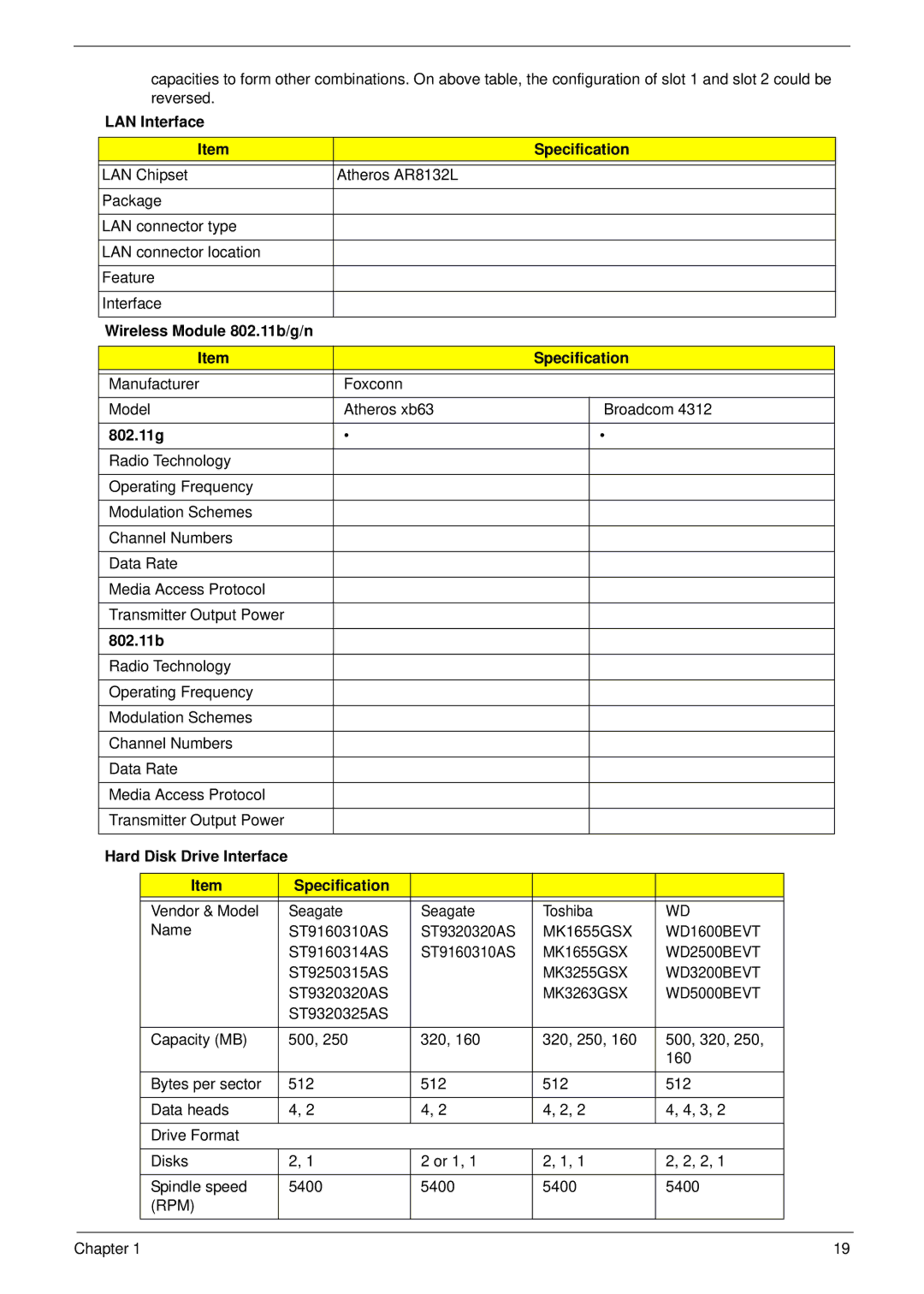
Wireless Module 802.11b/g/n Specification
LAN Interface Specification
Hard Disk Drive Interface Specification
802.11g
Super-Multi Drive
Sata
Speakers Specification
Audio Interface Specification
Audio Amplifier Specification
Power and Keyboard Controller Specification
Microphone Specification
Battery Specification Cell
LCD Specification
Lvds
Card Reader Specification
Chapter
Navigating the Bios Utility
Bios Setup Utility
Parameter Description
Aspire 5517 Bios
Information
Parameter Description Format/Option
Main
IDE Ahci
Security
Disabled or
Parameter Description Option
Clear or Set
Removing a Password
Setting a Password
Continue
Changing a Password
IDE1 Matshitadvd USB FDD
Boot
Cmos
Exit
Bios Flash Utilities
DOS Flash Utility
WinFlash Utility
Remove HDD Password
Remove HDD/BIOS Password Utilities
Password
UnlockHD
Cleaning Bios Passwords
Removing Bios Passwords
Using Boot Sequence Selector
Output
Using DMITools
Input
Using the LAN MAC Eeprom Utility
ON/OFF LED
Power Board
SW1
Clearing Password Check
Clearing Password Check and Bios Recovery
Steps for Clearing Bios Password Check
Clear Cmos Jumper
Bios Recovery Boot Block
Bios Recovery by Crisis Disk
Bios Recovery Hotkey
Steps for Bios Recovery from USB Storage
144 Chapter
FRU Field Replaceable Unit List
Main Assembly
Aspire 5517 Exploded Diagrams
Description Acer P/N
Base Assembly
Rear Assembly
Aspire 5517 FRU List
Case/Cover/Bracket Assembly
Description AcerPN Board
Cable
Description AcerPN
Sata LF F/WFG001J
Sata LF F/W FG011J
Sata LF F/WFG011J
HDD Bracket Assy
Keyboard
ODD BEZEL-SUPER Multi
ODD Bracket
ANTENNA*2, CCD 0.3M
Assy LCD Module 15.6 IN. Wxga Glare W
LCD Cover
ANTENNA-AUX
ANTENNA*2, W/O CCD
Assy LCD Module 15.6 IN. Wxga Glare W/O CCD
ANTENNA-MAIN+MIMO
LED Cable for W/O CCD F
LCD Bezel for W/O CCD AS
Assy LED Module 15.6 IN. Wxga Glare W
Antenna W/O CCD
Memory
LCD Bezel for W/O CCD F
Miscellaneous
Heatsink
Speaker
Chapter 159
Model Country Acer Part No Description
Appendix a
Media Extra Card Reader 2GB Processor
Model
VGA Chip
LAN1
Model Wireless LAN Bluetooth
Appendix B
Test Compatible Components
Vendor Type Description
Microsoft Windows Vista Environment Test
AUO N15.6WXGAG
LCD AUO N15.6WXGAG
Samsung N15.6WXGAG
LPL N15.6WXGAG
UMA UMA AMD
Plds NSM8XS
AMD AMDRS780MN
ATI AMDSB710
Appendix C
Online Support Information
168
Bios
170
171
172