2 Your mobile ..........................
one touch 803 one touch 813 one touch 813D
•Left soft key
•Right soft key
•Pick up/Send a call
•Enter Call Log
•Short key press: End a call
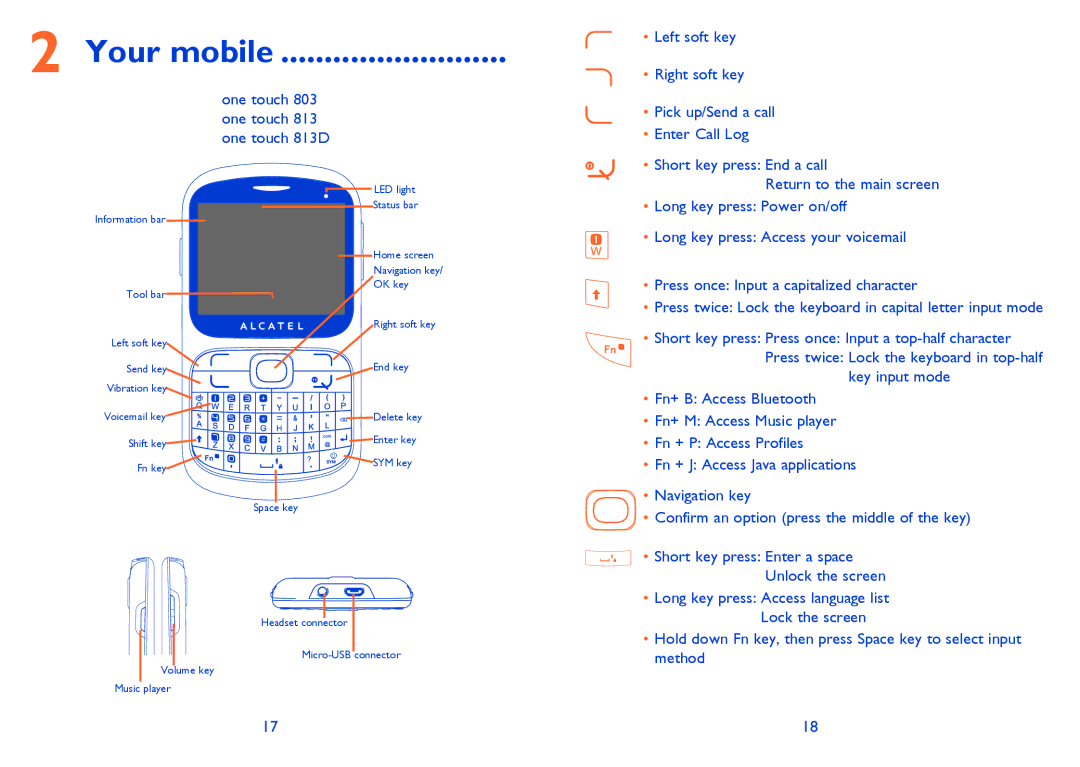
Information bar
Tool bar
Left soft key
Send key
Vibration key
Voicemail key
Shift key
Fn key
Volume key
Music player
LED light
Status bar
Home screen
Navigation key/
OK key
Right soft key
End key
Delete key
Enter key
SYM key
Space key
Headset connector
Return to the main screen
•Long key press: Power on/off
•Long key press: Access your voicemail
•Press once: Input a capitalized character
•Press twice: Lock the keyboard in capital letter input mode
•Short key press: Press once: Input a
key input mode
•Fn+ B: Access Bluetooth
•Fn+ M: Access Music player
•Fn + P: Access Profiles
•Fn + J: Access Java applications
•Navigation key
•Confirm an option (press the middle of the key)
•Short key press: Enter a space
Unlock the screen
•Long key press: Access language list Lock the screen
•Hold down Fn key, then press Space key to select input method
17 | 18 |