


 advanced accessory shoe for
 (Connection) appears.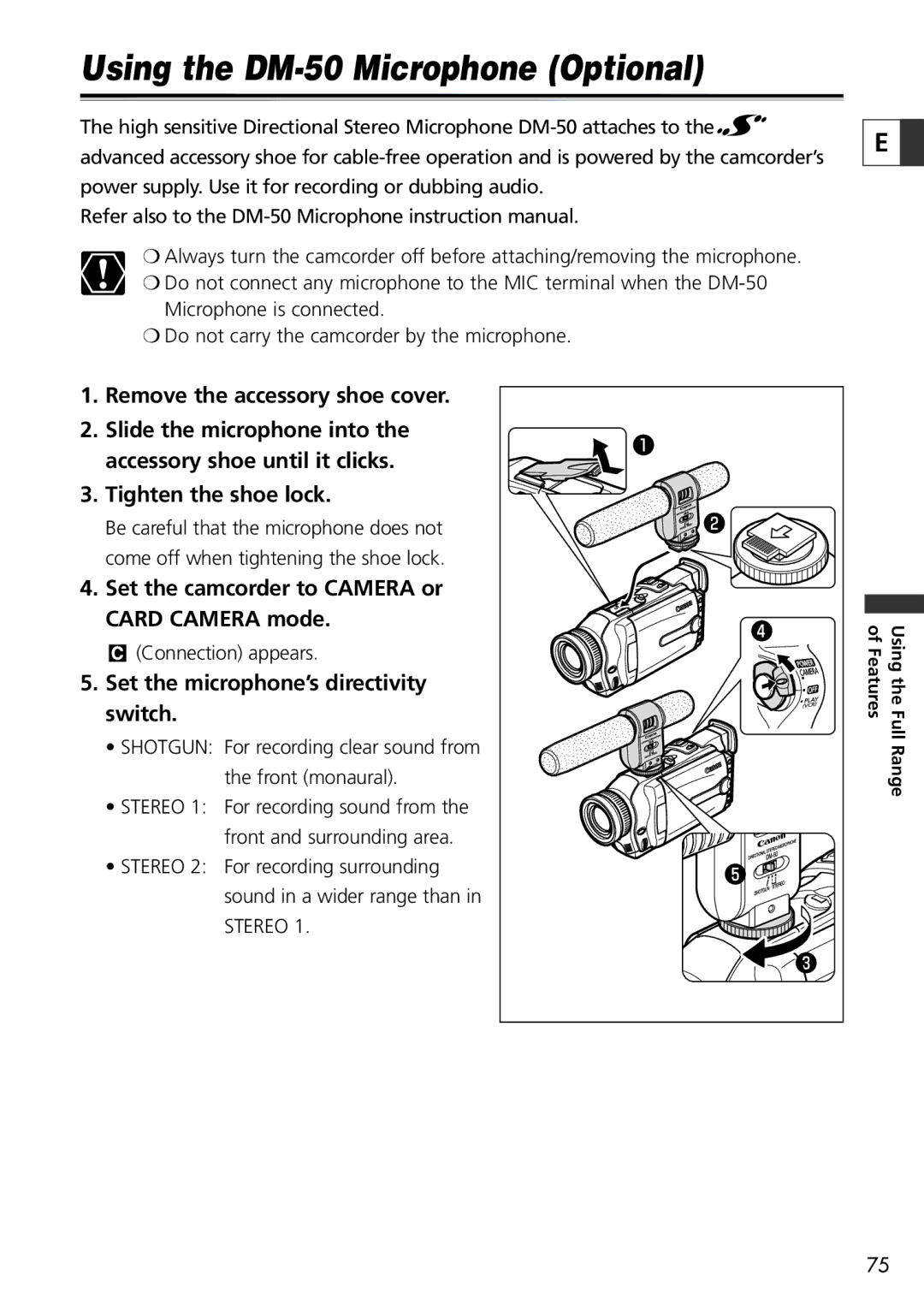
20, 10 specifications
The Canon Elura 20 and 10 are part of Canon's compact camcorders that gained popularity for their easy portability and user-friendly features. Designed with the modern user in mind, these camcorders combine advanced technology with functionality, making them appealing to both amateur and more experienced videographers.One of the standout features of the Elura 20 and 10 is their impressive optical zoom capabilities, boasting a 10x optical zoom lens. This allows users to capture detailed footage from a distance, making it particularly useful for outdoor shooting and events. Coupled with a digital zoom feature, these camcorders provide users with the flexibility to zoom in even closer without sacrificing too much image quality.
The Elura series is equipped with a 1/4-inch CCD sensor that delivers good color reproduction and decent low-light performance. This sensor captures video in a resolution of up to 680 horizontal lines, ensuring sharp and clear images even in complex lighting conditions. The camcorders support the MiniDV format, a choice that offers high-quality video recording for users looking for professionalism without the bulkiness of larger cameras.
In terms of design, the Elura 20 and 10 are noted for their sleek and compact profiles, making them easy to carry around and handle. Weighing just a little over a pound, these camcorders can be taken on various outings without becoming a burden. The intuitive control layout also allows users to quickly access various settings and features, enhancing the overall filming experience.
Both models support a range of shooting modes, including Night Mode, which is particularly effective for low-light environments, and Sports Mode for capturing fast-paced action. Additionally, the built-in image stabilization technology plays a crucial role in producing smooth footage, reducing the shakiness that can occur during handheld filming.
Another key feature of the Elura series is its connectivity options. The camcorders come equipped with USB and FireWire ports, making it easy to transfer footage to a computer for editing or sharing. The inclusion of audio inputs means that users can connect external microphones for improved sound quality in their recordings.
Overall, the Canon Elura 20 and 10 are versatile camcorders that cater to a variety of videography needs. With their compact design, impressive zoom capabilities, and user-friendly features, they remain a solid choice for capturing life's memorable moments. Whether used for family gatherings, travel adventures, or more formal events, these camcorders stand as reliable tools for video enthusiasts.