28-15

Catalyst 2960 Switch Software Configuration Guide

78-16881-01

Chapter 28      Configuring Network Security with ACLs

Configuring IPv4 ACLs

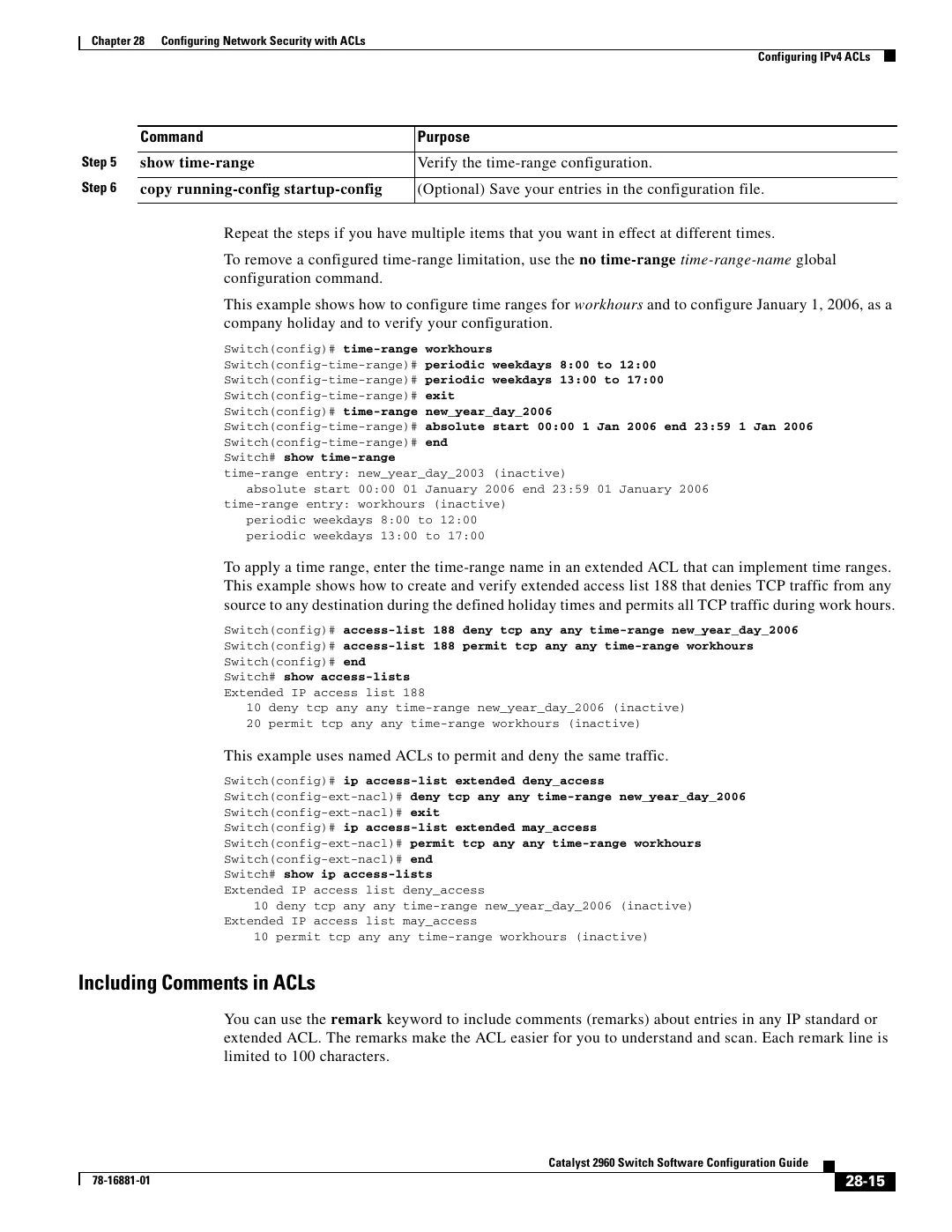
Repeat the steps if you have multiple items that you want in effect at different times. 

To remove a configured time-range limitation, use the 

no


time-range


time-range-name

 global 

configuration command.

This example shows how to configure time ranges for 

workhours

 and to configure January 1, 2006, as a 

company holiday and to verify your configuration.

Switch(config)# 

time-range workhours

Switch(config-time-range)# 

periodic weekdays 8:00 to 12:00

Switch(config-time-range)# 

periodic weekdays 13:00 to 17:00

Switch(config-time-range)# 

exit

Switch(config)#

 time-range new_year_day_2006

Switch(config-time-range)# 

absolute start 00:00 1 Jan 2006 end 23:59 1 Jan 2006

Switch(config-time-range)# 

end

Switch# 

show time-range

time-range entry: new_year_day_2003 (inactive)

   absolute start 00:00 01 January 2006 end 23:59 01 January 2006

time-range entry: workhours (inactive)

   periodic weekdays 8:00 to 12:00

   periodic weekdays 13:00 to 17:00 

To apply a time range, enter the time-range name in an extended ACL that can implement time ranges. 

This example shows how to create and verify extended access list 188 that denies TCP traffic from any 

source to any destination during the defined holiday times and permits all TCP traffic during work hours.

Switch(config)# 

access-list 188 deny tcp any any time-range new_year_day_2006

Switch(config)# 

access-list 188 permit tcp any any time-range workhours

Switch(config)# 

end

Switch# 

show access-lists

Extended IP access list 188

   10 deny tcp any any time-range new_year_day_2006 (inactive)

   20 permit tcp any any time-range workhours (inactive) 

This example uses named ACLs to permit and deny the same traffic.

Switch(config)#

 ip access-list extended deny_access

Switch(config-ext-nacl)# 

deny tcp any any time-range new_year_day_2006

Switch(config-ext-nacl)# 

exit

Switch(config)# 

ip access-list extended may_access

Switch(config-ext-nacl)# 

permit tcp any any time-range workhours

Switch(config-ext-nacl)# 

end

Switch# 

show ip access-lists

Extended IP access list deny_access

    10 deny tcp any any time-range new_year_day_2006 (inactive)

Extended IP access list may_access

    10 permit tcp any any time-range workhours (inactive) 

Including Comments in ACLs

You can use the 

remark

 keyword to include comments (remarks) about entries in any IP standard or 

extended ACL. The remarks make the ACL easier for you to understand and scan. Each remark line is 

limited to 100 characters. 

Step 5

show time-range

Verify the time-range configuration.

Step 6

copy running-config startup-config 

(Optional) Save your entries in the configuration file.

Command

Purpose

Page 479
Image 479
Open full-size image

2960 specifications

Cisco Systems 2960 series switches are a prominent solution in the networking landscape, known for their reliability, scalability, and feature-rich offerings. Ideal for small to medium-sized enterprises, these switches provide a robust foundation for network infrastructure, ensuring optimal performance and connectivity.

One of the standout features of the Cisco 2960 series is its Layer 2 switching capabilities. The switches support multiple VLANs (Virtual Local Area Networks), allowing network administrators to segment traffic efficiently and enhance security protocols. This is crucial in modern networks where managing traffic and isolating sensitive information is a priority.

The Cisco 2960 series also incorporates advanced Quality of Service (QoS) features, enabling the prioritization of critical applications and services. This functionality ensures that time-sensitive data, such as voice and video traffic, maintains a high quality of service even in congested networks. With support for IEEE 802.1p and DSCP marking, administrators can fine-tune their network performance to meet specific organizational needs.

Power over Ethernet (PoE) is another significant characteristic of the Cisco 2960 series. This feature allows switches to deliver electrical power alongside data over Ethernet cables to devices such as IP phones, wireless access points, and surveillance cameras. With PoE, organizations can reduce clutter from power cables and increase deployment flexibility for various devices.

In terms of security, the Cisco 2960 series is equipped with a range of integrated security features. The switch supports port security, 802.1X authentication, and Access Control Lists (ACLs), providing robust defenses against unauthorized access and potential network vulnerabilities. These security measures are essential for protecting sensitive data and ensuring compliance with industry regulations.

Moreover, the Cisco 2960 series offers enhanced network management capabilities with Cisco's Intelligent Network Services. This includes support for Simple Network Management Protocol (SNMP), Cisco Prime, and Embedded Event Manager (EEM), allowing for efficient monitoring, troubleshooting, and policy enforcement across the network.

Additionally, the Cisco 2960 switches provide various models and configurations, catering to different networking needs. Options include models with varying port densities, uplink configurations, and stacking capabilities, making it easy for organizations to choose solutions that align perfectly with their requirements.

In summary, the Cisco 2960 series is a versatile and essential component of modern networking environments. Its advanced features, including Layer 2 support, QoS, PoE, robust security, and diverse management tools, make it an excellent choice for organizations looking to build a strong and secure network infrastructure.