Regulatory Model HHB Regulatory Type HHB003
Page
Contents
Installing The Cooling Shroud
Technical Specifications System messages
Troubleshooting your system
Using system diagnostics
Jumpers and connectors
140
Using USB Diskette or USB DVD/CD Drives
Front-Panel Features And Indicators
Seconds, and turns Off six seconds
Hard-Drive/SSD indicator patterns
Drive-Status Condition Indicator Pattern
Off
Other Information You May Need
Choosing the system boot mode
Using the System Setup navigation keys
Entering System Setup
System setup options
Responding to error messages
System Information Screen
System Bios Screen
Processor Settings screen
Memory Settings Screen
Sata Settings screen
Integrated Devices Screen
Boot Settings Screen
Serial Communications screen
System profile settings screen
System Security screen
Miscellaneous Settings
Keyboard NumLock is set to On
System and setup password features
Assigning a system and/or setup password
Menu Item Description Keyboard NumLock
Using your system password to secure your system
Using the Boot Manager navigation keys
Entering the Uefi Boot Manager
Operating with a setup password enabled
Embedded system management
Boot Manager screen
System Setup Main Menu page, click iDRAC Settings
IDRAC settings utility
Entering the iDRAC Settings utility
Removing The Blade
Removing And Installing a Blade
Recommended tools
Removing or Installing the Blade
Installing The Blade
Closing The Blade
Opening And Closing The Blade
Opening The Blade
Removing The Cooling Shroud
Inside The Blade
Cooling shroud
System Memory
Installing The Cooling Shroud
Dimm
Processor
Memory Socket Locations
General Memory Module Installation Guidelines
Reliability, Availability,
Processor Heat Number of DIMMs Configuration Type Sink
Watts Serviceability RAS Features
Mode-specific guidelines
Advanced ECC Lockstep
Sample Memory Configurations
DIMMs Speed
System Capacity Dimm Size Number Organization
1R x8, 1333 MT/s
Removing Memory Modules
Installing Memory Modules
Removing a Mezzanine Card
Mezzanine card installation guidelines
Module Mezzanine Cards
Installing and Removing a Mezzanine Card
Installing a Mezzanine Card
Replacing The SD Card
Management riser card
Replacing The Internal USB Key
Internal USB key
Replacing The SD vFlash Card
SD vFlash card
Removing The Network Daughter Card/LOM Riser Card
Network Daughter Card/LOM riser card
Removing a Processor
Installing The Network Daughter Card/LOM Riser Card
Processors
Installing and Removing a Heat Sink
Open 1st label
Installing and Removing a Processor
Installing a Processor
Reinstalling a
Removing a Hard Drive/SSD
Hard drive/SSD installation guidelines
Hard Drives/SSDs
Shutdown procedure for servicing a hard drive/SSD
Installing a Hard Drive/SSD
Removing a hard drive/SSD from a hard-drive/SSD carrier
Configuring the boot drive
Installing a hard drive/SSD in a hard-drive/SSD carrier
Removing The Hard-Drive/SSD Backplane
Hard-drive/SSD backplane
Removing and Installing the Hard-Drive/SSD Backplane
Installing The Hard-Drive/SSD Backplane
Removing The System Board
System board
Removing and Installing the System Board
Installing The System Board
Replacing The Nvram Backup Battery
Nvram backup battery
Removing The PCIe Extender Card/Storage Controller Card
Storage controller card/PCIe extender card
Installing The PCIe Extender Card/Storage Controller Card
Troubleshooting your system
Troubleshooting USB devices
Troubleshooting hard drives
Troubleshooting the blade system board
Troubleshooting An Internal SD Card
Troubleshooting processors
Troubleshooting the Nvram backup battery
When to use the Embedded System Diagnostics
Dell Online Diagnostics Dell Embedded System Diagnostics
Least one event description is recorded
Running the Embedded System Diagnostics
Running embedded system diagnostics from an external media
System diagnostic controls
Jumper Setting Description
System Board Jumper Settings
Connector Description
System Board Connectors
Disabling a Forgotten Password
Drives
Connectors
Memory
Environmental
Battery
Mezzanine Cards
Video
Above 950 m 1 F per 228 ft
Removing LCD messages
System Error Messages
LCD status messages
Viewing LCD messages
AMP0303 Message
AMP0301 Message
LCD Message
AMP0302 Message
AMP0309 Message
AMP0306 Message
AMP0307 Message
AMP0308 Message
AMP0314 Message
AMP0310 Message
AMP0312 Message
AMP0313 Message
AMP0319 Message
AMP0315 Message
AMP0316 Message
AMP0318 Message
ASR0000 Message
AMP0320 Message
AMP0321 Message
AMP0322 Message
ASR0100 Message
ASR0002 Message
ASR0003 Message
ASR0008 Message
ASR0106 Message
ASR0103 Message
ASR0104 Message
ASR0105 Message
Controller
Due to thermal issues
CBL0006 Message
BAT0015 Message
BAT0017 Message
BAT0019 Message
CPU0005 Message
CPU0002 Message
CPU0003 Message
CPU0004 Message
CPU0100 Message
CPU0008 Message
CPU0010 Message
CPU0023 Message
CPU0202 Message
CPU0104 Message
CPU0200 Message
CPU0201 Message
CPU0700 Message
CPU0203 Message
CPU0204 Message
CPU0703 Message
CPU0701 Message
CPU0702 Message
CPU0803 Message
CPU0704 Message
CPU0801 Message
CPU0802 Message
CPU0816 Message
CPU0804 Message
CPU0805 Message
CPU0806 Message
HWC1006 Message
HWC1001 Message
HWC1002 Message
HWC1005 Message
HWC3000 Message
HWC2006 Message
HWC2008 Message
HWC2011 Message
CPU
Issue persists, see Getting Help
HWC4015 Message Link Tuning error detected Details
HWC4000 Message
HWC5010 Message
HWC5004 Message
HWC5006 Message
HWC5008 Message
Normal or warning state
HWC7002 Message
State
HWC7004 Message
LNK2700 Message
HWC7008 Message
HWC7010 Message
HWC7012 Message
MEM0005 Message
MEM0002 Message
MEM0003 Message
MEM0004 Message
MEM0702 Message
MEM0010 Message
MEM0022 Message
MEM0701 Message
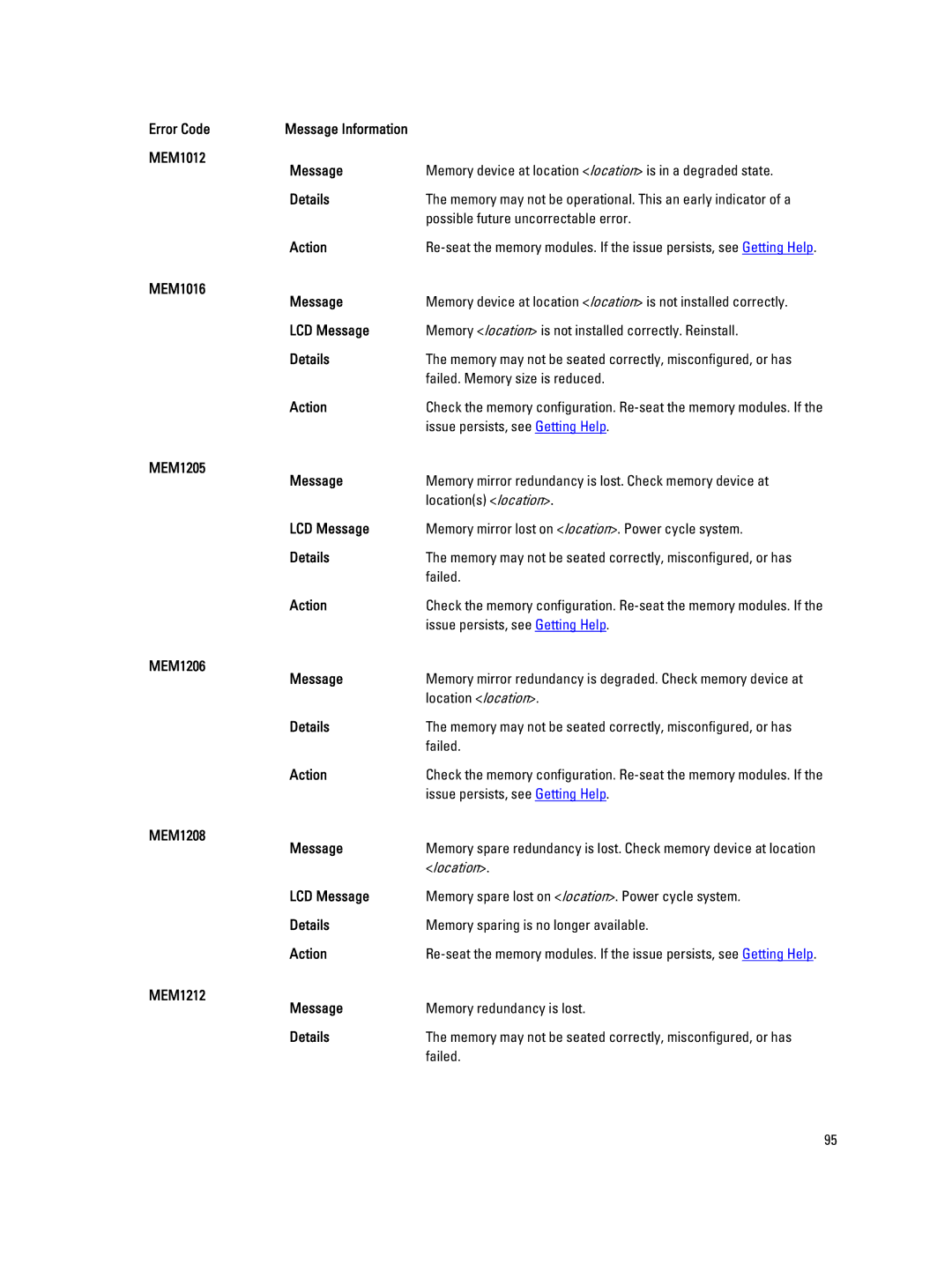
MEM1206 Message
MEM1012 Message
MEM1016 Message
MEM1205 Message
OSE0000 Message
MEM1214 Message
MEM7002 Message
MEM8000 Message
OSE1005 Message PXE boot failed Action
OSE1001 Message Failed to boot from a Action
Is bootable. See system video for additional information
OSE1003 Message Failed to boot from C Action
PCI1308 Message
PCI1302 Message
PCI1304 Message
PCI1306 Message
PCI1322 Message
PCI1316 Message
PCI1318 Message
PCI1320 Message
PCI1350 Message
PCI1344 Message
PCI1346 Message
PCI1348 Message
PCI2002 Message
PCI1360 Message
PCI1362 Message
PCI2000 Message
PCI3010 Message
PCI3004 Message
PCI3006 Message
PCI3008 Message
PDR1001 Message
PDR0001 Message
PDR0002 Message
PDR0016 Message
Memory for system operation
Configurations
PDR1024 Message
Correct drive type
System Post
Timer during Post
Seat processors
Persists, see Getting Help
Minimum configuration
PST0196 Message Incorrect memory configuration
Have been removed
PSU0002 Message
PST0254 Message
PST0256 Message
PSU0001 Message
Issues with the input source
Manual or on the power supply itself
Power supply
Circuit breaker fault
PSU1203 Message
PSU0031 Message
PSU1201 Message
PSU1202 Message
System may shutdown
System power inventory change
Configuration and power consumption
Changed
RFM1003 Message
PWR1006 Message
PWR1007 Message
PWR1008 Message
RFM1016 Message
RFM1006 Message
RFM1008 Message
RFM1014 Message
Properly
RFM1024 Message Removable Flash Media is offline Details
A copy operation that is in-progress
Idsdm cannot use a write-protected card
RFM2004 Message
RFM1205 Message
RFM2001 Message
RFM2002 Message
System performance may be degraded
Review installation documentation
SEC0001 Message Drive bay is open Details
Performance may be degraded
SEC0041 Message
System configuration
May have been comprised
Code = 20H
Disabled by the user
Password policies
SEL0002 Message Logging is disabled Details
Older events may be overwritten and lost
Appear if the user disabled event logging
Power. If problem persists call support
By the user
User to select a boot source
SEL1300 Message No bootable media found Details
Configuration settings are applicable
SEL1302 Message Non-bootable diskette detected Details
Group
Action Upgrade the management software
CMC firmware versions match
SEL1502 Message
Slot number and CMC
Bios in slot number and CMC
Please update the firmware
SWC4004 Message
TMP0107 Message
TMP0103 Message
TMP0104 Message
TMP0106 Message
TMP0113 Message
TMP0109 Message
TMP0110 Message
TMP0112 Message
TMP0121 Message
Failures
TMP0115 Message
Failed
TMP0100 Message
Details Ambient air temperature is too warm or cool Action
VLT0100 Message
TMP0130 Message
TMP0132 Message
TMP0134 Message
VLT0104 Message
VLT0102 Message
VLT0103 Message
VLT0202 Message
VLT0200 Message
VLT0201 Message
VLT0206 Message
VLT0203 Message
VLT0204 Message
VLT0209 Message
VLT0207 Message
VLT0208 Message
VLT0213 Message
VLT0210 Message
VLT0212 Message
VLT0216 Message
VLT0214 Message
VLT0215 Message
VLT0220 Message
VLT0218 Message
VLT0219 Message
VLT0224 Message
VLT0221 Message
VLT0222 Message
VLT0227 Message
VLT0225 Message
VLT0226 Message
VLT0231 Message
VLT0228 Message
VLT0230 Message
VLT0234 Message
VLT0232 Message
VLT0233 Message
Alert messages
Diagnostic messages
Contacting Dell
Getting help