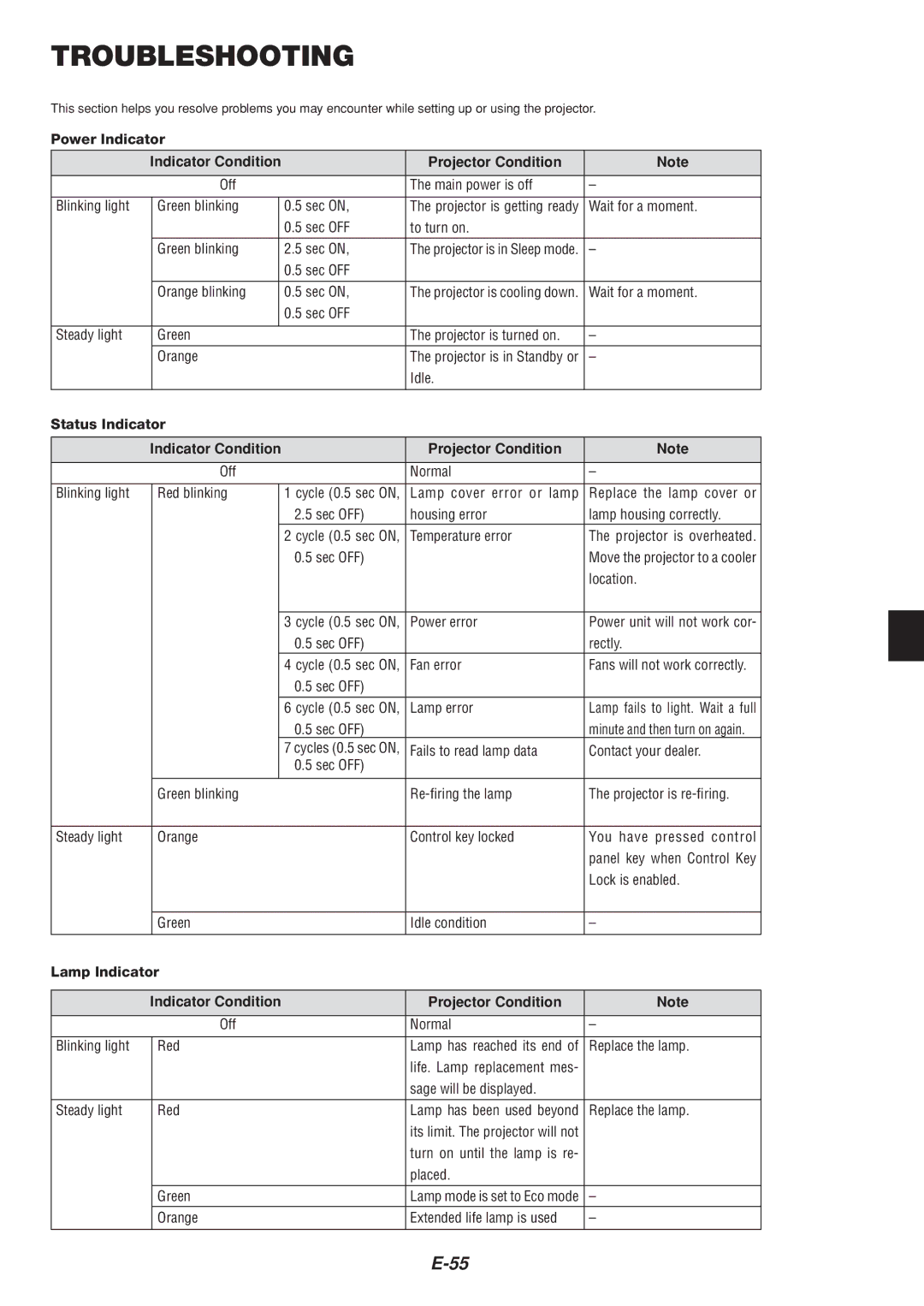
TROUBLESHOOTING
This section helps you resolve problems you may encounter while setting up or using the projector.
Power Indicator
| Indicator Condition |
| Projector Condition | Note | |
| Off |
| The main power is off | – | |
|
|
|
|
|
|
Blinking light | Green blinking |
| 0.5 sec ON, | The projector is getting ready | Wait for a moment. |
|
|
| 0.5 sec OFF | to turn on. |
|
| Green blinking |
| 2.5 sec ON, | The projector is in Sleep mode. | – |
|
|
| 0.5 sec OFF |
|
|
|
|
|
|
|
|
| Orange blinking |
| 0.5 sec ON, | The projector is cooling down. | Wait for a moment. |
|
|
| 0.5 sec OFF |
|
|
|
|
|
|
|
|
Steady light | Green |
| The projector is turned on. | – | |
| Orange |
| The projector is in Standby or | – | |
|
|
|
| Idle. |
|
Status Indicator |
|
|
| ||
|
|
|
|
| |
| Indicator Condition |
| Projector Condition | Note | |
| Off |
| Normal | – | |
|
|
|
|
| |
Blinking light | Red blinking |
| 1 cycle (0.5 sec ON, | Lamp cover error or lamp | Replace the lamp cover or |
|
|
| 2.5 sec OFF) | housing error | lamp housing correctly. |
|
|
| 2 cycle (0.5 sec ON, | Temperature error | The projector is overheated. |
|
|
| 0.5 sec OFF) |
| Move the projector to a cooler |
|
|
|
|
| location. |
|
|
|
|
|
|
|
|
| 3 cycle (0.5 sec ON, | Power error | Power unit will not work cor- |
|
|
| 0.5 sec OFF) |
| rectly. |
|
|
| 4 cycle (0.5 sec ON, | Fan error | Fans will not work correctly. |
|
|
| 0.5 sec OFF) |
|
|
|
|
| 6 cycle (0.5 sec ON, | Lamp error | Lamp fails to light. Wait a full |
|
|
| 0.5 sec OFF) |
| minute and then turn on again. |
|
|
| 7 cycles (0.5 sec ON, | Fails to read lamp data | Contact your dealer. |
|
|
| 0.5 sec OFF) |
|
|
|
|
|
|
|
|
| Green blinking |
| The projector is | ||
|
|
|
|
| |
Steady light | Orange |
| Control key locked | You have pressed control | |
|
|
|
|
| panel key when Control Key |
|
|
|
|
| Lock is enabled. |
|
|
|
|
| |
| Green |
| Idle condition | – | |
|
|
|
|
| |
Lamp Indicator |
|
|
| ||
|
|
|
|
| |
| Indicator Condition |
| Projector Condition | Note | |
| Off |
| Normal | – | |
|
|
|
|
| |
Blinking light | Red |
| Lamp has reached its end of | Replace the lamp. | |
|
|
|
| life. Lamp replacement mes- |
|
|
|
|
| sage will be displayed. |
|
Steady light | Red |
| Lamp has been used beyond | Replace the lamp. | |
|
|
|
| its limit. The projector will not |
|
|
|
|
| turn on until the lamp is re- |
|
|
|
|
| placed. |
|
| Green |
| Lamp mode is set to Eco mode | – | |
| Orange |
| Extended life lamp is used | – | |
|
|
|
|
|
|