15
Voice mode
Under music mode, press  FUNCTION
 button to enter voice mode. Under voice mode, you can select
1.Play/RW/FF/V+,- (details canbe found in music mode)
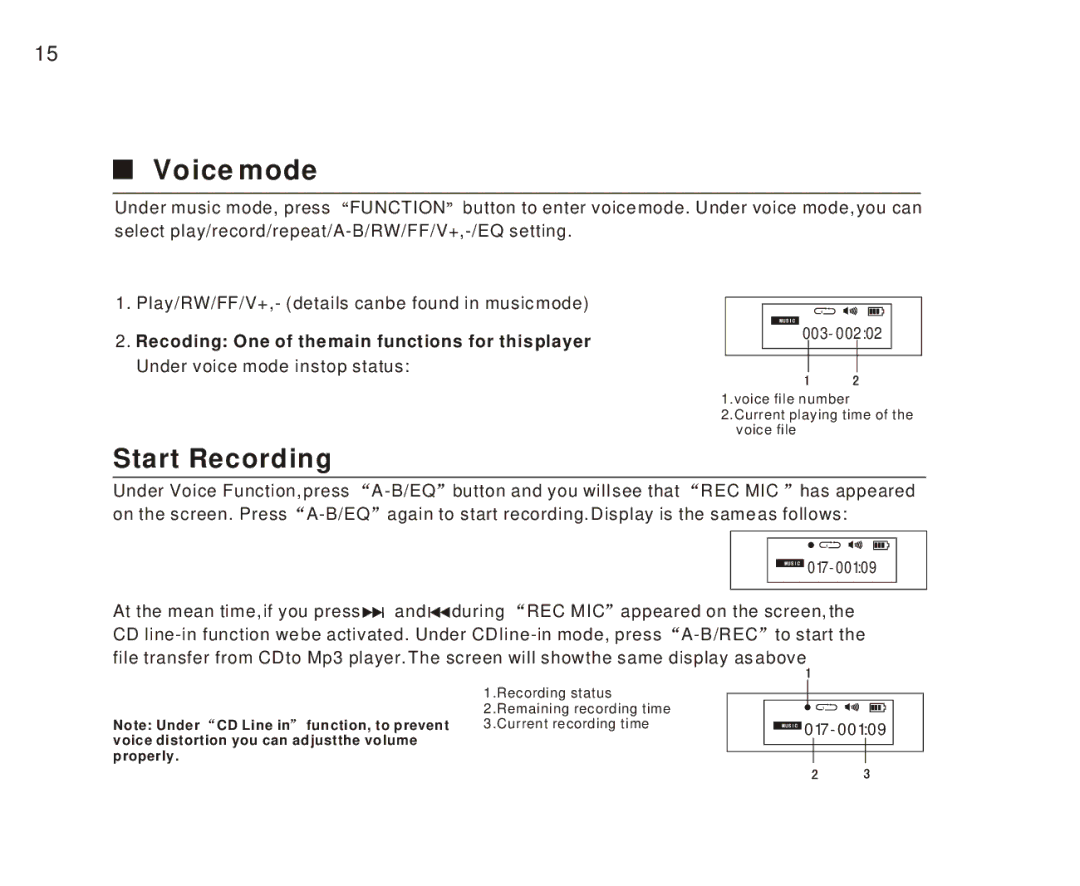
2.Recoding: One of the main functions for this player Under voice mode in stop status:
|
|
| 1.voice file number | |||||
|
|
| 2.Current playing time of the | |||||
|
|
|
| voice file | ||||
Start Recording |
|
|
|
|
|
|
|
|
Under Voice Function, press | button and you will see that | REC MIC has appeared | ||||||
on the screen. Press | again to start recording. Display is the same as follows: | |||||||
|
|
|
|
|
|
|
|
|
|
|
|
|
|
|
|
|
|
|
|
|
|
|
|
|
|
|
|
|
|
|
|
|
| ||
|
|
|
|
|
|
|
| |
|
|
|
|
|
|
|
|
|
At the mean time, if you press | and | during REC MIC appeared on the screen, the | ||||||
CD | ||||||||
file transfer from CD to Mp3 player. The screen will show the same display as above
1.Recording status 2.Remaining recording time
Note: Under CD Line in function, to prevent | 3.Current recording time |
voice distortion you can adjustthe volume properly.