User’s Manual
PCM-9387
Copyright
Packing List
Model No. List Description
Additional Information and Assistance
Page
PCM-9387 User’s Manual
Contents
Chapter Chipset Software Installation Utility
Integrated Peripherals
Chapter Audio Setup
Appendix D AT/ATX Power setting
PCM-9387 User’s Manual Xii
General Information
Introduction
Features
Introduction
2 VGA/LVDS Interface
Specifications
Standard 3.5 Biscuit SBC Functions
Mechanical and Environmental
Ethernet Interface
Audio Function
Board layout DimensionsComponent Side
Board layout dimensions
Board layout DimensionsSolder Side
Installation
Jumpers
Jumpers
Jumper Location
LCD Power Setting J6
Jumper Settings
Audio Power SelectorJ1
COM2 Setting
Cmos clear
PCI VIO JP1
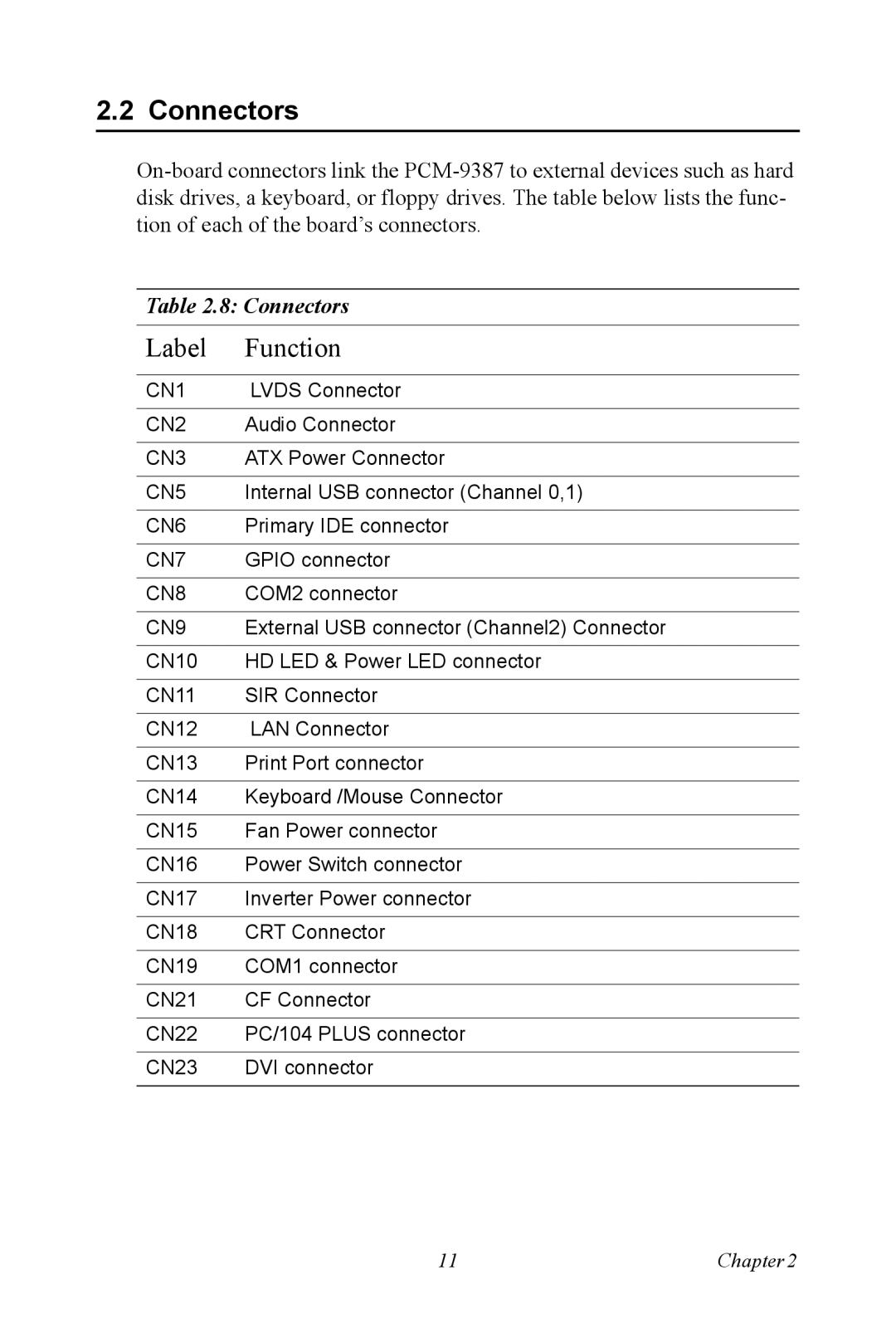
Connectors
Connectors
Jumpers and Connectors Drawing component side
Locating Connectors
Connectors solder side
Setting Jumpers
IDE, Cdrom hard drive connector CN6
Installing SO-DIMM
CompactFlash CN21
Parallel port connector CN13
Connecting the hard drive
Solid State Disk
Power connectors CN3
Keyboard and PS/2 mouse connector CN14
Power & HDD LED Connector CN10
14 VGA/LCD/LVDS interface connections
COM port connector CN8,CN19
Audio interfaces CN2
15.1 100Base-T/1000Base-T connector CN12
Ethernet configuration
Watchdog timer configuration
USB connectors CN5,CN9
Gpio General Purpose Input Output CN7
Chipset Software Installation Utility
Ers
Before you begin
Installing the CSI Utility
PCM-9387 User’s Manual
Page
PCM-9387 User’s Manual
Award Bios Setup
Cmos RAM Auto-backup and Restore
Award Bios Setup initial screen
Entering Setup
Advanced Bios Features
Standard Cmos Setup
2 L1 & L2 Cache
Quick Power On Self Test
First/Second/Third/Other Boot Device
Virus Warning
Typematic Delay msec
Boot UP Floppy Seek
Boot Up NumLock Status
Typematic Rate Setting
On-Chip Secondary PCI IDE
IDE Master/Slave PIO/UDMA Mode
Integrated Peripherals
MPS Version Control For OS
USB Controller
IDE HDD Block Mode
Uart Mode Select
IR Transmission Delay
ECP Mode Use DMA
14 UR2 Duplex Mode
Parallel Port Mode
EPP Mode Select
Acpi function
Power Management Setup
Power-Supply Type
Power Management
PowerOn By Alarm
HDD Power Down
PowerOn By LAN
PowerOn By Modem
PCI Pirq A-D#
PnP/PCI Configurations
PnP OS Installed
Primary IDE 0 1 and Secondary IDE 0