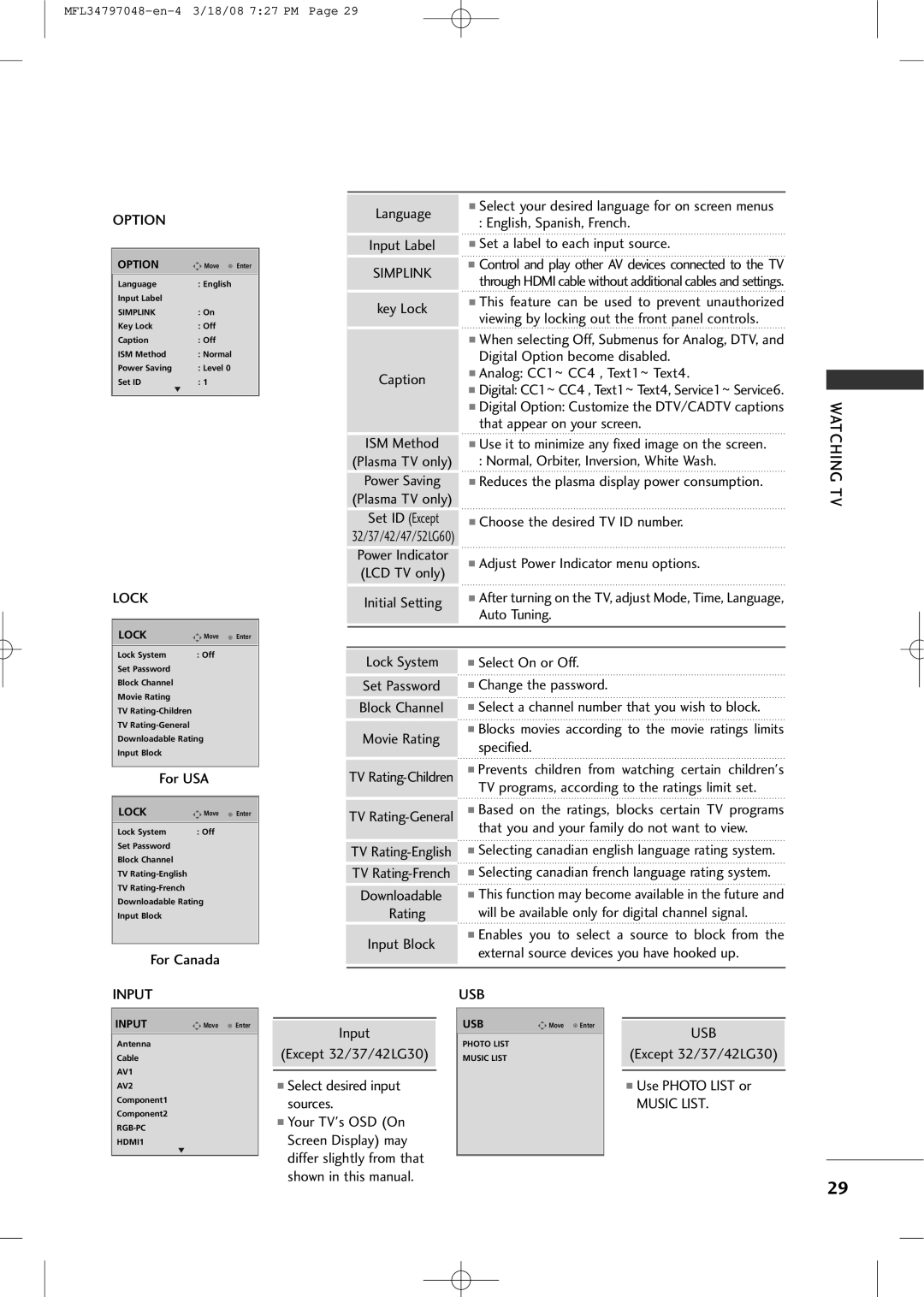
OPTION
OPTION | Move | Enter |
Language | : English |
|
Input Label |
|
|
SIMPLINK | : On |
|
Key Lock | : Off |
|
Caption | : Off |
|
ISM Method | : Normal |
|
Power Saving | : Level 0 |
|
Set ID | : 1 |
|
| E |
|
|
|
|
LOCK
Language
Input Label
SIMPLINK
key Lock
Caption
ISM Method
(Plasma TV only)
Power Saving
(Plasma TV only)
Set ID (Except
32/37/42/47/52LG60)
Power Indicator (LCD TV only)
Initial Setting
■Select your desired language for on screen menus
:English, Spanish, French.
■Set a label to each input source.
■Control and play other AV devices connected to the TV through HDMI cable without additional cables and settings.
■This feature can be used to prevent unauthorized viewing by locking out the front panel controls.
■When selecting Off, Submenus for Analog, DTV, and Digital Option become disabled.
■Analog: CC1~ CC4 , Text1~ Text4.
■Digital: CC1~ CC4 , Text1~ Text4, Service1~ Service6.
■Digital Option: Customize the DTV/CADTV captions that appear on your screen.
■Use it to minimize any fixed image on the screen.
:Normal, Orbiter, Inversion, White Wash.
■Reduces the plasma display power consumption.
■Choose the desired TV ID number.
■Adjust Power Indicator menu options.
■After turning on the TV, adjust Mode, Time, Language, Auto Tuning.
WATCHING TV
LOCK | Move | Enter |
Lock System | : Off |
|
Set Password |
|
|
Block Channel |
|
|
Movie Rating |
|
|
TV |
|
|
TV |
|
|
Downloadable Rating |
| |
Input Block |
|
|
|
| |
For USA |
| |
|
|
|
LOCK | Move | Enter |
Lock System | : Off |
|
Set Password |
|
|
Block Channel
TV
TV
Downloadable Rating
Input Block
For Canada
Lock System
Set Password
Block Channel
Movie Rating
TV
TV
TV
TV
Downloadable
Rating
Input Block
■Select On or Off.
■Change the password.
■Select a channel number that you wish to block.
■Blocks movies according to the movie ratings limits specified.
■Prevents children from watching certain children's TV programs, according to the ratings limit set.
■Based on the ratings, blocks certain TV programs that you and your family do not want to view.
■Selecting canadian english language rating system.
■Selecting canadian french language rating system.
■This function may become available in the future and will be available only for digital channel signal.
■Enables you to select a source to block from the external source devices you have hooked up.
INPUT
INPUT | Move Enter |
Antenna
Cable
AV1
AV2
Component1
Component2
HDMI1
E
Input
(Except 32/37/42LG30)
■Select desired input sources.
■Your TV's OSD (On Screen Display) may differ slightly from that shown in this manual.
USB
USB | Move Enter |
PHOTO LIST
MUSIC LIST
USB
(Except 32/37/42LG30)
■Use PHOTO LIST or
MUSIC LIST.
29