Ario
Page
When riding in a car, do not leave your phone or set
Important Safety Precautions
Do not use your phone in high explosive areas as
Phone may generate sparks
Store the battery out of reach of children
Table of Contents
Exit From the Music Player
Entry Mode Word/ Abc/ ABC
Voice Commands
Cast Music l Rhapsody Get New Ringtones
Call Name or Number
General Notice
Exposure to Radio Frequency
Potentially Explosive Atmosphere104
Explosion, Shock, and Fire
Welcome
Long battery standby and talk time
Easy operation using menu- driven interface with prompts
Bluetooth wireless technology for certain profiles
Technical Details
Technical Details
Important Information
Information to User
Reduce call interruptions
Analog mode. In addition, features
MS Mobile Station
Such as soft / softer handoff, hard
Vehicle-Mounted External Antenna
FCC RF Exposure Information
Optional, if available
Bodily Contact During Operation
Earpiece Lets you hear the caller and automated prompts
Phone Overview
International Call Prefix Key To make an
Rear view
Push the battery down until it clicks into place
Installing the Battery
Removing the Battery
Menus Overview
My Verizon Tools
Bluetooth Menu
Sounds Settings
Display Settings
Phone Info
Phone Settings
Call Settings
Memory
Charging with USB
Charging the Battery
Battery Temperature Protection
Getting Started with Your Phone
You can find the battery charge
How to Install Your microSDTM Card
Battery Charge Level
Signal Strength
Turning the Phone On and Off
Redialing Calls
Receiving Calls
Screen Icons
Quick Access to Convenient Features
Text Input Modes
Word/Abc/ABC/123/Symbols/Quick Text
Entering and Editing Information
Text Input
Speed Dial
Contacts in Your Phone’s Memory
Storing Basics
Customizing Individual Entries
With the flip open, enter
From standby mode
Storing a Number with Pauses
Adding Another Phone Number
Confirmation message is displayed Press again to save
Changing the Default Number
Deleting
Changing Saved Information
Multiple Digit Speed Dials
Speed Dialing
Deleting a Speed Dial
Single Digit Speed Dials
Press Contacts Press Contact List
Contacts
New Contact
Press Contacts Press New Contact
Speed Dials
Groups
Entering Your ICE Personal Info
Case of Emergency ICE
Highlight the Contact, then press
ICE Contact Assigned is displayed
Enter your information as necessary, then press
My Name Card
Press Contacts Press My Name Card
Press Edit to enter your personal Contact information
TXT Message
Messaging
New Message
On/ Off/ Edit
Customizing the Message Using Options Editing the To field
Editing Text
High/ Normal
Left Soft Key My Pics. Use
Picture Message
Basics of Sending a Picture Message
Press New Message
Editing Sound
From Contacts/ From Recent
To Contacts Editing Text
Editing Picture
Press New Message Press Video Message
Video Message
Editing a Subject
Basics of Sending a Video Message
Voice Message
Type your message
Press the Right Soft Key Options to access the options
After a connecting display, message is transmitted
Inbox
Options from here with a message highlighted
Sent
Message Icon Reference
Priority High Locked
Drafts
Manage Sent Allows you to manage erase or lock message list
Multiple Messages failed
Press Voicemail
Voicemail
Mobile IM
Checking Your Voicemail Box
Chat
Messaging Settings
Erasing Messages
Press Recent Calls
Recent Calls
Missed
Received
All
Dialed
Use the Directional Key to highlight a call list
View Timers
Press Recent Calls Press View Timers
Press Get New Applications
Games
With the flip open, press Menu Press Games
Cast Music l Rhapsody
Media Center
Music & Tones
Press Media Center Press Music & Tones Press My Ringtones
Get New Ringtones
My Ringtones
Press Media Center Press Music & Tones Press My Music
Access My Music
My Music
Playing Your Music
Album Art, Large Album Art, Visualizer
Repeat Allows you to select the player mode
Phone/ Lock/ Unlock
Player Type Allows you to select the player layout type
Treble Booster
Access FM Transmitter
FM Transmitter
Flat, Concert Hall, Classical
FM Transmitter Icon Reference
Using the Front LCD to set the FM Transmitter
Exit From the Music Player
Sync Music
How to record a new sound
How to select a sound
My Sounds
Selecting the My Library tab
Download music to your PC
Log
Select Download Tracks
Cast Music with Rhapsody
USB Autorun is a feature that
Autorun is not available when Phone is booting powering up
Running the phone as a Portable music device
Windows VistaTM
Connecting Phone to PC
Windows OS System
USB Modem Driver Storage
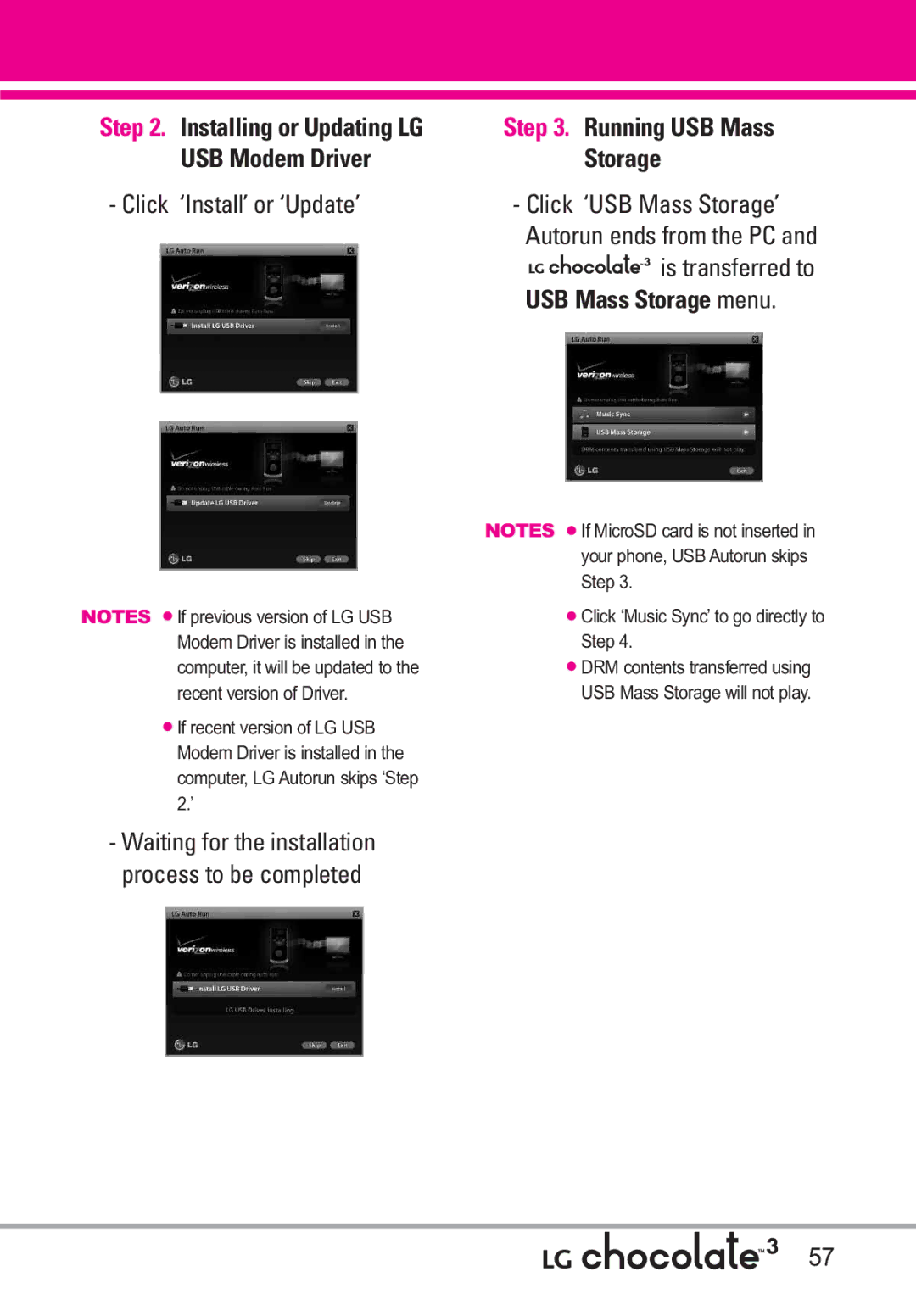
Click ‘Install’ or ‘Update’ Click ‘USB Mass Storage’
Waiting for the installation Process to be completed
Installing or Updating LG Running USB Mass
Downloading or Running V Cast Music with Rhapsody
Press Media Center Press Picture & Video
Highlight content provider, then press
Picture & Video
Cast Videos
Options Press Save Video
To view a Streaming Video
Video clip will begin playback shortly after being selected
To download a Video Clip
Deleting Video Clips
Configure Alerts for New Video Clips
Select Configure Alerts
Get New Pictures
Editing a Picture
My Pictures
My Videos
Press Media Center Press Picture & Video Press My Pictures
Press Media Center Press Picture & Video Press Take Picture
Take Picture
Set As Wallpaper/ File Info
Press Media Center Press Picture & Video Press Record Video
Record Video
Sound /Say Cheese Ready! 1 2
Negative/ Aqua/ Sepia Black&White
Online Album
Games
Mobile Web
Scrolling
Links embedded in content
Numbered options
Text or numbers
VZ NavigatorSM
Browse & Download
Deleting Text/Number Entered
Initiating a Phone Call From the Browser
Press Extras
Extras
MY Music
Press VZ Navigator
VZ Navigator
Find points of interest With the flip open, press Menu
Cast Videos
Tools
Settings & Tools
Voice Commands
My Verizon
Contacts Name
Prompts Mode/ Audio Playback Timeout
Go to Menu
Check Item
Ez Tip Calculator
Calculator
Calendar
Alarm Clock
Highlight a Calendar setting field
Press Alarm Clock
Press Stopwatch
Key Reset
Stopwatch
World Clock
After filling in the note, press to save it
Bluetooth Menu
USB Mass Storage
Press Notepad
Pairings within the and connect to one device
Bluetoothmeters. QD ID B014130
Icon Reference in Adding New Device
Press Bluetooth Menu
Add New Device
Press the Left Soft Key Turn On
Press Settings & Tools Press Bluetooth Menu
Turn On
My Device Info
Supported Profiles
Discovery Mode
Rename Device You can rename the paired device
Phonebook Access
Auto Pair Handsfree
File Transfer
Calls With the flip open, press Menu
Sounds Settings
Master Volume
Call Sounds
Alert Sounds
Keypad Volume
Service Alerts
Banner
Display Settings
Power On/Off
Wallpaper
Backlight
Font Size
Main Menu Settings
Display Themes
Main Clock/ Front Clock
Press Display Settings Press Clock Format
Clock Format
Front Display Hint
Set Shortcuts
Phone Settings
Airplane Mode
Location
Language
Security
Phone Lock
On Power Up The phone is locked when it is turned on
System Select
Answer Options
Call Settings
Press Phone Settings Press NAM Select
NAM Select
Auto Retry
TTY Mode
Press Call Settings Press Auto Retry
Press Settings & Tools Press Call Settings Press TTY Mode
TTY Off Users send and receive without TTY equipment
TTY Mode Tele Type writer
Connecting TTY Equipment and a Terminal
Transmission When making
Voice Privacy
One Touch Dial
Dtmf Tones
Sync Music/ Sync Data/ Ask On Plug
USB Auto Sync
Memory
Press USB Auto Sync
Card Memory
Save Options
Phone Memory
Icon Glossary
Phone Info
My Number
SW/HW Version
101
Software Update
Automatic Update
Manual Update
Phone Operation
Safety
Exposure to Radio Frequency Signal
Antenna Care
Pacemakers
Tips on Efficient Operation
Driving
Electronic Devices
Vehicles
Hearing Aids
Other Medical Devices
Health Care Facilities
Cause minor or serious damage to
For Vehicles Equipped with an Air Bag
Product
105
Replace the battery when it no longer provides acceptable
Battery usage by children should be supervised
Charger and Adapter Safety
Battery Information and Care
107
General Notice
108
Do not paint your phone
109
American Academy of Audiology
Safety and Health
Voice 1-800-35-NIOSH 1-800-356 Internet Ise/default.html
Hubert H. Humphrey Bldg
111
Do wireless phones pose a health hazard?
U.S. Food and Drug
112
What kinds of phones are the subject of this update?
National Telecommunications and Information Administration
What are the results of the research done already?
113
114
115
116
What about children using wireless phones?
117
118
Where can I find additional information?
119
120
121
Specific Absorption Rate
122
123
124
Http//tap.gallaudet.edu/DigWireless.KS DigWireless.htm
FCC Hearing Aid Compatibility and Volume Control
Onetech.asp
125
Accessories
Limited Warranty Statement
127
What LG will do
Tel -800-793-8896 or Fax -800
128
MicroSDTM
Glossary
EZ Tip Calculator
Advanced Voice Recognition
130
ERI
131
Index
Cast Videos
132
Memo
Memo
Memo
Microondas ya que esto haría que estallara la batería
Precaución de Seguridad Importante
No use el teléfono en áreas altamente explosivas, ya
Precaución de Seguridad Importante
Page
Contenido
Ir a Menú Verificar Elemento
Internet Móvil
MI Música
Programación de Llamada
Progrmación de Sonidos
Programación de Pantalla
Programación de Teléfono
Accesorios
Reconocimiento de voz avanzado Protección de teclas
Bienvenidos
Música V Cast con Rhapsody Videos V Cast
Tapa
Cumplimiento de Clase B con el artículo 15 de la FCC
Detalles Técnicos
Información Importante
Información para el usuario
TSB-74 Operaciones interbanda
Designador Cdma Designador Descripción
Interfaz aérea Cdma de modo doble
Protocolo de enlace de radio a 14.4kbps y
Información de la FCC sobre exposición a la RF
Detalles Técnicos
Precaución
Antena externa instalada en un vehículo
Opcional, en caso de estar disponible
Micrófono
Descripción general del Teléfono
Tecla suave Derecha Úselas para acceder al menú Contactos
Vista posterior
Deslice la tapa de la batería hacia abajo para quitarla
Instalación de la batería
Extracción de la batería
Foto y Video
Descripción general de los menús
Perdidas Recibidas Marcadas Todas Ver Cronómetro
Música y Tonos
Programación de Pantalla
Menú de Bluetooth
Mi Verizon Herramientas
Programación de Sonidos
Memoria
Programación de Llamada
Sinc automática de USB Syncro-Música Syncro datos
Ask On Plug
El tiempo de carga varía según el nivel de la batería
Carga de la batería
Carga con USB
Nivel de carga de la batería
Instalación de la tarjeta microSDTM
Desinstalación de la tarjeta microSDTM
Remarcado de llamadas
Potencia de la señal
Apagar y Encender el teléfono
Para hacer llamadas
Teléfono -Glosario de Iconos
Para recibir llamadas
Iconos de pantalla
Oprima para finalizar la llamada
Llamada en espera
Ajuste rápido del volumen
Modo de vibración
Sonidos desactivados
En un campo de texto, toque la
Introducir y editar información
Entrada de texto
Modos de entrada de texto
Corregir
Contactos en la memoria de su teléfono
Aspectos Básicos
Marcación Rápida
Almacenar un número con una pausa
Agregar otro número de teléfono
Oprima Espera o 2-Seg Pausa
Desde la pantalla Lista de contactos
Agregar una pausa a una entrada de contacto
Borrar
Cambiar el Número Predeterminado
Rápido 25, presione y luego Mantenga oprimida la tecla
Marcado Rápido
Marcado rápido de una cifra
Marcado rápido de más de una cifra
Lista de Contacto
Contactos
Nuevo Contacto
Grupos
La etiqueta genérica Contacto cambia al nombre especificado
Resaltar el Contacto, y oprima
Ingreso de su información personal
Oprima In Case of Emergency
Oprima Mi Tarjeta de Nombre
Mi Tarjeta de Nombre
Mensaje de TXT
Mensajería
Nuevo Mensaje
Encendido/ Apagado/ Editar
Añadir
Editar Texto
Alta / Normal
Mensaje de Foto
Tarjeta de Nombre/ De Contactos
Toque la Tecla suave Izquierda Sonidos. Use la tecla
Use para seleccionar Mi
Oprima ENV. Aparece un mensaje de confirmación
Editar Nom Tarj
Mensaje de Video
Editar Foto
Editar Sonido
Editar Video
Suave Izquierda Contactos Use para seleccionar Mi
Mensaje de Voz
Mensaje Uso del teclado interno
Mensaje Oprima Nuevo Mensaje Oprima Mensaje de Voz
Prioridad
Entrada
Ver su bandeja de entrada
Mensaje
Mensaje entregados Enviar mensajes TXT Foto/Video fallidos
Enviado
Bloqueado
Revisión de su Buzón de Correo de Voz
Borradores
Bzn Msjs Voz
Mensaje Oprima Borradores
Mensaje Oprima Correo Elect
IMMóvil
Correo Elect
Chatear
Progrmación de Mensajes
Tamño de Fuente de Mensajería
MSJ Borrar
Dev Llmda #
Firma Ninguno/ Costumbre
Recibidas
Perdidas
Oprima Todas
Marcadas
Todas
Oprima Marcadas
Le permite ver la duración de las llamadas seleccionadas
Ver Cronómetro
Oprima LLAMAS. Recntes Oprima Ver Cronómetro
Oprima Obtén Nuevas Aplicaciones
Juegos
Oprima Menú Oprima Juegos
Acceso y Opciones Oprima Menú Oprima Centro de
Centro de Medios
Música y Tonos
¿Hay algo que no sea claro?
Mis Timbres
Música de V Cast l Rhapsody
Obtén Nuevos Timbres
Acceso a Mi música
Mi Música
Reproducción de Mi música
Oprima Música y Tonos Oprima Mi Música
Borrar / a Tarjeta/ a Teléfono/ Bloq/ Desbloq
Transmisor de FM El transmisor
Oprima para iniciar el reproductor de música
Visualizador
Seleccione una canción y
Repetir le permite seleccionar el modo de reproducción
Rango de frecuencia de FM
Transmisor de FM
MHz -108.0 MHz
Con el círculo de navegación Desplácese hasta
Oprima Música y Tonos Oprima Mis Sonidos
Mis Sonidos
Cómo grabar un nuevo sonido
Memoria/dispositivo
Sincronizar Música
Cómo seleccionar el sonido
Oprima Escu
Mi biblioteca
Seleccione Descargar pistas
Esta función permite conectar un
Ejecución Automática USB
Esté establecida la opción Preguntar al conectar
Manual
Esperando a que el proceso de instalación sea completado
Haga clic en Instalar o Actualizar
Paso 4/5. Descarga o ejecución de Música V Cast con Rhapsody
Oprima Foto y Video
Foto y Video
Videos de V Cast
Acceso y Opciones
Opciones Oprima Guardar Video
Navegación, Selección y Video
Para ver un video
Para descargar un Video Clip
Oprima Sí para borrar el Video
Borrar Video Clips
Mis Videos
Opciones y oprima Borrar
Seleccione Conf. Alertas
Configurar alertas para nuevos Video Clips
Obtén Nuevas Fotos
Mis Fotos
Oprima Foto y Video Oprima Mis Videos
Mis Videos
Prueba Info Nombre/ Fecha Hora/ Resolución/ Tamaño
Edición de una Foto
Oprima Foto y Video Oprima Tomar Foto
Tomar Foto
Prueba Info Nombre/ Fecha Hora/ Duración/ Tamaño
Tapiz Fijar Como/ Info de Arch
Le permite grabar un mensaje de video con sonido
Grabar Video
Oprima Foto y Video Oprima Grabar Video
Accede al albúm en línea Lugar de Fotos Oprima Menú
Juegos
Internet Móvil
Álbum En Línea
Texto o números
Uso del navegador
Opciones numeradas
Enlaces incrustados en el contenido
Introducción de Texto, Números o Símbolos
Teclas suaves
Tecla suave Izquierda
Tecla suave Derecha
Sistema de direccional VZ NavigatorSM
Extra
Tecla direccional y oprima
Oprima Extra
MI Música
Oprima VZ Navigator
Oprima Videos de V Cast
Videos DE V Cast
Comandos de Voz
PROG/HERR
Mi Verizon
Herramientas
Contactos Nombre
Nombre
Ir a Menú
Verificar Elemento
Ez Sugerencia
Calculadora
Hora de Comienzo Hora de Término
Calendario
Reloj Despertador
Oprima PROG/HERR Oprima Herramientas Oprima Calendario
Oprima PROG/HERR Oprima Herramientas Oprima Reloj Mundial
Cronómetro
Reloj Mundial
Oprima PROG/HERR Oprima Herramientas Oprima Cronómetro
Oprima PROG/HERR Oprima Herramientas Oprima Almacen masivo
Cuaderno de Notas
Almacen masivo USB
Bluetooth10 m r s 30piesQD. ID B014130
Menú de Bluetooth
Oprima Anadir Nuevo Aparato
Oprima Menú de Bluetooth
Anadir Nuevo Aparato
Oprima PROG/HERR
Comprobar la conexión que tiene un icono azul en la lista
Resalte el dispositivo y oprima
Introduzca la clave de paso y oprima
Una vez conectado, verá el Dispositivo en el menú
Oprima Mi Info de Dispositivo
Encendido
Mi Nombre de Teléfono
Encender
Redes de marcado telefónico
Modo de Descubrimiento
Perfiles Soportados
Encendida/ Apagado
Oprima Auto
Auto-Emparejamiento Manos Libres
Transferencia de archivos
Acceso a libreta de teléfonos
Progrmación de Sonidos
Volumen Maestro
Le permite configurar los valores de volumen Oprima Menú
Ajuste el volumen con la círculo
Sonidos de Alerta
Sonidos de Llamada
Desactivado
Volumen de Teclado
Alertas de Servicio
Tono/ Vibrar/ Recordatorio
Aviso
Apagado/Encendido
Programación de Pantalla
Oprima Luz de Pantalla
Luz de Pantalla
Aviso IRO
Oprima Aviso IRO
Oprima Mostrar Temas
Fondo de Pantalla
Mostrar Temas
Elija un submenú y oprima
Tamaño de Fuente
Tablero
Modo avión
Programación de Teléfono
Formato de Reloj
Consejo De Pantalla de Frente
Establecer Atajos
Ubicación
Idioma
Oprima Editar Códigos
Seguridad
Oprima Seguridad
Editar Códigos
Bloqueo de teléfono
Restricciones
Oprima Restricciones
Introduzca el código NIP de cuatro cifras
Oprima Bloqueo de teléfono
Seleccione una opción y oprima
Bloquear teléfono ahora
Restablecer Implícito
Oprima Restaurar teléfono
Selección de Sistema
Restaurar teléfono
Sólo Base/ Automático
Oprima Menú 104
Programación de Llamada
Seleccionar NAM
Opciones de Respuesta
TTY Llena/ TTY + Charla/ TTY + Oír/ TTY Apagada
Modo TTY
Oprima Modo TTY
Menú Usuario
Conexión de un equipo TTY y un terminal
Modo TTY máquina de escribir a distancia
Oprima Tonos Dtmf
Marcado oprimiendo un botón
Privacidad de Voz
Tonos Dtmf
Opciones de Memoria
Memoria
Sinc automática de USB
Oprima Memoria de Teléfono
Memoria de Teléfono
Videos/ Sonidos un valor y oprima
Oprima Mi Número
Información de Teléfono
Memoria de Tarjeta
Mi Número
Oprima Glosario de Iconos
Versión SW/HW
Glosario de Iconos
Actualización de Software
Software, presione la tecla de función derecha Quit
Actualización manual
Oprima Actualización de Software
Funcionamiento del teléfono
Seguridad
Cuidado de la antena
Marcapasos
Manejo
Dispositivos Electrónicos
Vehículos
Aparatos para la sordera
Otros Dispositivos Médicos
Centros de atención médica
Atmósfera potencialmente explosiva
Para vehículos equipados con bolsas de aire
Información de seguridad
Seguridad del cargador y del adaptador
Aviso General
Los tiempos de conversación y espera
No apague o encienda el teléfono cuando se lo ponga al oído
No pinte el teléfono
Limite la cantidad de tiempo que escucha
Cuidado
Sólo disponible en inglés
Voz 1-800-35-NIOSH 1-800-356 Internet Ise/default.html
Academia Americana de Audiología
Plaza American Drive, Suite 300 122
Actualización de la FDA para los consumidores
124
¿Qué tipos de teléfonos son el tema de esta actualización?
126
127
128
129
130
12. ¿Dónde puedo hallar información adicional?
Consejos de Seguridad para Conductores
133
134
135
SAR
Inalámbrico para echar una mano
136
137
BEJVX8550 de la FCC
138
Aparatos para la audición de la FCC
Http//tap.gallaudet.edu/DigWireless
Http//hraunfoss.fcc.gov/edocspubl 139
Hlaa Hearing Loss Association
140
Accesorios
141
Declaración DE Garantía Limitada
142
4El consumidor debe notificar al
143
Tel -800-793-8896 o Fax -800
Memoria externa adicional para su teléfono celular
La tecnología inalámbrica Bluetooth
Glosario
144
Roaming como un
Enhanced Roaming
Celular está en su
De roaming. Muchos
De satélites
WiFi
Global Positioning
Posicionamiento
147
Obtén Nuevas Fotos Obtén Nuevos Timbres
Volumen Maestro
148
Nivel de carga de la batería Noticias e Información
Memo
Memo
Memo