LCD TV / LED LCD TV / Plasma TV
Separate purchase
DSW400BG
Contents
Contents
M4 x M4 x 24 M4 x M4x16 Bolts for stand assembly
Accessories
Batteries Remote Control
This item is not included for all models Polishing Cloth
Speaker
Front Panel Controls
Preparation
Emitter Only 42/47LX6
Only 32/37/42LE4
Power/Standby Indicator
Only 42/47/55LE8
Surrounding conditions
This port is used for Service or Hotel mode
Connect an Hdmi signal to Hdmi IN. Or DVI
Video signal to HDMI/DVI port with DVI to
This feature is not available in all countries
Cover with the TV
Stand Installation
On a cushioned surface to protect
Back of the TV
Attaching the TV to a Desk
Swivel Stand
If your TV has bolts in the eyebolts, loosen then bolts
When moving the TV undo the cords first
Kensington Security System
Mounted on the wall
200 100
Earthing
32LE4 200 37/42LE4 32LE5 37/42/47LE5 55LE5 400
55LE7 400 42/47LE8 200 55LE8 42/47LX6
When connecting AV devices. p.66
Switches the TV on from standby or off to standby
You can turn the light of the remote control button
External input mode rotate in regular sequence
Selects numbered items in a menu
Subtitle Recalls your preferred subtitle in digital mode
Selects a programme
Displays the programme table. p.55
Installing Batteries
Remote Control KEY Functions Only 42/47LX6
List
Installing Batteries
32/42LD7
Power Cord
Batteries
Protection cover
Only 32/37/42/47/55LD6
Only 32/42/47LD7
Preparation Speaker
Only 32/37/42LD8
Only 32/37/42LD4
Option menu
Back Panel Information
Fit the Cable Management Clip as shown
Open the Cable Management Clip as
Do not use the Cable Management Clip to lift the TV
Not Using the DESK-TYPE Stand
Attaching the TV to a
System
32LD6
32LD4
37/42LD4
37/42/47LD6
Remote Control KEY Functions
Opens an empty space on the screen keyboard
Installing Batteries
AAA
LED LCD TV Models 47/55LX9 Accessories
Bolts for stand assembly Cable Holder
Nero MediaHome
Front Panel Controls
Back Panel Information
Cover with the TV
Fix the 4 bolts securely using the holes
Stand Body on
Stand Rear Cover
Product to the wall as shown in the picture
47LX9
55LX9
Only 47/55LX98
To 9 number
Installing Batteries
Cable Management Clip Batteries Remote Control
LED LCD TV Models 42/47LE73 Accessories
Nero MediaHome Cable Holder
Front Panel Controls
4 5
Ment, see the External Equipment Setup
Install the Cable Management Clip as
Equipment Setup section
To lift the TV
Kensington Security System
42/47LE73 200
Remote Control KEY Functions
List
Installing Batteries
Lightly wipe any stains or
Cover 3D Glasses Only 50/60PX9
Cable
Fingerprints on the surface
Only 50/60PK5
Touch Button
Only 50/60PK7***, 50/60PK9***, 50/60PX9
Back Panel Information
Only 50PK5
HOW to Remove the Cable Management Clip
Back Cover for Wire Arrangement
External Equipment Setup section
Not Using the DESK- Type Stand
60PK7
50PK5 400 60PK5
50PK7
50PK9
Only 50/60PK5**, 50/60PK7***, 50/60PK9
Only 50/60PK78**, 50/60PK98
List
Installing Batteries
Remote Control KEY Functions Only 50/60PX9
List
Batteries matching correct polarity +with +,-with
To remove the batteries, perform the installation actions
Ies with new ones
Installing Batteries
View
Page
Antenna Connection
External Equipment Setup
Wall Antenna Socket Outdoor
Component in Audio jacks on the TV
Connecting with a Component Cable
Component Input ports
On DVD player
Top box, DVD, etc. to HDMI/DVI in 1DVI , HDMI/DVI
Connecting with AN Hdmi Cable
Select HDMI1, HDMI2, HDMI3 or HDMI4 Except for
Connecting with AN Hdmi to DVI Cable
Connecting with a Euro Scart Cable
AV1
USB Setup
Connecting with AN RF Cable
Connecting with AN RCA Cable
Video Game Set
Connecting with a D-SUB 15 PIN Cable
Insertion of a CI Module
Headphone Setup
To adjust the headphone volume, press
Check this point as shown and insert the CI Module
Digital Audio OUT Setup
External Equipment Wireless Connection
LG Wireless Media Box
RGB-PC, HDMI/DVI-PC mode HDMI/DVI-DTV mode
Supported Display Resolution
Plasma TV Models
RGB-PC, HDMI/DVI-PC mode
LCD TV Models / LED LCD TV Models
External Equipment Setup
Screen Reset
Screen Setup for PC Mode
Screen
Select Auto Config
Auto Configure RGB PC mode only
Auto configure
Run Auto Config
Select Resolution
Selecting Resolution
Select the desired resolution
Select Position, Size or Phase
Adjustment for screen Position, Size, Phase
Make appropriate adjustments
Select Network Setting in the Network menu
Network Setup
Wired Network Connection
Router Broadband Modem Broadband Service
Select Network Setting
Network Setting
When Selecting IP Manual Setting
External Equipment Setup
External Equipment Setup
After connecting, you can use the NetCast menu
Wireless Network Connection
Connect the LG Wireless LAN for Broadband/DLNA
Adaptor to the USB in 1 or USB in 2 jack on the TV
Wireless Network Setup
External Equipment
PIN Personal Identification Number
Repeat -6 on P.24 Connect the access point with PIN
Setup
External
Select Simple setting WPS-button mode
Repeat -4 on P.24
Select Setting Ad-hoc network
Equipment Setup
Repeat -3 on P.24
Network Status
Select Network Status
Turning on the TV
Initializing Setup
Volume Adjustment
Programme Selection
Audio or Audio Language Selects the sound output
Quick Menu
Watching TV
Programme Control
Watching
On Screen Menus Selection and Adjustment
TV / Programme Control
Lock
Select Auto Tuning
Auto Programme Tuning
Select Setup
Run Auto tuning
Select Cable
Setup -Auto Tuning -Cable -Setting
Select Comhem or Other Operators Select Quick or Full
Watching TV / Programme
When you select the Quick
Control
When you select the Full
Select Full Select OK Select Start
Watching TV / Programme Control
Cable DTV Setting
Cable Mode only
Manual Programme Tuning
Select Manual Tuning
Select Manual Tuning Select Cable DTV
6875
Channel number
Select Setup Select V/UHF or Cable
Commence searching
Select TV or Cable TV Select Name
Fine Tuning
Assigning a station name
Select TV or Cable TV Select Fine
Select a programme to be stored or
Programme Edit
Enter the Programme Edit
Skipped
DTV/RADIO Mode
TV Mode
Auto Sort
Selecting favourite programme
Select your desired programme Display a pop-up window where
Selecting favourite programme group
Select a Favourite group
Booster
Select Setup Select Booster Select On or Off
Save
Select CI Information
CI Common Interface Information
Programme
Information, language, or software download etc Save
Select Software Update
Software Update
Select Customer Support
Simple Update for current update stream
When setting Software Update
TV is restarted when download is completed
PICTURE/SOUND Test
Select Yes or No
Software Version
Signal Test
RED Select Customer Support Select Signal Test
Display the information of Channel
Network Test
PRODUCT/SERVICE Information
RED Select Customer Support Select Product/Service Info
Check the network status
Select Simple Manual
Simple Manual
Select the part of the manual you want to see
Selecting a programme in the programme list
Selecting the Programme List
Displaying programme List
Display the Programme List
Turn the pages
Paging through a programme list
Return to normal TV viewing
Currently selected Group Favourite group is changed
Input List
Blue Select Input Label
Input Label
Select the source Select the label
Select Data Service Select Mheg or Teletext
Data Service
Select Option
TV / Programme
MHP Service
Select MHP Auto start
RED Display the MHP
When MHP Auto Start is set to On
When MHP Auto Start is set to Off
Display the MHP Application List
Simplink
Display the Simplink Select On or Off Save
Connecting to Home Theater with the Simplink logo
HDMI/DVI in 3 or Hdmi in 4 Except for
Simplink Functions
Simplink Menu
AV Mode
Game Optimizes video and audio for playing games
Initializingreset to Original Factory Settings
Select Factory Reset
Select Legal Notice
Legal Notice
Netcast
Check Legal notice
Important Notice Relating to Network Services
Select Netcast menu option
Netcast Menu
Accu Weather YouTube Picasa
Enjoy the AccuWeather, Picasa or YouTube
YouTube menu
Youtube
Videos list
YouTube Service menu
AccuWeather menu
Accuweather
Weather list by city
Picasa menu
Remote control
Picasa
Photos list
Picasa Service menu
Precautions when using the Bluetooth
BLUETOOTH?
To USE a Bluetooth
USE a Bluetooth
Setting the Bluetooth
Select Bluetooth Select Bluetooth on
Connecting a new Bluetooth headset
Bluetooth Headset
Select Bluetooth Select Search headset
Connecting to Bluetooth headset already registered
Select Bluetooth
Disconnect the Bluetooth headset
Disconnecting the Bluetooth headset during use
Select Bluetooth Select Disconnect
To USE
When requesting to connect to TV from the Bluetooth headset
Select Bluetooth RED Select Remove device
Remove the Bluetooth Device
Select Delete Remove the Bluetooth device
Select Setup TV PIN or Setup TV name
MY Bluetooth Information
Select My Info
Receiving Photos from External Bluetooth Device
Listening to the Musics from External Bluetooth Device
Listening to bluetooth music
3D Imaging
3D Technology
Analog TV, 3D Imaging does not work
3D Imaging Viewing Range
When Using 3D Glasses
When the viewing distance is 2 m
7 m
Watching 3D Imaging
Select 3D video or 2D video
Select Left/Right or Right/Left
Select the screen with 3D video with better visibility
Music List
When Connecting a USB Device
Select Movie List, Photo List or
Select USB Device
Precautions when using the USB device
To USE a USB or PC Device
To USE a USB or PC Device
Dlna
Click Next to go to the next step
Installation is not possible without this agreement
Click the Exit button to complete the installation
Button
Sharing files and folders
Playing back shared contents
Movie List
Max bitrate of playable movie file is 20 Mbps
Supported DivX file
To USE a
You can also adjust USB in the Input menu
Screen Components
USB or PC Device
Blue Convert to Mark Mode
Using the remote control
When playing movie files
Movie Selection
When selected movie files are played
100
Play the selected movie file
Blue Exit the Mark Mode
101
Mark all movie files on the screen
102
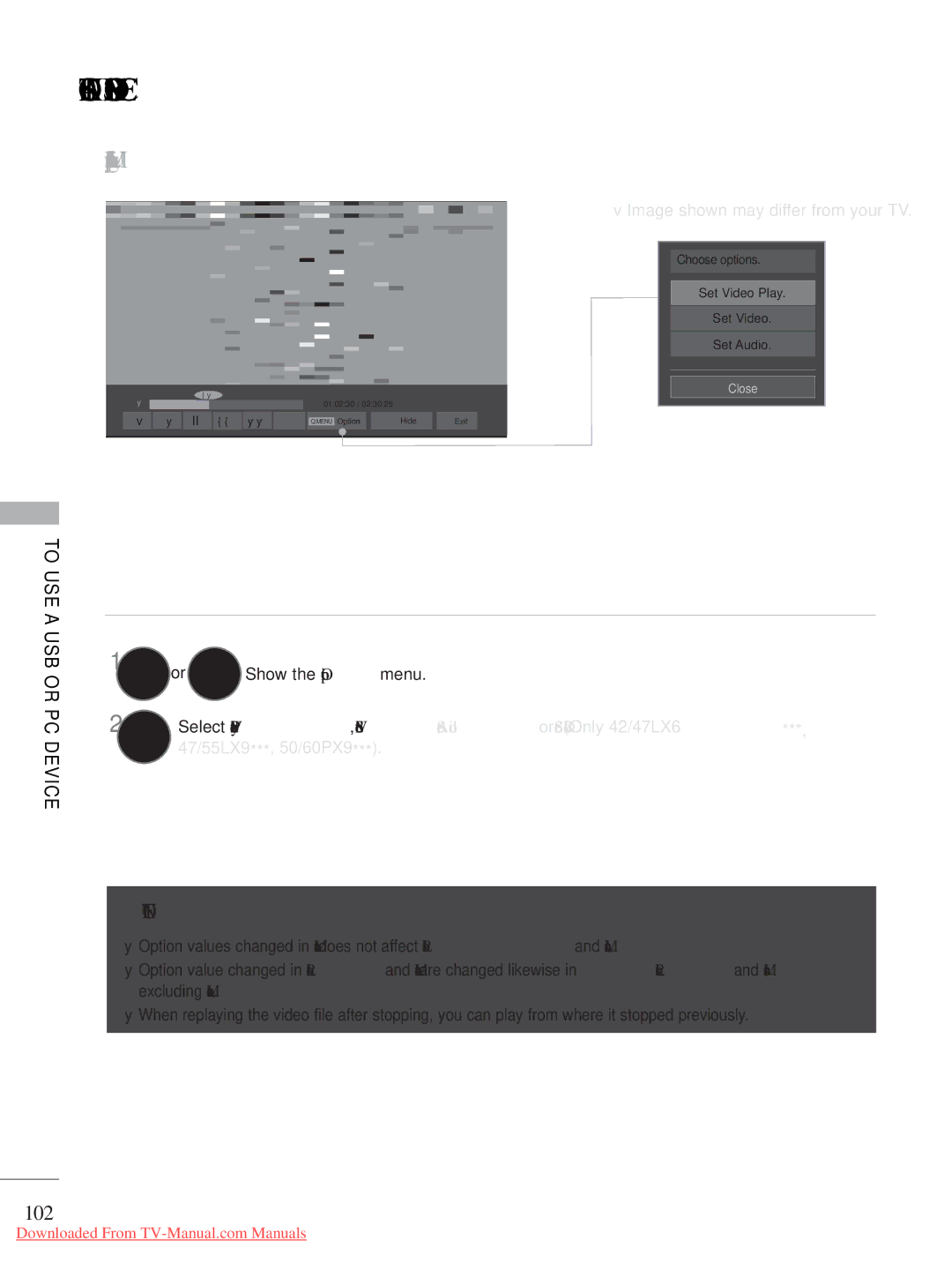
Using the Movie List function, play
Or Show the Option menu
103
When you select the Set Video Play
104
105
When you select the Set Video
Select Picture Mode or TruMotion
LCD TV/LED LCD TV only
Select Sound Mode, Auto Volume, Clear Voice II or Balance
When you select the Set Audio
106
Photo List
107
Photo Selection
When playing photo files
Convert to Mark Mode
108
Select the target folder or drive
When selected photo files are displayed
109
RED Marked photo file is displayed
Display the selected photo file
110
Yellow Deselect all marked photo files
How to view photo
111
Slideshow
112
Option Set values for Slide Speed and BGM
Option, Hide or Exit
Using the Photo List function
113
114
When you select the Set Photo View
Select Slide Speed or BGM
115
116
117
Music List
Select Music List
118
When playing music files
Music Selection
Use the P button to navigate up/down in the music
When selected music files are played
119
Mark all music files on the screen
120
Display the selected music file
Yellow Deselect all marked music files
Using the Music List function, play
121
122
123
When you select the Set Audio Play
Select Repeat or Random
124
125
126
Divx Registration Code
Display DivX Reg. Code
127
Deactivation
Display Deactivation
128
Allows you to enjoy the games installed on the TV
Game
Game
Shows current programme information
EPG Electronic Programme in Digital Mode
129
Guide
EPG Electronic Programme Guide in Digital Mode
Switch on/off EPG
Button Function in NOW/NEXT Guide Mode
Select a programme
Button Function in 8 Day Guide Mode
131
Button Function in Date Change Mode
132
Button Function in Record/Remind Setting Mode
133
134
Button Function in Schedule List Mode
Switch off Schedule List
Blue or
Picture Size Aspect Ratio Control
135
Zoom
136
149
Cinema Zoom
Picture Wizard
137
Select Energy Saving
Energy Saving
138 LCD TV/LED LCD TV only Plasma TV only
Minimum , Medium
139
Preset Picture Settings
Picture Mode-Preset
Vivid
140
Picture Mode-User option
Manual Picture Adjustment
141
142
143
Picture Improvement Technology
Select Advanced Control
Expert Picture Control
Select your desired Source Make appropriate adjustments
144
145
LCD TV/LED LCD TV
146
Colour Gamut
Expert Control EBU/SMPTE/BT709/ Wide/Standard Edge Enhancer
Initialize the adjusted value
Picture Reset
Select Picture Reset
147
148
Trumotion
Select TruMotion Select Low, High, User or Off
149
LED Local Dimming
Select LED Local Dimming
Select Power Indicator Select Standby Light or Power Light
Power Indicator
Power Light
150
White Wash
Image Sticking Minimization ISM Method
151
Orbiter
Select Mode Setting Select Store Demo or Home Use
Mode Setting
152
153
Demo Mode
Select Mode Setting Select Store Demo
Select On
154
Auto Volume Leveler
Select Auto Volume
Sound & Language Control
155
Adjustment for Clear Voice Level With selecting On
Clear Voice
Select Clear Voice
Select Audio You can also adjust Sound Mode in the Q
Preset Sound SETTINGS-SOUND Mode
156
Infinite Sound
Sound Setting Adjustment -USER Mode
Select Sound Mode
157
Balance
Select Audio Select Balance Make desired adjustment
158
159
TV Speakers ON/ OFF Setup
Select TV Speaker
160
DTV Audio Setting in Digital Mode only
Select DTV Audio Setting
Select Auto, HE-AAC, Dolby Digital +, Dolby
Select Digital Audio Out
Selecting Digital Audio OUT
161
Select Auto or PCM
Select Audio Select Reset
Audio Reset
162
163
Audio Description in Digital Mode only
Adjustment for Audio Description Volume With selecting On
Select Disability Assistance
Select the sound output
164
Select Audio or Audio Language
Mono sound selection
165
Nicam Dual I+II or FM Mono
166
ON-SCREEN Menu Language / Country Selection
Select LanguageLanguage Select Menu Language
Select LanguageLanguage
Language Selection
167
Select Hard of Hearing
Select an audio language
168
Audio Language Selection
Subtitle Language Selection
169
Clock Setup
Time Setting
Select Time
170
Auto ON/OFF Time Setting
Setting
Select Off Time or On Time
Sleep Timer Setting
171
Parental Control / Ratings
SET Password & Lock System
172
Select Lock System
Select Lock
Block Programme
173
Select Block Programme Enter the Block Programme
174
Parental Control in Digital Mode only
Select Parental Guidance
Select Lock System Select Input Block
External Input Blocking
175
Select input source Select On or Off
KEY Lock
176
Simple Text
Switch ON/OFF
This feature is not available in all countries
177
178
TOP Text
Fastext
Block / group / page selection
Special Teletext Functions
179
180
Teletext Within Digital Service
Teletext in Digital Service
This function works in UK, Ireland only
Hdmi
Troubleshooting
181
Appendix
Appendix
182
Cleaning the Cabinet
Maintenance
Cleaning the Screen
Extended Absence
32LE5
Product Specifications
184
37LE5
42LE5
185
47LE5
55LE5
186
42LX6 47LX6
32LE7
187
37LE7
42LE7 42LE7500-ZA 42LE7510-ZB 42LE7300-ZA
188
47LE7
55LE7
189
47LX9 55LX9
42LE8
190
47LE8
32LD4 37LD4
191
55LE8
42LD4
32LD6
192
37LD6
42LD6
193
47LD6
32LE4 37LE4
194
55LD6
42LE4
32LD7
195
42LD7
196
47LD7
32LD8
197
37LD8
198
42LD8
199
50PK5 60PK5 50PK590-ZE 60PK590-ZE
200
50PX9 60PX9
201
IR Codes
Code Hexa Function
Type of Connector D-Sub 9-Pin Male
External Control Device Setup
RS-232C Setup
RS-232C Configurations
203
Set ID
Select Option Select Set ID
Communication Parameters
Command Reference List
204
Power Command k a
205
Tint Command k j
206
ISM Method Command j p Plasma TV only
207
KeyCommand m c
208
Open Source Software Notice
209
210
211
Open Source License
Version 2, June
212
213
214
GNU Lesser General Public License
215
216
217
218
219
Mozilla Public License
220
221
222
223
224
10. U.S. Government END Users
Model Serial No

 or
 Show the Option menu.
 NOTE