User Guide
Page
Limited Warranty Statement
Damage resulting from use of non-LG approved accessories
State LAW Rights
Consumables such as fuses
CU400
Table of Contents
Page
Page
Camera & Recordings
102
Safety Information
For Your Safety
Safety Instructions
Important Information
For Your Safety
FCC RF Exposure Information
Body-worn Operation
Battery Disposal
Adapter Charger Cautions
Using your phone safely
Avoiding hearing damage
Your Phone
Phone Components
Earpiece
Your Phone’s Features
Navigation key Use for quick access to phone functions
Your Phone
Backlight
External Display
Display Information
Area Description
On-Screen Icons
Icon
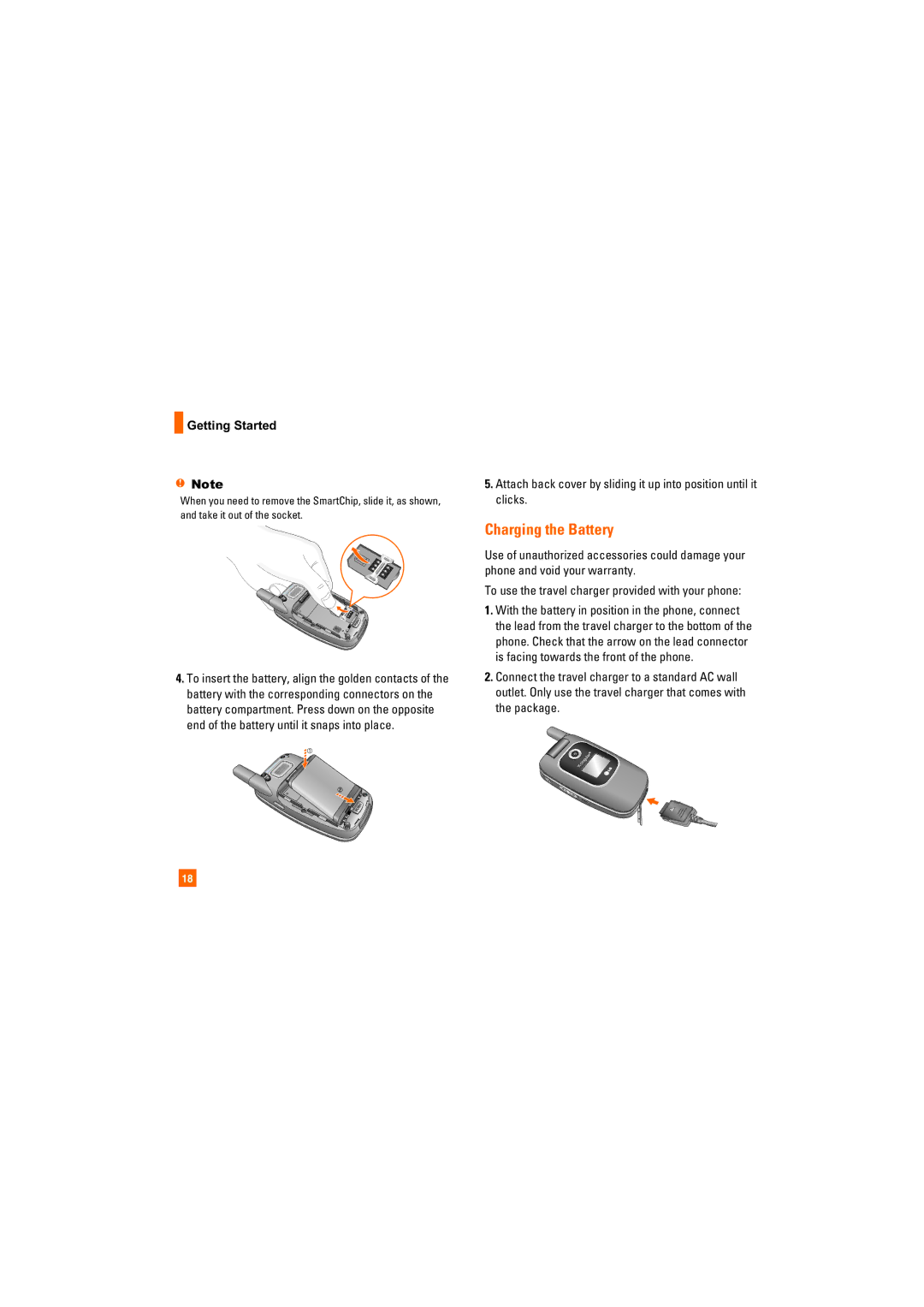
Remove the battery
Installing the SmartChip
Remove the battery cover
Getting Started
Charging the Battery
Getting Started
If the battery fails to charge completely
Turning Your Phone On and Off
Access Codes
Security code 4 digits
General Functions
Making a Call
Signal Strength
Adjusting the Volume
Vibrate Mode Quick
Answering a Call
Mode Numbers Mode
T9 Mode
ABC Mode
Symbol Mode
Using the ABC Mode
Key Characters in the Order Display
Using the Symbol Mode
General Functions Using the 123 Numbers Mode
T9 dictionary
Selecting Functions and Options
In-Call Menu
During a Call
Muting the Microphone
Using the Speakerphone
Conference Calls
In-Call Menu
Adding Calls to the Conference Call
Setting Up a Conference Call
Activate the Conference Call on Hold
Private Call in a Conference Call
Entertainment see
Menu Tree
Cingular Video see Messaging see
MEdia Net see
Push to Talk PTT see
MEdia Net
Cingular Mall see
Menu Tree My Stuff see
Menu Tree My Stuff
Settings see
Address Book see
Menu Tree Settings
Settings
Cingular Video
New Message
Advanced Settings Set the White Balance as
Messaging
Editing a message
Messaging
Default Settings Allows you to set to the default settings
Using Options
Template
Press the right soft key Options
Inbox
Sending a Message
Following Options are available in the Inbox list
Sign
Offline Menu
Delete All Read Messages You can delete all read messages
Saved Conversations
IM Information
When cursor is located on a Conversations List
Online Menu / 1 to 1 conversation
Offline Conversations Only for AIM
When cursor is located on a Contact
When cursor is located on a Conversation
When cursor is located on a Contact List
Session or conversation
Menu options available in the Conversation screen
To Set Up Mobile Email
Mobile Email
Save Conversation Stores the currently active conversation
Outbox
Drafts
Delete All Deletes all messages in the folder
Sent
Voicemail
Text Templates Menu
Message Settings
Templates
Multimedia Templates Menu
Automatic Download
Multimedia Message Menu
Download Messages Menu
On You can always receive multimedia messages automatically
Games
Entertainment
Shop Music
Applications
Music Videos
MusicID
Streaming Music
Buzz
MEdia Net
Using the Navigation Keys
Using the WAP Browser Menu
MEdia Net Home
Go to URL
Bookmarks
Saved Pages
Security
MEdia Net is the predefined account that is set as default
Browser Settings
Accounts Menu
Character Encoding Menu
Cache Settings Menu
Cookie Settings Menu
Scrolling Control Menu
Online menu
Cingular Mall
Icon Descriptions
Initialize your PTT Service
Push to Talk PTT
Welcome to PTT
PTT Message
Unavailable
Do Not Disturb
Push to Talk PTT Unavailable
Making a PTT Call
PTT Calls
Push to Talk PTT Silent/Vibrate
Receiving a PTT Call
How a PTT call works
PTT Contacts
PTT Key
Groups
Dynamic Call It is similar to Quick Group Call
Add Contact
Add Group
PTT Settings
Pending Invitations
My Stuff
Recent Calls
Dialed Calls
Audio & Ringtones
Graphics
All Calls
Tools
Alarm Clock Menu
Video
Calendar Menu
Calculator Menu
Tip Calculator Menu
World Clock Menu
You can input a decimal point by pressing the Star key
Stop Watch Menu
Unit Converter Menu
Date Finder Menu
New Time
Day Counter Menu
Advanced Settings
Camera & Recordings
Delete All Deletes all saved items
Select the desired value and press the key to confirm
Record Video Menu
Quality Determines the quality of a video clip
Other Files
Record Voice Menu
Address Book
My Numbers
Service Dial Numbers
Delete All Contacts
Address Book
Settings
Display
Dialing Fonts Menu
Bluetooth
Menu Styles Menu
Clocks & Calendar Menu
Date & Time
Call
Call Waiting Menu
Answer Mode Menu
Minute Minder Menu
Call Reject Menu
Transmission
TTY mode Tele Type writer
Menu User
TTY Full
Send Dtmf Tones Menu
Settings Connecting TTY Equipment and a Terminal
Hearing Aid Menu
Lock Handset Menu
Change Codes Menu
PIN Code Request Menu
Fixed Dial Number Menu
PTT Key Lock Menu
Connection
Flight Mode
Software Update
Network Profiles Menu
Check Memory
Reset Settings
Reset Default Menu 9.#.2
Handset Information
Page
Page
Vehicle Power Adapter
Accessories
Battery
Standard battery is available
Exposure to Radio Frequency Signal
Safety Guidelines
TIA Safety Information
Antenna Care
Electronic Devices
Safety Guidelines Tips on Efficient Operation
Driving
Pacemakers
Health Care Facilities
Safety Guidelines Aircraft
Other Medical Devices
Vehicles
Charger and Adapter Safety
Safety Guidelines For Vehicles Equipped with an Air Bag
Safety Information
Battery Information and Care
Safety Guidelines General Notice
Explosion, Shock, and Fire Hazards
Service Centre Do not paint your phone
FDA Consumer Update
Safety Guidelines
Do wireless phones pose a health hazard?
National Institute for Occupational Safety
Health Environmental Protection Agency
Subject of the safety questions discussed in this document
What kinds of phones are the subject of this update?
Safety Guidelines
Safety Guidelines
What about children using wireless phones?
Where can I find additional information?

 Getting Started