Monarch 9460 ADK Printer
Trademarks
TA B L E O F C O N T E N T S
Command Reference
Table of Contents
Sample Script
E v i e w o f T e r m s
W t o U s e t h i s M a n u a l
2Overview
N n e c t i n g t h e P r i n t e r
Install i n g t h e S o f t w a r e
S t e m R e q u i r e m e n t s
T t i n g S t a r t e d
Page
O u t P r o j e c t s
V i n g a F i l e
A n g i n g t h e D o w n l o a d S e t t i n g s
I l d i n g P r o j e c t s
If you select LPT1 LPT2
If you select COM1 COM4
If you select Tcpip
W n l o a d i n g a P r o j e c t
I t i n g E x i s t i n g P r o j e c t s
8Using the Software
C e s s i n g t h e T o o l b o
S p l a y i n g t h e R e a d y P r o m p t
Choose Tool Box
A d i n g a p p l i c a t i o n s
END
N c t i o n s
Begin
Function Start Begin
A r t i n g a S c r i p t
L e s a n d B u f f e r s
R i p t F l o w C o n t r o l
ADD Control , TEMP1 , *ERROR2, *SUCCESS2
O p e o f F i e l d N a m e s
T a C o d i n g
M m e n t s i n a S c r i p t
T a S t o r a g e
E l d N a m e s
O g r a m m i n g C o n v e n t i o n s
Y w o r d s
Command Reference
R i p t F l o w
When a label is defined
When a label is not defined
E c i a l C h a r a c t e r s
M p i l e r D i r e c t i v e s
N c t i o n a l R e l a t i o n s h i p s
T h C o m m a n d s
R i p t C o n t r o l C o m m a n d s
T a M a n i p u l a t i o n C o m m a n d s
P u t / O u t p u t C o m m a n d s
L e M a n a g e m e n t C o m m a n d s
ADD WHOLESALE,TEMP2
ADD CONTROL,TEMP1,*ERROR2
Buffer-field 1
Example
Appversion AP11, VER
P V E R S I O N
Argread PARAMLIST, PARAM1, #1
G R E a D
Raw-Data, Destination,
Index
ASC TAINT, Taascii
ASC int-field,asc-field
Int-field and Asc-field
Int-field only
Autostart
T O S T a R T
Availabledata COMM, , *CHARLN
A I L a B L E D a T a
Availabledata device , invalid label , valid label
Device
Bitclear TEMP1, #2
T C L E a R
Asc-field and Int-field
Field2
T M a S K
Operation
Buffer-field1 and Buffer
Bit-position
T S E T
Both buffer-field1 and bit-position must be numeric
Buffer-field
Bitshift LEFT, TEMP1, #1
T S H I F T
Direction
Buffer-field1 and count
Bittest TEMP1, #2, *CLEARED
T T E S T
Buffer-field1
Value
Bsearch CONTROLID, INPUT, *ERRORID
E a R C H
Bsearch lookup-field,value , invalid label , valid label
Call Computetax
L L
Call function-name param1, param2, …,paramX
Param
ADD
Function Start
Call
END Function Addnum Begin
Type
Chartype type , buffer-field1
Using type and buffer-field1
A R T Y P E
Value Description
E C K
Check item , buffer-field , invalid label , valid label
Check BATTERY, *LOWBATTERY
CHR TAASCII, Taint
CHR asc-field,int-field
Clear TEMP1
E a R
Clear Printer
Closecomm #1
O S E C O M M
Commport
Is no invalid label
M P a R E
Modifier
No valid label
Concat SKU,BCFIELD
N C a T
Source and Destination
Field-buffer2 only
T R I P
Field-buffer1 and Field
Buffer2
Datatype Alphanumeric
T a T Y P E
Data-type
DEC Tempsku
DEC buffer-field , invalid label , valid label
Buffer Field
F I N E
Define TEMPORARY,CURRQTY,4,N
L a Y
Delay #interval
Delay #20
Delay Timeout
Hotkey3
Disable F1, F2, F3
S a B L E
Hotkey1, Hotkey2,
Buffer Field1
Divide CONTROL,TEMP1,*ERROR2
Divide PRICE,#100,*ERROR2
V I D E
A B L E
Enable F1, F2, F3
Exit
I T
Src1 and Src2
T C H
Fetch src1 , src2 , invalid label , valid label
Fieldlen WHOLESALE,TEMP2
E L D L E N
Fixdata buffer-field1
X D a T a
Generate INPUT, #2
N E R a T E
Buffer-field and Type
Examplef
Minimum and Maximum
Hotkey F3, Querylookup
T K E Y
Hotkey key, function-name
Key
Buffer-fields
Buffer-field1 comparison buffer-field2
Elseif buffer-field2 comparison buffer-field4
Comparison Description
INC COUNT01
INC buffer-field , invalid label , valid label
Include C\PROGS\SAMPLE\SPECIAL.ULT
C L U D E
Include TRUCKIN.ULT
Position
S E R T
Overwrite-flag
Jump *REQUESTSKU
M P
Labelcount Numoflabels
B E L C O U N T
Labelcount buffer-field1 , invalid label , valid label
Left SHIPNO,SKU,NUMCHARS
F T
Left SHIPNO,SKU,#5
Linkfile CHCKDGIT.PKT
N K F I L E
Source
C a T E
Locate row-position, col-position
Row-position and col-position can be one of the following
Lower Tempsku
W E R
Field-buffer3 only
Field-buffer1, Field
Buffer2, and Field Buffer3
Field-buffer1 and Field Buffer2 only
Defining the Macro
C R O
Macro macro-name
Macro-body
Move PIEND$
Macro Ptridle Begin Move Check
Compare
MID LOCATION,TEMP1,#5,#5
Buffer-field1, 2, Start
Buffer-field1, start, Length only
Move source, destination , invalid label , valid label
V E
Move INPUT,CONTROLID
Destination
Valid label
Multiply PRICE,TEMP1,*ERROR2
L T I P L Y
Multiply buffer-field1 ,buffer-field2 , invalid label
E N C O M M
Opencomm commport, timeout
Commport and Timeout
PAD L,PRICEFIELD,*,LPRICE
Pad-field, Pad-character
Max-length
Parse
R S E
Parse invalid label , valid label
Format-number and quantity must be numeric
I N T
Format-number
Quantity
Buffer-field2
E R Y
Comparison
Control passes to the *PROCESSID
Command again to ensure a valid record pointer
Rule
Is numeric, buffer-field2must be numeric
Read Lookup
A D
Read record table-name , invalid label , valid label
Record
Savescreen Clear Display Move
Restorescreen
S T O R E S C R E E N
Clear Display Move
Return
T U R N
Compare FSIZE,EQ,#12,,*GOODDATA
Right SHIPNO,SKU,#5
G H T
Right buffer-field1 ,buffer-field2 ,length , invalid label
Buffer-field1, 2
Rstrip SHIPNO, SKU, #5
Buffer-field1,Buffer-field2
Length
Savescreen
V E S C R E E N
Seek NEXT,LOOKUPFILE,*EOFLABEL
E K
To modifier
File-type
SUB CONTROLID,TEMP1
I T C H
Switch buffer-field1 Case buffer-field
While
Function/Description Parameter1 Parameter2
S S E T
Sysset function, parameter1, parameter2
Sysset PROMPTS, #1
192 * width in inches 192 * length in inches
Character, buffer-field1
K E N
Token Delimeter character , invalid label , valid label
Buffer-field2 only
Buffer-field1 and buffer-field2 can be one of the following
Buffer-field1 and Buffer-field2
Upper Tempsku
P E R
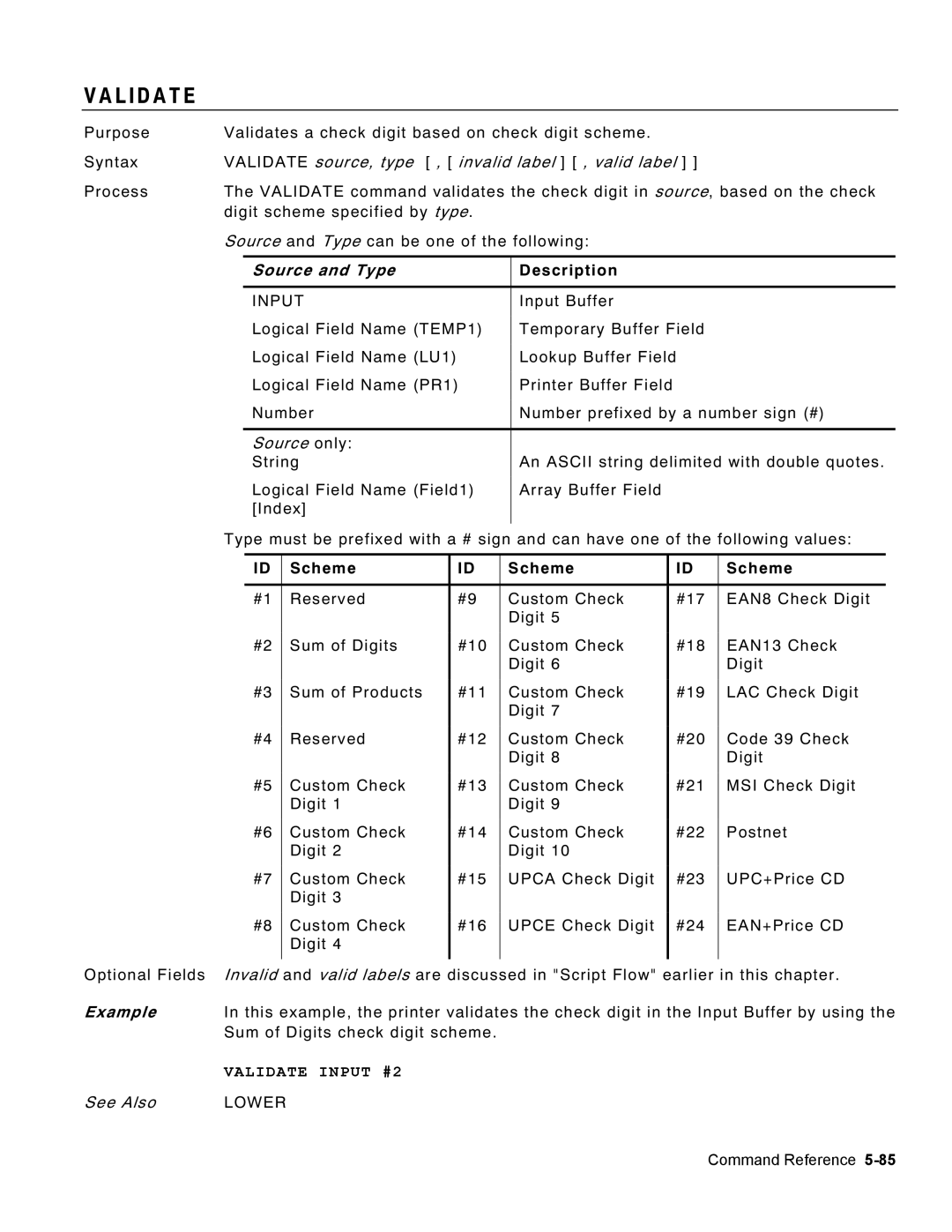
Validate Input #2
L I D a T E
Validate source, type Invalid label , valid label
Source and Type
While buffer-field1 comparison buffer-field2
I L E
Endwhile
While
Ptridle
88Command Reference
M P L E S C R I P T
Concat 13,~034FISHING ROD~034, Scratch
Concat
Concat R,1,~034170 Monarch LANE~034, Scratch
Scratch
Scratch Concat
Concat R,1,~034MIAMISBURG OH 45342~034, Scratch
DEPT#25~034, Scratch
D E
Page
Page
Index