Page
Welcome
2 Welcome
Contents
Phone Features
Service and Repairs Specific Absorbtion Rate Data
Battery Tips
Optional Features
Optional Accessories
Getting Started
Charging the Battery
Installing the Battery
To charge the battery
Adjusting Volume
Turning Your Phone On
Making a Call
Answering a Call
Installing the Memory Card
Installing and Removing the Memory Card
Removing the Memory Card
Highlight Features
How to Start
Check It Out
Amp’d LiveTM
Sports
Music and Videos
Danny Sheridan
For Laughs
Entertainment
Games
How to Find Stuff
News & Lifestyle
Press the Amp’d LiveTM button to enter Amp’d LiveTM
Browsing
Making Purchases
Enjoy Your Stuff
Using the Media Player
Organize Your Music
Select Add2MyList
Play Videos
Play Games
Access Your Subscriptions
Cancel a Subscription
Change PhoneStuff
Select PhoneStuff
Select Menu Select Home
MyStuff Menu Commands Quick Reference Action
How do I complete a download that was interrupted?
Where can I view details about an item?
How do I cancel a subscription?
Taking and Sending a Photo
How do I edit playlists?
Resolution, Shutter Tone
Pictures Menu Options
Taking a Self Portrait
Apply as Contacts Entry
Recording and Playing Video Clips
Recording a Video
Press M Media Gallery Video Camera
Select Media Gallery
Press M Media Gallery Videos
Playing Video Clips
To play a video clip stored on your phone
Or on phone memory Phone
Conditions , Recording Sound , Status Icons
Sending a Multimedia Message
Message
Bluetooth Connections
Turn Bluetooth Power On or Off
Pairing with a Headset, Handsfree Device, or PC
Receiving a Multimedia Message
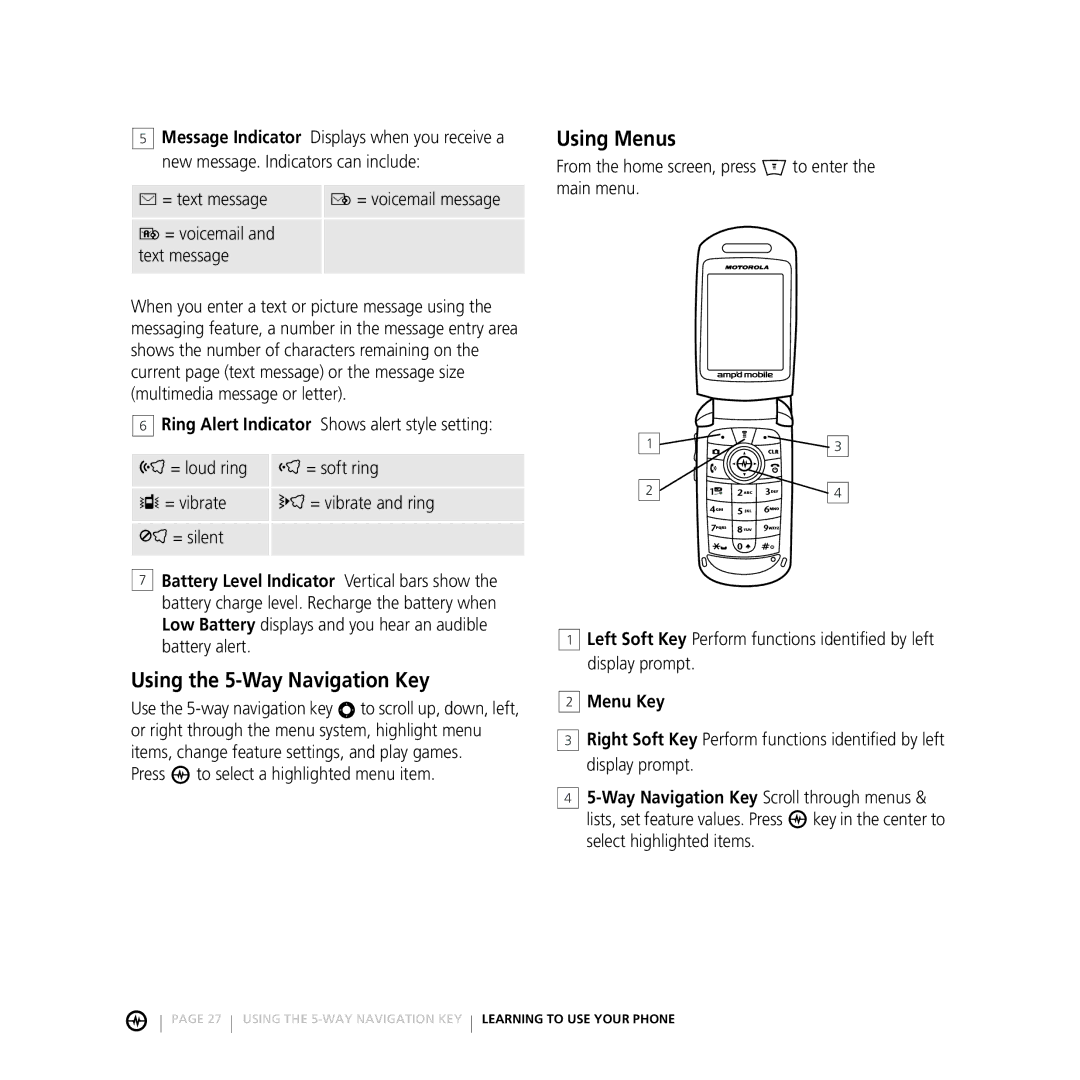
See page 1 for a basic phone diagram
Using the Display
Learning to USE Your Phone
Using Menus
Using the 5-Way Navigation Key
Press to select a highlighted menu item
Selecting a Feature Option
Selecting a Menu Feature
Icon Feature
Press M Recent Calls Dialed
Entering Text
Setting Up a Text Entry Method
Using Capitalization
Text Entry Method Indicators
Indicator Setting
Using Tap Method
Press
Keypad key 1 or more times Select a letter
Press OK b to accept and store text
Character Chart
Using iTAP Method
Tap Method Text Entry Rules
Using Numeric Method
Using Symbol Method
Symbol Chart
Entering Words
Using the External Display
Using a Removable Memory Card
Using the Handsfree Speaker
Turning On Airplane Mode
Changing a Code, PIN, or Password
Viewing Memory Card Contents
If You Forget a Code or Password
Setting Your Phone to Lock Automatically
Locking and Unlocking Your Phone
Locking Your Phone Manually
Setting UP Your Phone
Setting an Alert Style
Setting Answer Options
Setting a Wallpaper Image
Setting a Screen Saver Image
Setting Display Contrast
Setting Display Brightness
Adjusting the Backlight
Calling Features
Using the Notepad
Returning an Unanswered Call
Attaching a Number
Calling with Speed Dial
Using Voicemail
Using Dtmf Tones
Calling with 1-Touch Dial
Muting a Call
PTT Basics
PUSH-TO-TALK PTT Calls
PTT Call Types
Making a Private PTT Call
Making a Group PTT Call
Sending a Call Me Alert
Receiving a PTT Call
Receiving a Call Me Alert
Adding a PTT Contact
Erasing a PTT Contact
Check Contact Availability
Setting Your Availability
Press
Creating a PTT Group
Saving, Editing, and Erasing PTT Groups
Adding a Member to a PTT Group
Editing a PTT Group Name
Erasing a PTT Group
Erasing a PTT Group Member
Removing Yourself from a PTT Group
Managing Multiple Calls
Erasing PTT Call History
Contents of the Main Menu M Contents of the Settings Menu
Phone Features
Menu Map
Messaging
Contacts
Setup View by List or Picture
Setup Sort by sort order
Contacts entry
Edit Speed No
Setup View All Contacts or Primary Contacts
Set Primary phone number
Delete
Copy Entry location number
Personalizing Features
Using Speech Commands
Speech Command Description
Voicemail, Camera, Redial, Received Calls
55 Personalizing Features Phone Features
Additional Personalizing Features
Menu Features
Dialing Features
Call Monitoring
Handsfree Features
Data and Fax Calls
Bluetooth Wireless Connections
Network Features
Personal Organizer Features
Tools Alarm Clock
Tools Voice Memos voice memo
Tools Calculator
Tools Calculator Exchange Rate
Security
News and Entertainment
Media Gallery Pictures
Media Gallery Sounds
Service and Repairs
Specific Absorbtion Rate Data
Guidelines
Index
Language, setting 57 left soft key Functions 1
Passwords. See codes phone
Touch dial using Open to answer
Photo Picture ID 20
Individual contact
Changing 35 default Send key
Received calls list 39 recent calls 39 redial
Voice memo 62 voicemail


 Message Indicator Displays when you receive a new message. Indicators can include:
 Ring Alert Indicator Shows alert style setting:
 Battery Level Indicator Vertical bars show the battery charge level. Recharge the battery when Low Battery displays and you hear an audible battery alert.
 to select a highlighted menu item.
 Left Soft Key Perform functions identified by left display prompt.
 Menu Key
 Right Soft Key Perform functions identified by left display prompt.

 key in the center to select highlighted items.