Digital Camera
Shoot, View, and Enjoy
Product Documentation
Quick-Start Guide
Playback Menu
For Your Safety
Turn off immediately in the event of malfunction
Iii
Page
Trademark Information
Table of Contents
Vii
Viii
Before You Begin
This chapter is divided into the following sections
Overview
Overview Getting to Know the Coolpix Menu Guide
Use Only Nikon Brand Electronic Accessories
Overview
About This Manual
Life-Long Learning
Where to Find It-Parts of the Coolpix
Getting to Know the Coolpix
Parts of the Camera and Their Functions
Multi selector Non-slip grip Button
How to Use It-Camera Controls and Displays
Mode Selector
Monitor
Controlling the Monitor
Normal
Scene Mode Transfer Button
Multi Selector
Scene mode/transfer
Mode Menu Description
Menu Guide
Index to Menu Options
Pressing the Menu button when the mode selector is
Adjust exposure for bright, dark, or high contrast subjects
SET ing options
2048
Shooting Menu The Shooting Menu
Auto
Single
Off
Setup Menu
30 s
Mass Storage
Playback Menu
All on
Scene Menu and Modes
Mode
Use for portraits
First Steps
Taking Pictures
Review and Deletion
Getting Creative
Insert the Battery and Memory Card
Alternative Power Sources
First Steps
Attach the Camera Strap
Read Battery Warnings
Formatting Memory Cards
Flip it open C
Removing the Battery
Clock Battery
Close the battery-chamber/memory card slot cover
Removing the Memory Card
Choose a Language
USB
Set the Time and Date
Monitor when the camera is in mode
Taking Pictures
Ready the Camera
Lens Section
Basics
Battery Level a
Display
Meaning
Camera status
Choose Mode
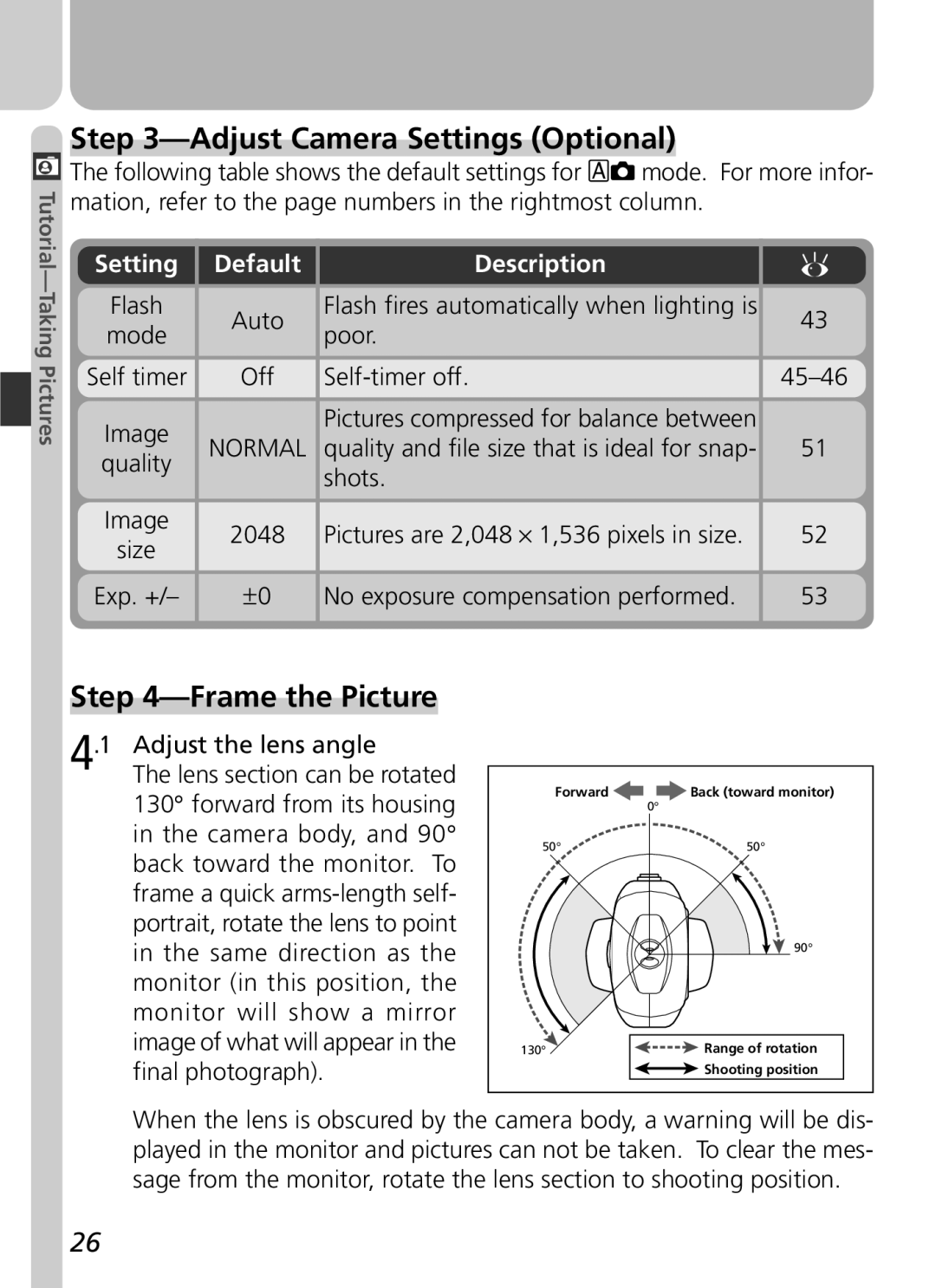
Adjust Camera Settings Optional
Setting
Default
Frame the Picture
Don’t Block the Shot
Smear
When Lighting Is Poor
Green Focus Indicator Flashes red Ready Flickers Lamp Off
Focus and Shoot
Focus
Getting Good Results with Autofocus
During Recording
Take the picture
Button. For more information, see Keep or Delete
Put the Camera Away
Returns you to mode
Review and Deletion
Quick Review
Quick Review
Full-Screen Review
Following operations can be performed in quick review
Press
Views see following
Multi selector up or down to highlight op
Tion, press to right to select
Select No to exit
Thumbnail Review
Highlight pictures
Delete highlighted Picture
Playback Mode
Getting Creative
Scene Selection
Camera Shake
Be selected
Camera Shake
Noise Reduction
Obtain permission first
Flash mode fixed at fill flash
Camera focuses on subject at center of frame
Fine-Tuning Camera Settings
Beyond Point-and Shoot
42-48
49-58
Or Movie Choosing a Shooting Mode
Beyond Point-and-Shoot
Camera Controls
Mode How it works When to use it
Flash Photography The Button
Flash-Ready Light
Flash mode can be selected with the button
ISO Sensitivity Gain and Camera Shake Icons
Delaying Shutter Release Choosing a Self-Timer Mode
Restrictions on the Self-Timer
Digital Zoom
Photos can be framed in the monitor using the zoom buttons
Framing Pictures Optical and Digital Zoom
Optical Zoom
Digital Zoom
Keep or Delete Picture Review
Press Description
Delete picture
Will
Fine-Tuning Camera Settings
-Mode Menu
Making Effective Use of Memory Image Quality and Size
Option
54-55
Image Quality
Image Size
Print Size
Size pixels
Adjusting Exposure Exp. +
Choosing a White Balance Setting
Keeping Colors True White Balance
Mode, white balance can be chosen from
Preset White Balance
Option Description
This value
Position, but no picture will be recorded
Taking Pictures in a Sequence Continuous
Flash, Focus Exposure, and White Balance
Getting Sharper Pictures BSS Best Shot Selector
Restrictions on BSS
Making Edges More Distinct Image Sharpening
Camera Setup
SET-UP Menu
Camera Setup
SET-UP Menu Options
SET-UP menu contains the following options
Adjusting Monitor Brightness Brightness
Formatting Memory Cards CF Card Format
During Formatting
Setting the Time and Date Date
Conserving Battery Power Auto Off
Sleep Mode Auto Off
Before Formatting
Choosing a Language Language
Choosing a USB Protocol USB
Mac OS
Operating system
Windows 2000 Professional
Mode Only
Resetting File Numbering to
Menu for mode, but resets settings for all modes
Default Setting
Basic Playback
68-74
Playback Menu
75-82
Basic Playback
Full-Frame and Thumbnail Playback
Ture displayed in the monitor
Image File and Folder Names
Press Button for an enlarged view
Tures that will be transferred to a computer at a
Button will create a small copy 320 ⋅
Thumbnail Review
Zoom photo View other Areas of image Cancel zoom
Taking a Closer Look Playback Zoom
Playback Tips
Creating a Small Copy of a Picture Small Picture
Restrictions on Small Picture
Viewing Small Picture Files on Other Cameras
Movie Playback
Inverted Playback
Start playback Pause/resume Playback Rewind movie One frame
Playback Menu
Memory Card Format/Brightness
Managing Pictures
To view the playback menu
Deleting Pictures Delete
Deleting Selected Photographs and Movies
Deleting All Photographs and Movies
Before Deletion
Protected Pictures
To delete all pictures on the memory card
Cancel the current print order
Ordering Prints Print Set
Selecting Pictures for Printing
Create or modify print order
Date
Safeguarding Valuable Pictures Protect
Selecting Protect from the playback menu displays
Marking All Pictures for Transfer Auto Transfer
Transferring More than 999 Pictures
Marking Pictures for Transfer with Other Cameras
Selecting Pictures for Transfer
Transferring Pictures to a Computer
Technical
Camera Care, Options, and Resources
Caring for the Camera and Battery
Handle the lens and all moving parts with care
Cleaning
Avoid Contact with Liquid Crystal
Lens
Monitor
Storage
Batteries
Optional Accessories
Rechargeable battery AC adapter Carrying case
Memory Cards
Approved Memory Cards
Troubleshooting
Problem
Web Resources
For Product Information and Tips For Contact Information
Monitor is hard To read No photo is taken
Camera is in movie mode
Continuous menu Mode only BSS is on Battery level is low
When Menu button Camera is in movie mode
By camera shake can be reduced by
Picture can not be Played back
Nikon View does not
Error Messages
Display Problem Solution
Problem Solution
Camera Mode
Error occurs when You try to transfer Images to computer
Lect Mode
When But
USB cable discon
Nected or memory
Card removed while
Specifications
CCD
Design Rule for Camera File Systems DCF
Flash control Interface
Dimensions W ⋅ H ⋅ D
Symbols
Index
Index
100
6MAA3811

 The following table shows the default settings for mode. For more infor- mation, refer to the page numbers in the rightmost column.