$4!, #!-%2
See pages
Where to Find It
Error Messages See pages
Troubleshooting See pages
Technical Notes
Custom Settings
Introduction
More on Playback
For Your Safety
For Your Safety
Use appropriate cables
Iii
Symbol for Separate Collection in European Countries
Table of Contents
Table of Contents
General Questions
Camera Setup
Index
Index
How can I get more photos on the memory card?
Can the flash fire automatically when needed?
Viii Q&A Index
Taking Photographs
Can I create a monochrome copy of a photograph?
Viewing, Printing, and Retouching Photographs
Can I zoom in on pictures to make sure they’re in focus?
Is there an automatic playback slide show option?
Life-Long Learning
Lens
Introduction
108
Getting to Know the Camera
Introduction Getting to Know the Camera
Camera Body
Press up
Multi selector
Playback
Menus/shooting info 22
Advanced Modes Exposure Modes
Mode Dial
Select these modes for full control over camera settings
D40 offers a choice of the following twelve shooting modes
Viewfinder Display
Viewfinder
Large-Capacity Memory Cards
Shutter-Speed and Aperture Displays
Shooting Information Display
Camera Strap
Supplied Accessories
EN-EL9 Rechargeable Li-ion Battery 103
DK-5 Viewfinder Eyepiece Cap
Detaching Lenses
First Steps
Attaching a Lens
Introduction First Steps
Charging and Inserting the Battery
Battery and Charger
Introduction First Steps
Removing the Battery
Basic Setup
Using Camera Menus
Introduction First Steps
Inserting Memory Cards
Front
Removing Memory Cards
Display options Highlight Yes
Write Protect Switch
Write-protect switch
Highlight Format memory card
Exposure meters on Exposure meters off
Adjusting Viewfinder Focus
Focus brackets
Auto Meter Off
Point-and-Shoot Photography Mode
Tutorial Point-and-Shoot Photography Mode
Description
Tutorial Point-and-Shoot Photography Mode
Using a Zoom Lens
Holding the Camera
Built-in Flash
Turn the camera off when shooting is complete
Shutter-Release Button
Focus
Portrait
Creative Photography Digital Vari-Programs
Tutorial Creative Photography Digital Vari-Programs
Auto Flash Off
Night Portrait
Child
Sports
Close Up
Basic Playback
Tutorial Basic Playback
Deleting Unwanted Photographs
Reference
More on Photography All Modes
A, and M Modes
More on Playback
Shooting Information Display
More on Photography All Modes
Focus
Focus Mode
Focus mode Description
Focus Mode
Reference More on Photography All Modes/Focus
AF-Area Mode
Focus Area Selection
AE-L/AF-L
Focus Lock
Release button halfway to initiate focus
Controls used Shutter-release button/AE-L/AF-L button
Getting Good Results with Autofocus
Manual Focus
Electronic Range Finder
Focal Plane Position
SmallImage sizeLarge
Image Quality and Size
Image Quality and Size
HighImage qualityLow
Image size Size pixels
Image Quality
Image Size
Option Format Description
Capture NX
File Names
11- /Fn Button
Memory Buffer
Shooting Mode
Reference More on Photography All Modes/Shooting Mode
Mode Description
Shutter released about 2s after camera has focused
Self-Timer and Remote Control Modes
Shutter released when camera focuses
Level surface Select one of the following shooting modes
Rotate the mode dial to P, S, A, or M Press
Using the Built-in Flash
Using the Built-in Flash , , , , and Modes
Using the Built-in Flash P, S, A, and M Modes
Sync
Flash Mode
Custom Settings 76
Slow Red-eye
Rear-Curtain Sync
ISO Auto
ISO Sensitivity
Sensitivity
ISO Sensitivity
Default Settings
Two-Button Reset
Reference More on Photography All Modes/Two-Button Reset
Option Default
Shutter Speed and Aperture
Lens Aperture Ring
Mode P Programmed Auto
Reference P, S, A, and M Modes/Mode P Programmed Auto
Flexible Program
Shutter Speed and Camera Shake
Mode S Shutter-Priority Auto
Reference P, S, A, and M Modes/Mode a Aperture-Priority Auto
Mode a Aperture-Priority Auto
Mode M Manual
Electronic Analog Exposure Display
Display Description
35s, f/25
Reference P, S, A, and M Modes/Mode M Manual
Long Time-Exposures
Thirty minutes or until the button is pressed a second time
Method Description
Metering can also be selected from the Custom Settings menu
Exposure
Metering
Reference P, S, A, and M Modes/Exposure
Adjusting Shutter Speed and Aperture
Mode Setting
Autoexposure Lock
Exposure Compensation
1EV No exposure compensation
+2EV
Flash Compensation
Flash Compensation
White Balance
Image Review
Auto Off Timers
Viewing Photographs on the Camera
Auto Image Rotation 88/Rotate Tall
Retouch History1
Photo Information
File Information
Shooting Data,
Viewing Multiple Images Thumbnail Playback
Highlights
Histogram
Taking a Closer Look Playback Zoom
This option can be used to delete multiple photographs
Protecting Photographs from Deletion
Deleting Individual Photographs
Delete
Computer operating system
Connecting to a Computer
Before Connecting the Camera
Connecting the USB Cable
Mac OS
Drag the camera volume Nikon D40 into the Trash
Windows Vista/Windows XP
Windows 2000 Professional
Printing Via Direct USB Connection
Printing Photographs
Printing Via Direct USB Connection
Take photographs
Connecting the Printer
Printing Pictures One at a Time
Additional pictures
Printing Multiple Pictures
Printing Selected Photographs
Choosing Print select displays the menu shown in Step
Print Set
Creating a Dpof Print Order Print Set
Connect to video device
Viewing Photographs on TV
Tune the television to the video channel
Recorded to video tape the camera monitor will remain off
Return to previous menu
Using Camera Menus
Personalize camera settings
Move cursor up Increase number
To modify menu settings
Menu Guide/Using Camera Menus
Playback Options The Playback Menu
Delete
Delete menu contains the following options
Choose a folder for playback
Playback Folder
Rotate Tall
Menu Guide/Playback Options The Playback Menu
Slide Show
Print Set Dpof
Following operations can be performed during a slide show
Shooting Options The Shooting Menu
Optimize Image P, S, A, and M Modes
Menu Guide/Shooting Options The Shooting Menu
Customizing Image Enhancement Options Custom
Default setting Auto
Default setting IIIa sRGB
Default setting ±0
Select image quality
Fine-Tuning White Balance
Preset White Balance
White Balance P, S, A, and M Modes
Measuring a Value for Preset White Balance
Copying White Balance from a Photograph
Adjust ISO sensitivity
ISO Sensitivity
Noise Reduction
Beep
Custom Settings
Reset
Menu Guide/Custom Settings
No Memory Card?
Shooting Mode
Menu Guide/Custom Settings
Metering P, S, A, and M Modes Only
ISO Auto P, S, A, and M Modes Only
Adjust flash level
Flash Compensation P, S, A, and M Modes Only
AF-assist All Modes Except
Choose the function performed by the Fn button
11 /Fn Button
AE-L/AF-L
AE Lock
Auto Off
Auto off Timers
Built-in Flash P, S, A, and M Modes Only
Optional SB-400 Speedlight
Remote on Duration
Self-Timer
Basic Camera Settings The Setup Menu
CSM/Setup menu
Menu Guide/Basic Camera Settings The Setup Menu
Menu Guide/Basic Camera Settings The Setup Menu
Format Memory Card
Info Display Format
Manual flash control indicator
Classic format is shown below
39-44
LCD Brightness
Video Mode
Auto Shooting Info
World Time
Language
Image Comment
Choose the language for camera menus and messages from
Naming Folders
NCD40 default Folder Current folder
Folders
Delete Delete all empty folders on the memory card
View the current camera firmware version
File No. Sequence
Mirror Lock-Up
Firmware Version
Image Dust Off
Dust off Ref Photo
Auto Image Rotation
Camera rotated Orientation
Counter-clockwise
Image Quality
Creating Retouched Copies The Retouch Menu
Description Lighting
Retouching Copies
BeforeAfter
Lighting
Menu Guide/Creating Retouched Copies The Retouch Menu
To create retouched copies from the retouch menu
Red-Eye Correction
Trim
Trim Image Quality and Size
Color
Monochrome
Filter Effects
Small Picture
Highlight Select picture
Viewing Small Pictures
Select pictures 65. Selected pictures are
Image Overlay
Image Overlay
Picture Angle and Focal Length
Optional Accessories
Technical Notes/Optional Accessories
Use Only Nikon Brand Electronic Accessories
Type G and D Lenses
Lens/accessory
Lenses
AI-P Nikkor
AF-Assist Illumination/Red-Eye Reduction
Incompatible Non-CPU Lenses and Accessories
SB-400, SB-800, and SB-600 Speedlights
SB-R200 Wireless Remote Speedlight
SU-800 Wireless Speedlight Commander
Optional Flash Units Speedlights
AS-15 Accessory Shoe Adapter
Flash mode/feature
Flash mode SB-26, SB-25, SB-24 SB-21B2, SB-29s2
Use Only Nikon Flash Accessories
Technical Notes/Optional Accessories
Memory Cards
Other Accessories
Approved Memory Cards
Filters
Remote Controls
Accessories for the D40
Storage
Cleaning
Caring for the Camera
Technical Notes/Caring for the Camera
Present, proceed to Step
Use a Reliable Power Source
Low-Pass Filter
Low-pass filter
Lens contacts Keep the lens contacts clean
Caring for the Camera and Battery Cautions
Foreign Matter on the Low-Pass Filter
Turn the product off before replacing the battery
AF-A mode
Troubleshooting
Technical Notes/Troubleshooting
Problem Solution
Technical Notes/Troubleshooting
Set USB to MTP/PTP
Rotation
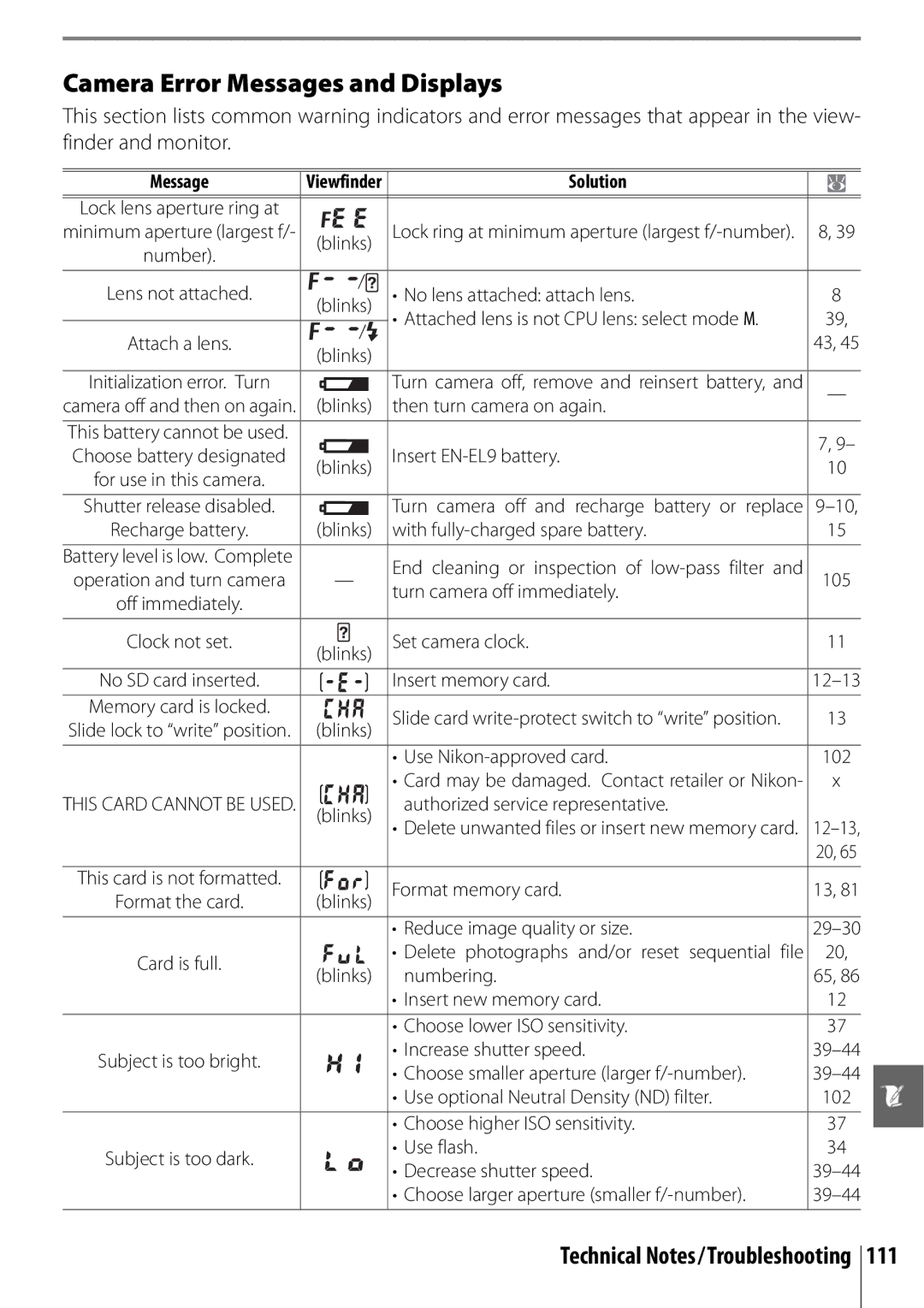
Message
Camera Error Messages and Displays
Set Playback folder to All
Appendix
Following defaults are restored with Custom Setting R Reset
Defaults for other settings are listed below
Technical Notes/Appendix
Command Dial
Choose a flash mode Modes
Set flash compensation P, S Modes
Image size File size MB1
Exposure Program Mode P
Exposure program for mode P is shown in the following graph
Memory Card Capacity and Image Quality/Size
Supported Standards
Flash Control
Shutter Speeds Available with the Built-in Flash
Aperture, Sensitivity, and Flash Range
Dir. sunlight
White Balance and Color Temperature
Fine tuning White balance None Auto
Fine tuning added to value selected by camera
Technical Notes/Specifications
Specifications
Technical Notes/Specifications
Slow shutter speeds
EN-EL9 Rechargeable Li-ion Battery
Battery Life
Specifications
DC 8.4V/0.9A
80g 2.8oz., excluding power cable
Zoom adjusted by rotating lens ring
AC 100-240V, 50/60Hz
Index
Image size shooting menu, 30
Video mode setup menu, 62
126
0RINTEDNIN Elgium 3�&����� �-!������