Battery
My number
Model number Phone type
1261
Legal Information
Contents
Personalization
Use Keyguard Understand the security code Restrict calls
Start a new game Snake II Space impact Pairs II
Page
Safety first
Qualified service
Accessories and batteries
Use sensibly
Water-resistance
Understand the terms
Welcome and quick guide
GET the Most OUT of this Guide
Bold
Follow graphic clues
Learn text conventions
Sign up with a service provider
Look for updates
Understand Wireless Network Services
Register Your Phone
Newsletters
Understand Your Phone
Install and remove the battery
Use the antenna
It, then remove it
Remove the Battery
From the top of the phone. Apply Phone
Charge the battery
Important Battery Information
Prolong Battery Life
Use the headset
SET UP Your Headset
Connect the headset
GET Started with the Quick Guide
Page
GET Help
Find your phone’s label
Contact Nokia
Fax
Contact your service provider
Receive accessibility information
LPS-3 Mobile Inductive Loopset
HOW the Loopset Works
Set up the TTY/TDD profile
Scroll to Yes, then press Select
Make a TTY/TDD Call
Receive a TTY/TDD Call
END a TTY/TDD Call
Press
Switch Your Phone on or OFF
Switch on your phone
Switch OFF your phone
Basic operations
Press to end the call or cancel the call attempt
Use the keypad
Use the phone book
Make a 1-touch dial call
Adjust the earpiece volume
Answer a call
Silence an incoming call
Redial the last-dialed number
Understand the Scroll Bar
Understand indicators and icons
Indicators
Alarm clock is set
Icons
USE the Selection Keys
Scroll Keys
Check IN-PHONE Help
Selection key allows you to select various phone options
Browse Phone Menus
Scroll through menus
Return to the previous menu level
Use shortcuts
Menu shortcuts
Menu Tips
Profiles
Show/Hide clock Set the time Time format
Automatic redial
System
Phone Book Menu
Enter letters ABC mode
Text entry
Standard Text Input
Entry
Change from Capital Uppercase Letters
Enter numbers 123 mode
Erase Mistakes
Enter SPACES, Punctuation and Special Characters
R S
Y Z
Enters an empty space or Special characters
Use four-way scrolling
Use symbols in names and numbers
Use special characters
Turn on predictive text input
Write with Predictive Text
Understand predictive text input
Turn off predictive text input
Save a word in the dictionary
Enter numbers
Enter punctuation and special characters
Change the case
Write compound words
Clear the screen
Delete information
Find Add new Erase all Options Touch dialing
Phone book
USE Phone Book Menus
Save an entry using the phone book menu
Save NAMES, Numbers and E-MAIL Addresses
Quickly save a name and number
Save an e-mail address
Edit a Name or Number
Recall Names and Numbers
Recall information with shortcuts
Entire contents
Erase Names and Numbers
Individual entries
Customize Your Phone Book View
Select your scrolling view
Check Memory Status
Name list
Name only
Call log
Call LOG Options
Missed calls Received calls Dialed calls
Call time
Check Missed Calls
Check Received Calls
Check Dialed Calls
Clear call lists
USE Call Timers
Press Menu 2-5 Menu Call log Call timers
Duration of last call Duration of all calls Clear timers
Press Menu 2-4 Menu Call log Clear call lists
Clear call timers
Turn on a current call timer
Messages
Voice Mail
Check for messages
Appears on your phone’s screen, along with the icon
Follow the prompts to review your messages
Save the voice mailbox number
Listen to your voice messages
Options when working with messages
Send Settings
TEXT, E-MAIL and Picture Messages
Understand messaging
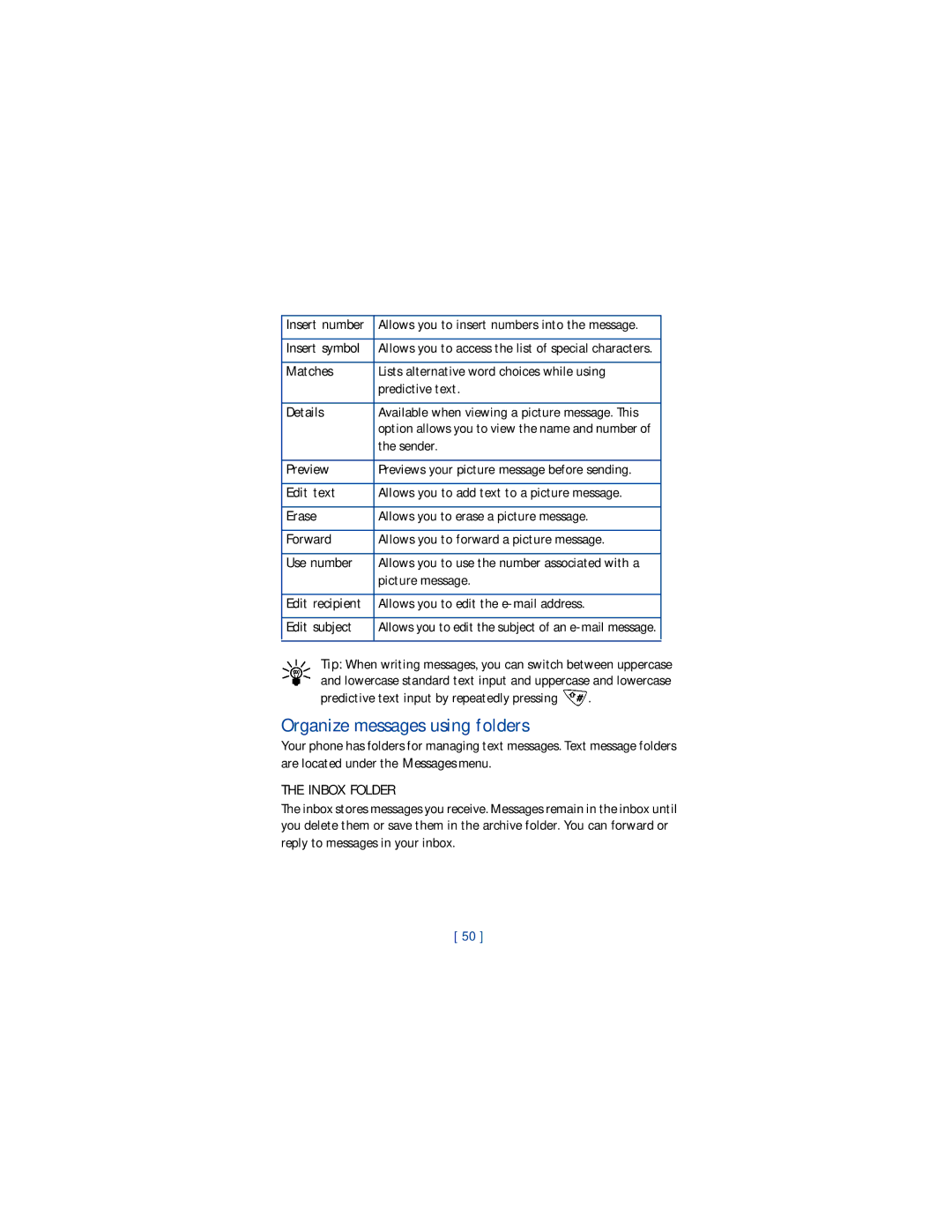
Organize messages using folders
Details
Predictive text input by repeatedly pressing
Inbox Folder
Text Messages
Outbox Folder
Archive Folder
Erase Messages from Folders
Write and send a text message
Read a text message
Respond to a text message
Reply to the Message
Forward the Message
Save a Message
When Your Memory is Full
Picture Messages
Send a picture message
Press Menu 1-7 Menu Messages Picture Messages
Receive a picture message
Save a picture message
Mail Messages
Preview a Picture Message Before Sending
Press Menu 1-2 Menu Messages Write e-mail
Send an e-mail message
Receive an e-mail message
Forward an e-mail message
Edit an existing e-mail message
Reply to an e-mail message
Personalization
Profiles
SET the Ringing Options
Select a profile
Customize a profile
Press Menu 3 Menu Profiles
SET the Ringing Volume
SET the Ringing Tone
SET the Warning Tones
SET the Message Alert Tone
SET Keypad Tones
Accessory settings
SET UP the Loopset
Press Menu 4-4-3 Settings Accessory settings Loopset
Rename a profile
Press Menu 4-4 Settings Accessory settings
SET the Default Profile
Automatic Answer
SET the Lights CAR KIT only
SET the Clock Using AM/PM Format
SET the Clock Using 24-HOUR Format
Set the display language
Set the clock
Add a welcome note
Automatic update of time
Display the clock
Restore factory settings
Lock keys Mute End all calls Touch tones
Advanced calling features
Understand ACTIVE-CALL Options
Access menus
Access the phone book
Make a new call
End all calls
Mute the phone’s microphone
Use conference call
Conference a Call
Disconnect Third Party
USE Voice Privacy
USE Call Forwarding
END a Conference Call
To end all calls, press
Learn about call forwarding feature codes
Store the call forwarding feature code
Forward if busy
Forward if out of reach
Activate/cancel call forwarding
Store the call waiting feature code
Press Menu 4-6-2 Settings Network services Call forwarding
USE Call Waiting
Store the Feature Code
Manage calls
USE Send OWN Caller ID
Place a Call Without Sending Your Number
Scroll to the phone number you want to use and press Select
Select a Phone Number
Select the phone number
USE Automatic Redial
USE 1-TOUCH Dialing
Assign a key to 1-touch dialing
Change 1-touch dialing numbers
Erase 1-touch dialing numbers
SET Touch Tone Strings
Set manual touch tones
Set touch tone length
Store touch tone strings
Continuous Fixed Off
Link Phone Book Entries
Send a Touch Tone String
USE Linking Options
Store the touch tone string into your phone book
Select a System
Search for a network
Press Menu 5 Menu System
You have the following three options
Security
USE Keyguard
Lock the Keypad
Unlock the Keypad
Change your security code
Answer a call while Keyguard is active
Understand the Security Code
Restrict Calls
Add a number to the call restriction list
Restrict outgoing calls
Restrict all incoming calls
Scroll to Restrict outgoing calls, then press Select
Scroll to Restrict incoming calls, then press Select
Special features
USE the Alarm Clock
Set the alarm clock
Respond to the alarm
Alarm when phone power is off
Turn off the alarm clock
Send and Receive Business Cards
Send a business card
Save a viewed business card
Delete a viewed business card
Download a Ringing Tone
Notification of a received ringing tone
Save a received ringing tone
Discard a received ringing tone
My charges
Minute Manager
Check Your Call Information
My minutes
My data
Check Your Account Information
My bill
My limit
My rate plan
My number
Customer Care
Games
Start a NEW Game
Game Settings
Snake
Space Impact
Time trial Pairs II only Puzzle Pairs II only
Pairs
Move the cursor with keys , , To reveal the pictures, press
Battery Statements
Your phone is powered by a rechargeable battery
Reference information
Charging and Discharging
Proper Care and Maintenance
Do not dispose of batteries in a fire
Remember road safety always comes first
Important Safety Information
Traffic safety
Operating environment
Electronic devices
Pacemakers
Pacemaker manufacturers recommend that a minimum separation
Other medical devices
Vehicles
Potentially explosive atmospheres
Hearing Aids
Vehicles
Make Emergency Calls
To make an emergency call
Certification Information SAR
101
102
Accessory Safety
Practical rules for accessory operation
Standby and Talk Times
Batteries
Charging Times
MAh Li-ion Battery BLC-2
Accessories
MAh NiMH Battery BMC-3
Rapid Travel Charger ACP-12U
Standard Travel Charger ACP-7U
Rapid Travel Charger ACP-8U
Spare Battery Charger DDC-1
Rapid Cigarette Lighter Charger LCH-9
Compatible with
Standard Travel Charger ACP-7U Rapid Travel Charger ACP-8U
Boom headset HDB-5
Headset HDC-5
Headset HDE-2
Loopset LPS-3
TTY/TDD Adapter HDA-9
What YOU’LL Need
Here is what you’ll need for TTY/TDD communication
Mobile Holder MBC-6
Express Car Kit Cark
Express Car Kit PPH-1
Carry case CSM-6
Frequently Asked Questions
What is my security code?
How do I lock and unlock the keypad?
How do I make the ringing louder?
How do I store my voice mailbox number?
How do I redial the last-dialed number?
Press twice
How do I assign a key to 1-touch dialing?
How do I find my phone’s Model number and ESN number?
Glossary
SMS
Weight Volume Frequency Range Transmitter Output Power
Technical Information
Number of Channels
Up to
Troubleshooting
Charger is not properly plugged Battery is not charged
You don’t have voice mail service
Can’t listen to my voice messages
Nokia One-Year Limited Warranty
119
120
Melbourne, FL
121
122
123
124
125
126
To all users of mobile phones
Guide to Safe and Responsible Wireless Phone Use
127
128
Appendix B Message from the FDA U.S
130
131
132
133
Index
Accessories Boom headset HDB-5 107 car kit PPH-1
Accessory
Carry case 110 change
Definition of terms 114 dialed calls
Display language 63 download
Making
Memory
Menu tips
Accessory settings 61 customize 58 selecting Punctuation
Phone book
Menu
Reference information 93 ringing
Timers check 44 clear 45 current call
Storing with numbers 76 troubleshooting TTY
Time
Turn the phone on/off Unlock the keypad 79 user guide

 .
.