Page
C3b
Phone Specifications
Pantech C3b at a glance
Quick & Easy
Keys Functions
Keys
Contents
Contents
Applications
Contents
Contents
Appendix
Page
Getting Started
Package Contents
Removing cover
Installing/Removing your SIM card
About your SIM card
Attaching cover
Removing your battery
Battery
Inserting your battery
Charging your battery
Internal & External Displays
Internal display
Internal display icons
Internal & External Displays
IconsDescription
Internal & External Displays
Selecting functions and options
Selecting functions and options when your phone is open
Selecting functions and options when your phone is closed
Automatic display off
Side Key Special Functions
Selecting functions and options & Keypad Lock
Keypad Lock
To lock the keypad
Basic functions
Switching your phone on or off & Making and ending a call
Making and ending a call
To make an International call
To make a call using Entry
Making and ending a call
❸ Press the s key to dial the selected number
To make an emergency call
Answering a call
To speed-dial from Entry
To answer a call
Options during a call
Options during a call
To put a call on hold, and return to a held call
Transferring a call
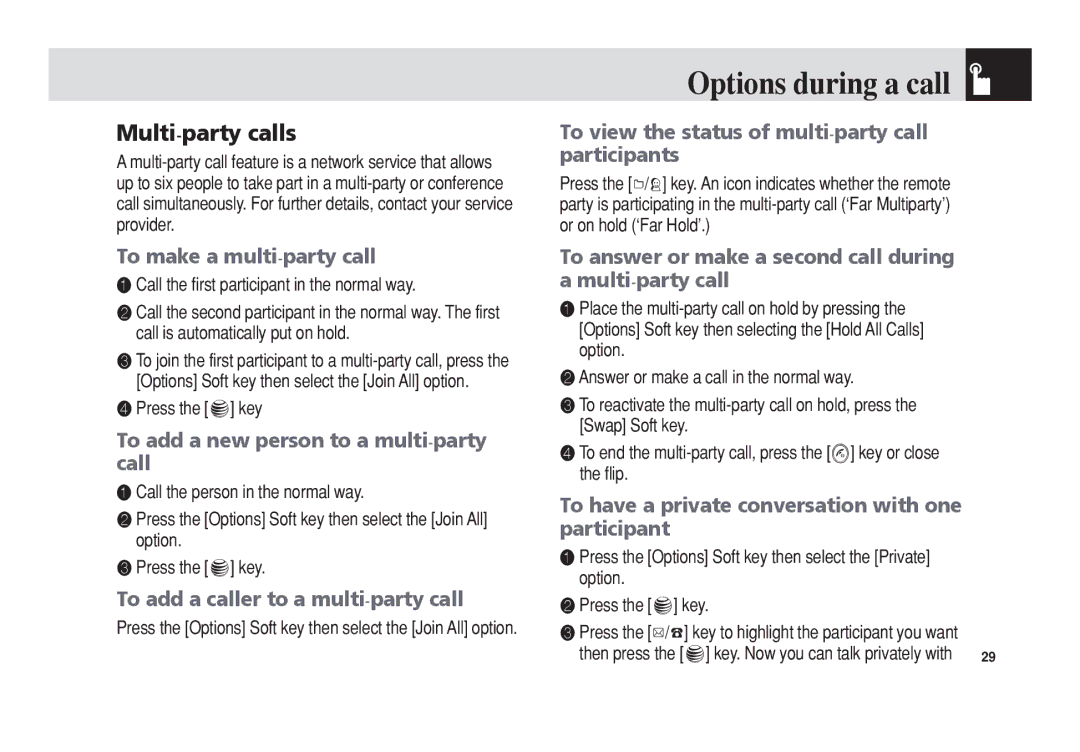
Multi-party calls
To search for a name or group in Address Book
Searching for a number in Address Book during a call
To remove one participant from a multi- party-call
To find a name manually in Address Book
Reading or writing a message during a call
Using your headset
Using Dtmf tones
Retrieving Call in Headset Handsfree/Phone
Using the Shortcut Key in Standby Mode
Selecting menu functions
Moving within your phone’s menu and submenu functions
Entering text
Entering text
Using T9 mode
Using ABC mode
Changing case
Using My Words
Using 123 mode
Using Symbol mode
Adding a new word to My Words Spell function
T9 mode
Deleting a word from My Words Delete function
Editing a word in My Words Edit function
Applications
Taking photos when your phone is open
Camera
Take a Photo
Single or Frame Capture mode
Using your camera options
Preview mode
Send via Bluetooth Transmits the selected photo via
Photo Album
Using the photo options
Taking photos when your phone is closed
Viewing the saved photos
Messaging
Settings
Camera & Messaging
Text Message
Messaging
Receiving a new message
Managing memory
Message SMS
Write New
Text Message
See the icon
Multimedia Message
Slide page after the specified time
Delete Text/Image/Sound Deletes the selected text
Image, or sound from the slide
Text at Top
Priority Set Normal, High, or Low
Edit Edits text
Call Log Shows the recent calls
Inbox
Press the Menu Soft key, select 2. Messaging, select
Starting Instant Messenger
❶ Press Menu Soft key, select 2. Messaging, and then
Viewing the Conversation Log
Sent
Outbox
To manage messages in Sent
Voicemail
Draft
Browser Msg
Templates
Common Settings
Text messages and multimedia messages
When the user receives an SL Service Load message
Voice Mail
Browser SL Message
Memory Info
Messaging & Recent Calls
Recent Calls
Missed Calls
Dialed Calls
Recent Calls
Received Calls
Delete Deletes the selected number
Gprs Info
Delete Call Logs
Call Time
Person if you missed the call
MEdia Net Home
OTA Settings Service
MEdia Net
Bookmarks
Profile Name Press the o key to change the profile name
Go to URL
Profiles
Connection Type Select either WAP or Http
Clear Cache
Cache Mode
Cache
This function sets up your phone’s cache
MEdia Net & AT&T Mall
AT&T Mall
Shop Applications
AT&T Mall & Mobile Email
Mobile Email
Starting Mobile Email
Games & Apps
My Stuff
DRM/ Forward Lock
Audio
Graphics
Shop Graphics
Graphics
❶ Press the Menu Soft key, select 1. Camera, and then
To manage existing alarms
Alarm
To set an alarm
Other Files
Calendar
Monthly View
Press the New Soft key to add a new event
Event View & Edit
Daily View
Delete Deletes an event Delete All Deletes all events
Schedule or creates a new schedule
To record a voice memo
Voice Memo
World Time
To manage voice memos
Calculator
Length, area, volume, weight and temperature
Press the Reset Soft key to initialize all
Converter
Memory Status
My Stuff & Address Book
Address Book
Contact List
Speed Dial
Address Book
Add Contact
To set Speed Dial
To remove from Speed Dial
Group
To edit Speed Dial
To set Speed Dial in Contact List
Memory in Use
Service Numbers
My Business Card
Delete All
Settings
Settings
Display
Alert Tones
Volume
Ringtone
Specifies how loudly your phone rings
Flip Open Tone
Call
Key Tone
Sound Effects
Call Forward
When Busy
When not Found
Forward Always
Auto Redial
Cancel All
Answer Type
Call Waiting
Phone
Connectivity
Paired Device
To Search a device
Search All Audio Accessory Phone Others
Registered device type is PC/PDA
To Pair with a device
Visibility
Security
Outgoing call device
Name
Change PIN1
Change Password
PIN1 Check
Phone Lock
Change PIN2
Software Version
Fixed Dialing Fixed Dialing Numbers
Network Barring
Reset
TTY
Menu Tree Access Codes
Appendix
Menu tree
Settings
TTY
Access codes
Troubleshooting checklist
When you are unable to charge the battery
Troubleshooting checklist & Performance and safety
Performance and safety
When you are unable to input data into your Address Book
Glossary
Glossary
FCC & Industry Canada Regulatory Compliance
Statement according to FCC part
RF exposure FCC
Health and Safety Information FCC
FCC & Industry Canada Regulatory Compliance
To account for any variations
Safety precautions
Mobile phones and other electronic devices
Month Limited Warranty
Warranty
Protect Your Warranty
This Warranty does not apply to
Pantech WIRELESS, INC