English
Functional Overview
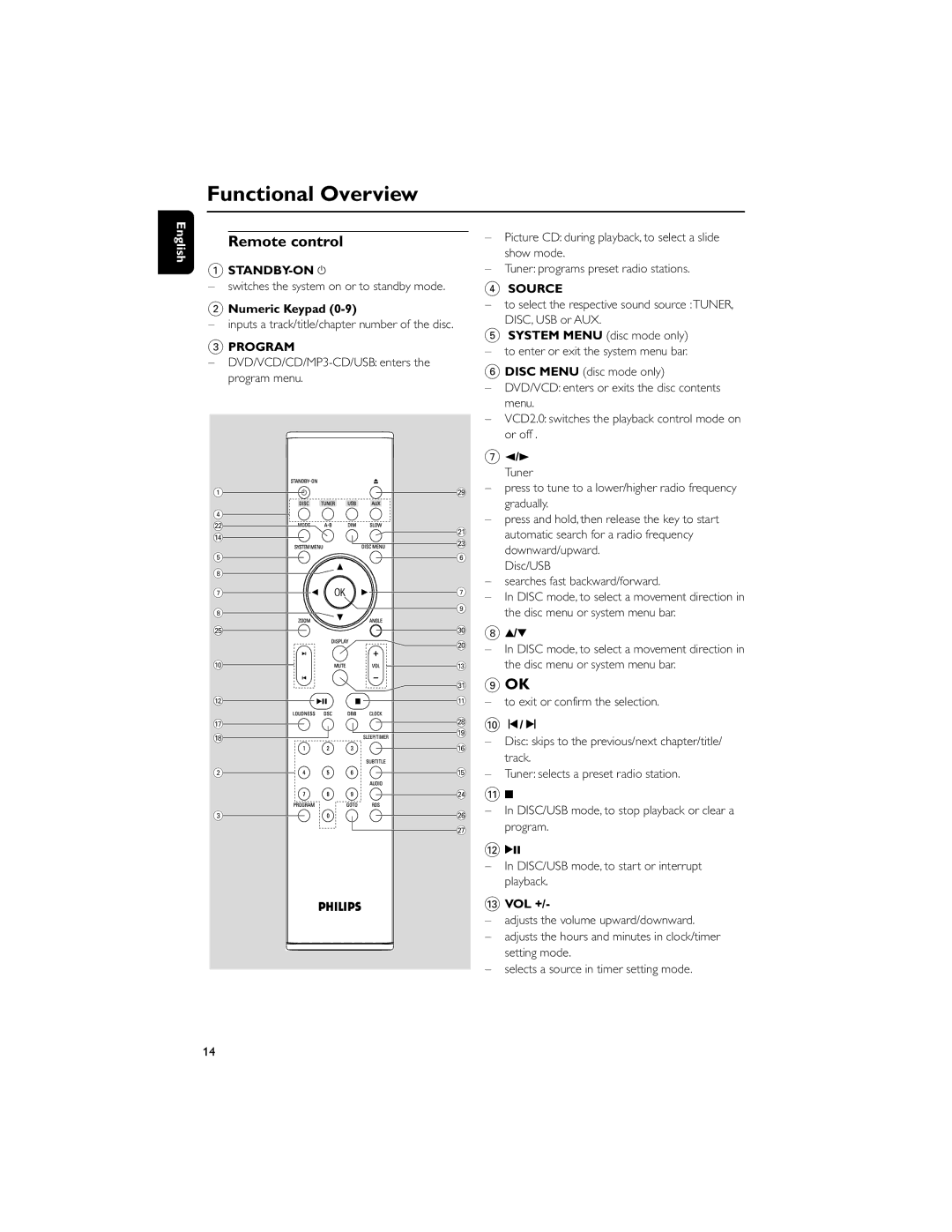
Remote control |
| – | Picture CD: during playback, to select a slide | |
|
|
| show mode. | |
1 |
| – | Tuner: programs preset radio stations. | |
– switches the system on or to standby mode. |
| 4 SOURCE | ||
2 Numeric Keypad |
| – | to select the respective sound source :TUNER, | |
|
| DISC, USB or AUX. | ||
– inputs a track/title/chapter number of the disc. |
|
| ||
| 5 SYSTEM MENU (disc mode only) | |||
3 PROGRAM |
| |||
| – | to enter or exit the system menu bar. | ||
– |
| |||
| 6 DISC MENU (disc mode only) | |||
program menu. |
| |||
| – | DVD/VCD: enters or exits the disc contents | ||
|
| |||
|
|
| menu. | |
|
| – | VCD2.0: switches the playback control mode on | |
|
|
| or off . | |
|
| 7 | 2/3 | |
|
|
| Tuner | |
1 | ª | – | press to tune to a lower/higher radio frequency | |
| gradually. | |||
4 |
|
| ||
| – | press and hold, then release the key to start | ||
™ |
| |||
¡ |
| automatic search for a radio frequency | ||
$ |
| |||
£ |
| |||
|
| downward/upward. | ||
5 | 6 |
| ||
| Disc/USB | |||
8 |
|
| ||
| – | searches fast backward/forward. | ||
7 | 7 | |||
– | In DISC mode, to select a movement direction in | |||
| 9 | |||
8 |
| the disc menu or system menu bar. | ||
|
| |||
∞ | º | 8 | 3/4 | |
| ) | – | In DISC mode, to select a movement direction in | |
|
| |||
0 | # |
| the disc menu or system menu bar. | |
| ⁄ | 9 OK | ||
@ | ! | – | to exit or confirm the selection. | |
& | • | 0 | í/ë | |
( | ||||
* | – | Disc: skips to the previous/next chapter/title/ | ||
| ||||
| ^ | |||
|
| track. | ||
|
|
| ||
2 | % | – | Tuner: selects a preset radio station. | |
| ≤ | ! | 9 | |
3 | § | – | In DISC/USB mode, to stop playback or clear a | |
| program. | |||
| ≥ |
| ||
|
| @ | 2; | |
|
| – | In DISC/USB mode, to start or interrupt | |
|
|
| playback. | |
|
| # VOL +/- | ||
|
| – | adjusts the volume upward/downward. | |
|
| – | adjusts the hours and minutes in clock/timer | |
|
|
| setting mode. | |
|
| – | selects a source in timer setting mode. | |
14