DVD
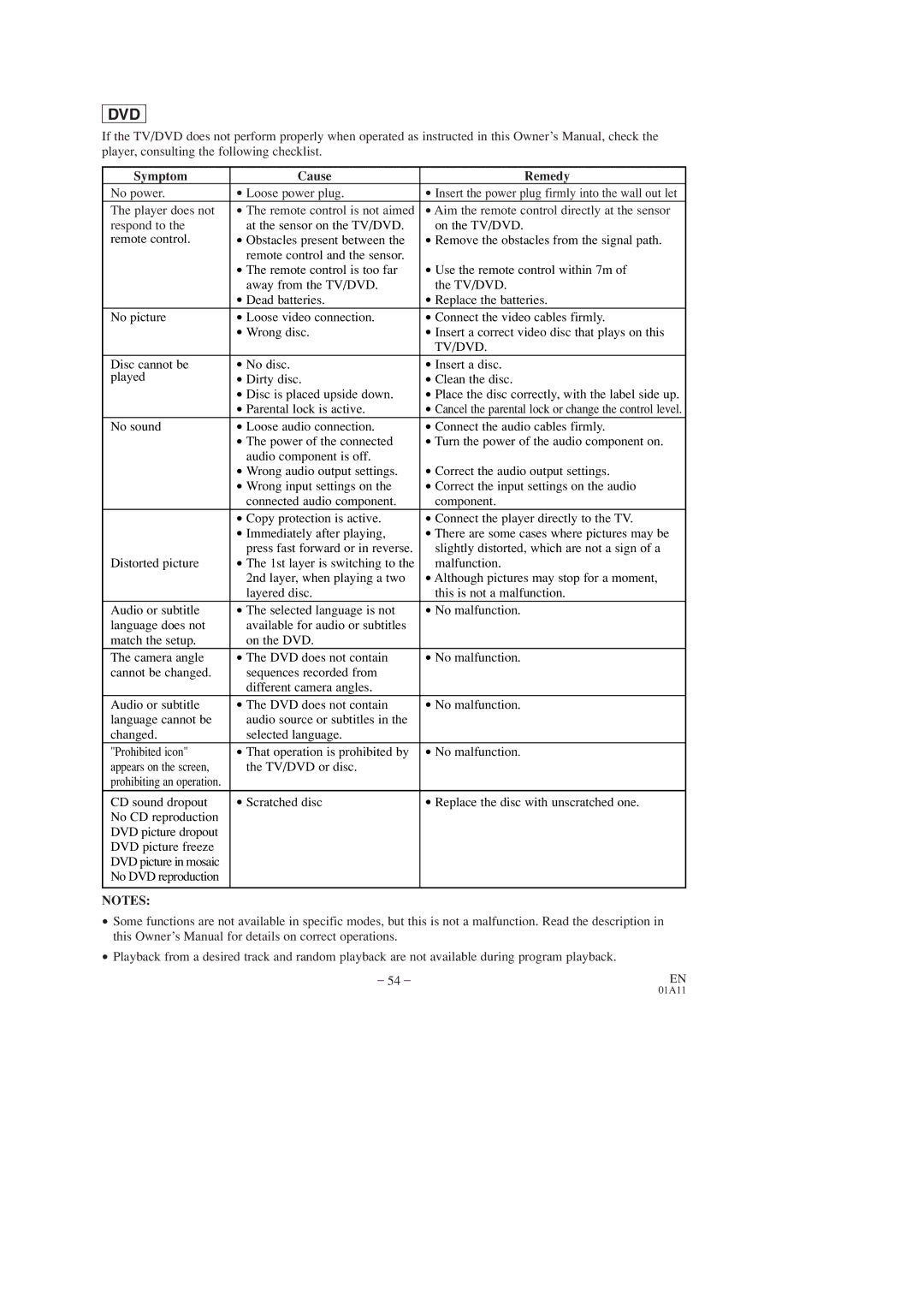
If the TV/DVD does not perform properly when operated as instructed in this Owner’s Manual, check the player, consulting the following checklist.
Symptom | Cause | Remedy |
No power. | • Loose power plug. | • Insert the power plug firmly into the wall out let |
The player does not | • The remote control is not aimed | • Aim the remote control directly at the sensor |
respond to the | • at the sensor on the TV/DVD. | • on the TV/DVD. |
remote control. | • Obstacles present between the | • Remove the obstacles from the signal path. |
| • remote control and the sensor. | • Use the remote control within 7m of |
| • The remote control is too far | |
| • away from the TV/DVD. | • the TV/DVD. |
| • Dead batteries. | • Replace the batteries. |
No picture | • Loose video connection. | • Connect the video cables firmly. |
| • Wrong disc. | • Insert a correct video disc that plays on this |
|
| • TV/DVD. |
Disc cannot be | • No disc. | • Insert a disc. |
played | • Dirty disc. | • Clean the disc. |
| • Disc is placed upside down. | • Place the disc correctly, with the label side up. |
| • Parental lock is active. | • Cancel the parental lock or change the control level. |
No sound | • Loose audio connection. | • Connect the audio cables firmly. |
| • The power of the connected | • Turn the power of the audio component on. |
| • audio component is off. | • Correct the audio output settings. |
| • Wrong audio output settings. | |
| • Wrong input settings on the | • Correct the input settings on the audio |
| • connected audio component. | • component. |
| • Copy protection is active. | • Connect the player directly to the TV. |
| • Immediately after playing, | • There are some cases where pictures may be |
| • press fast forward or in reverse. | • slightly distorted, which are not a sign of a |
Distorted picture | • The 1st layer is switching to the | • malfunction. |
| • 2nd layer, when playing a two | • Although pictures may stop for a moment, |
| • layered disc. | • this is not a malfunction. |
Audio or subtitle | • The selected language is not | • No malfunction. |
language does not | • available for audio or subtitles |
|
match the setup. | • on the DVD. |
|
The camera angle | • The DVD does not contain | • No malfunction. |
cannot be changed. | • sequences recorded from |
|
| • different camera angles. |
|
Audio or subtitle | • The DVD does not contain | • No malfunction. |
language cannot be | • audio source or subtitles in the |
|
changed. | • selected language. |
|
"Prohibited icon" | • That operation is prohibited by | • No malfunction. |
appears on the screen, | • the TV/DVD or disc. |
|
prohibiting an operation. |
|
|
CD sound dropout | • Scratched disc | • Replace the disc with unscratched one. |
No CD reproduction |
|
|
DVD picture dropout |
|
|
DVD picture freeze |
|
|
DVD picture in mosaic |
|
|
No DVD reproduction |
|
|
|
|
|
NOTES: |
|
|
•
•
Some functions are not available in specific modes, but this is not a malfunction. Read the description in this Owner’s Manual for details on correct operations.
Playback from a desired track and random playback are not available during program playback.
– 54 – | EN |
01A11