Connecting to External Equipment
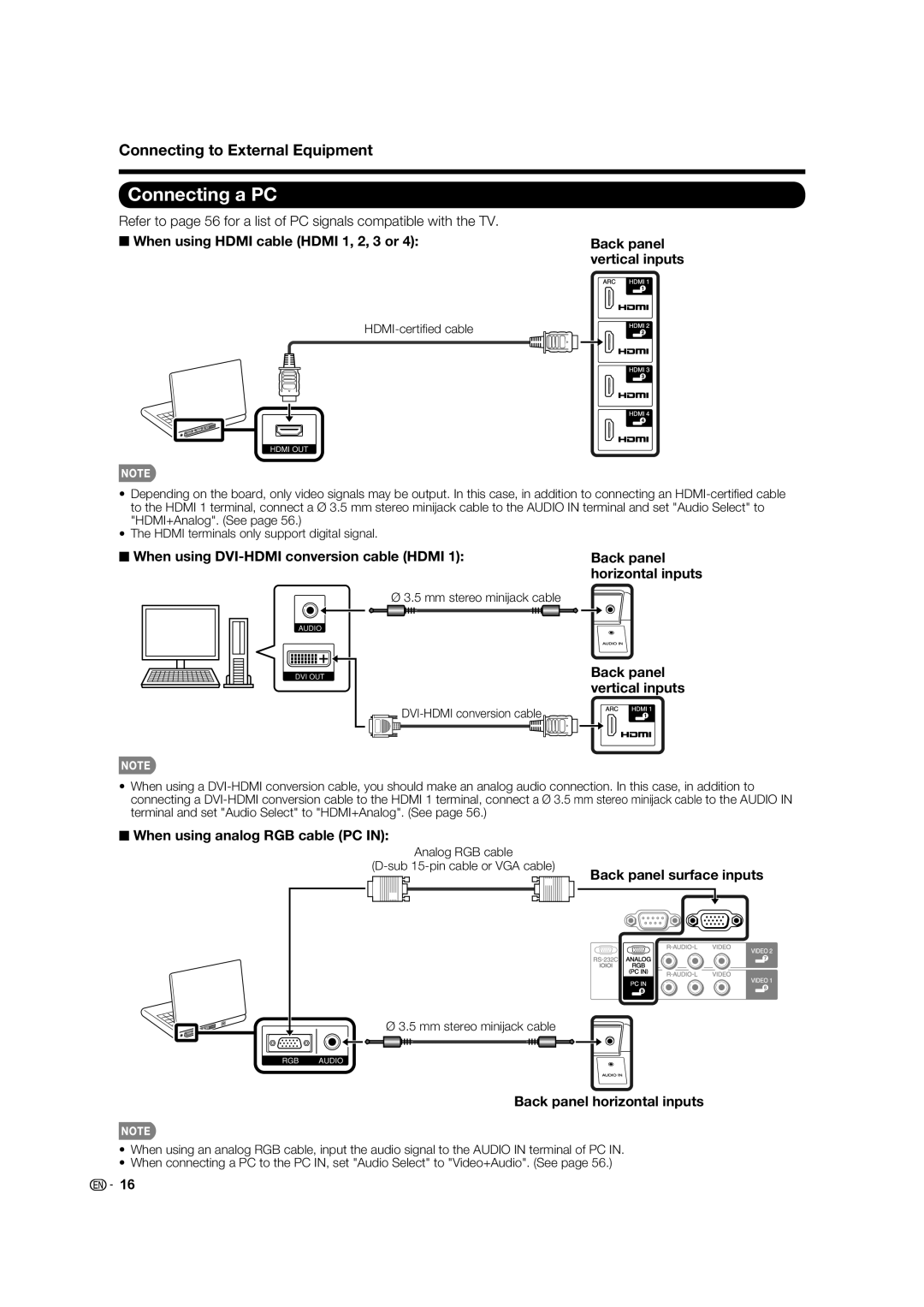
Connecting a PC
Refer to page 56 for a list of PC signals compatible with the TV.
■ When using HDMI cable (HDMI 1, 2, 3 or 4): | Back panel | |
| vertical inputs | |
|
|
|
|
|
|
HDMI OUT
•Depending on the board, only video signals may be output. In this case, in addition to connecting an
•The HDMI terminals only support digital signal.
■When using DVI-HDMI conversion cable (HDMI 1):
Ø3.5 mm stereo minijack cable
AUDIO
DVI OUT
Back panel horizontal inputs
Back panel vertical inputs
•When using a
■When using analog RGB cable (PC IN):
Analog RGB cable
(D-sub 15-pin cable or VGA cable)
Back panel surface inputs
Ø 3.5 mm stereo minijack cable
RGB AUDIO
Back panel horizontal inputs
•When using an analog RGB cable, input the audio signal to the AUDIO IN terminal of PC IN.
•When connecting a PC to the PC IN, set "Audio Select" to "Video+Audio". (See page 56.)

 16
16