USB Media Player (Continued)
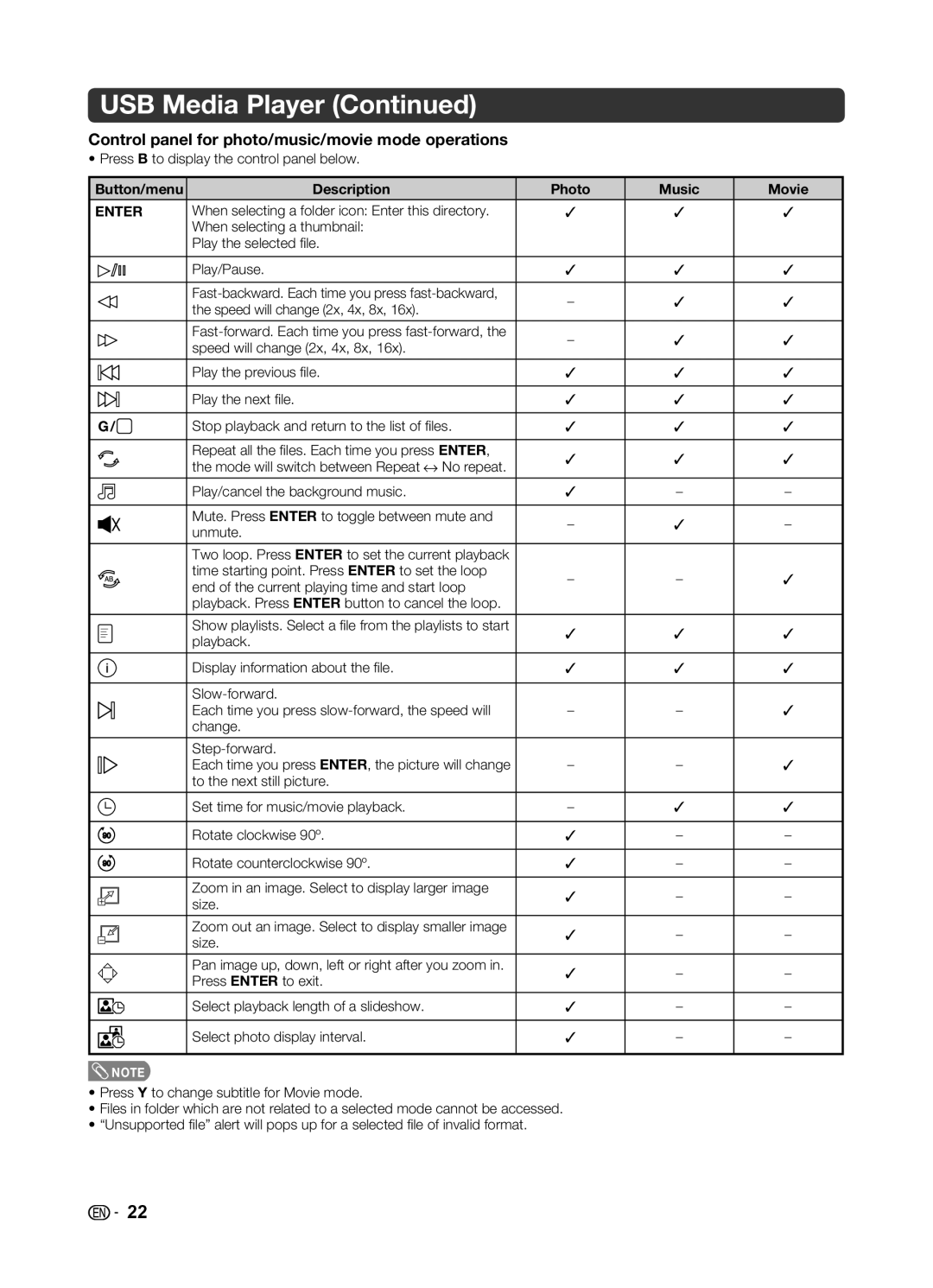
Control panel for photo/music/movie mode operations
• Press B to display the control panel below.
Button/menu | Description | Photo | Music | Movie | ||||
|
|
|
|
|
|
|
|
|
ENTER | When selecting a folder icon: Enter this directory. | ✓ | ✓ | ✓ | ||||
|
|
|
|
| When selecting a thumbnail: |
|
|
|
|
|
|
|
| Play the selected fi le. |
|
|
|
|
|
|
|
|
|
|
|
|
|
|
|
|
| Play/Pause. | ✓ | ✓ | ✓ |
|
|
|
|
|
|
|
|
|
|
|
|
|
| – | ✓ | ✓ | |
|
|
|
|
| the speed will change (2x, 4x, 8x, 16x). | |||
|
|
|
|
|
|
|
| |
|
|
|
|
|
|
|
|
|
|
|
|
|
| – | ✓ | ✓ | |
|
|
|
|
| speed will change (2x, 4x, 8x, 16x). | |||
|
|
|
|
|
|
|
| |
|
|
|
|
|
|
|
|
|
|
|
|
|
| Play the previous fi le. | ✓ | ✓ | ✓ |
|
|
|
|
| ||||
|
|
|
|
| ||||
|
|
|
|
|
|
|
|
|
|
|
|
|
| Play the next fi le. | ✓ | ✓ | ✓ |
|
|
|
|
| ||||
|
|
|
|
| ||||
|
|
|
|
|
|
|
|
|
G / | Stop playback and return to the list of fi les. | ✓ | ✓ | ✓ | ||||
|
|
|
|
|
|
|
|
|
|
|
|
|
| Repeat all the fi les. Each time you press ENTER, | ✓ | ✓ | ✓ |
|
|
|
|
| the mode will switch between Repeat t No repeat. | |||
|
|
|
|
|
|
|
| |
|
|
|
|
| Play/cancel the background music. | ✓ | – | – |
|
|
|
|
|
|
|
|
|
|
|
|
|
| Mute. Press ENTER to toggle between mute and | – | ✓ | – |
|
|
|
|
| unmute. | |||
|
|
|
|
|
|
|
| |
|
|
|
|
|
|
|
|
|
|
|
|
|
| Two loop. Press ENTER to set the current playback |
|
|
|
|
|
|
|
| time starting point. Press ENTER to set the loop | – | – | ✓ |
|
|
|
|
| end of the current playing time and start loop | |||
|
|
|
|
|
|
|
| |
|
|
|
|
| playback. Press ENTER button to cancel the loop. |
|
|
|
|
|
|
|
|
|
|
|
|
|
|
|
|
| Show playlists. Select a fi le from the playlists to start | ✓ | ✓ | ✓ |
|
|
|
|
| playback. | |||
|
|
|
|
| ||||
|
|
|
|
|
|
|
| |
|
|
|
|
|
|
|
|
|
|
|
|
|
| Display information about the fi le. | ✓ | ✓ | ✓ |
|
|
|
|
|
|
|
|
|
|
|
|
|
|
|
|
| |
|
|
|
|
| Each time you press | – | – | ✓ |
|
|
|
|
| ||||
|
|
|
|
| change. |
|
|
|
|
|
|
|
|
|
|
|
|
|
|
|
|
|
|
|
| |
|
|
|
|
| Each time you press ENTER, the picture will change | – | – | ✓ |
|
|
|
|
| ||||
|
|
|
|
| to the next still picture. |
|
|
|
|
|
|
|
|
|
|
|
|
|
|
|
|
| Set time for music/movie playback. | – | ✓ | ✓ |
|
|
|
|
|
|
|
|
|
|
|
|
|
| Rotate clockwise 90º. | ✓ | – | – |
|
|
|
|
|
|
|
|
|
|
|
|
|
| Rotate counterclockwise 90º. | ✓ | – | – |
|
|
|
|
|
|
|
|
|
|
|
|
|
| Zoom in an image. Select to display larger image | ✓ | – | – |
|
|
|
|
| ||||
|
|
|
|
| size. |
|
|
|
|
|
|
|
|
|
|
|
|
|
|
|
|
| Zoom out an image. Select to display smaller image | ✓ | – | – |
|
|
|
|
| ||||
|
|
|
|
| size. |
|
|
|
|
|
|
|
|
|
|
|
|
|
|
|
|
| Pan image up, down, left or right after you zoom in. | ✓ | – | – |
|
|
|
|
| Press ENTER to exit. | |||
|
|
|
|
|
|
|
| |
|
|
|
|
|
|
|
|
|
|
|
|
|
| Select playback length of a slideshow. | ✓ | – | – |
|
|
|
|
|
|
|
|
|
|
|
|
|
| Select photo display interval. | ✓ | – | – |
|
|
|
|
|
|
|
|
|
 NOTE
NOTE
•Press Y to change subtitle for Movie mode.
•Files in folder which are not related to a selected mode cannot be accessed.
•“Unsupported fi le” alert will pops up for a selected fi le of invalid format.

 22
22