Using Blank CDs and DVDs
How to Copy a CD or DVD
DVD-Writable Drives
Helpful Tips
Adjusting the Picture
Adjusting the Volume
If the Computer Is Turned Off or in Hibernate Mode
Connecting Your Computer to a TV or Audio Device
Video and Standard Audio
Enabling the Display Settings for a TV
Setting Up the Cyberlink CL Headphones
Click the DVD Audio Setting icon
Click Advanced
Click the tab for your video card
Using Multimedia
Connecting a Network or Broadband Modem Cable
Setting Up and Using Networks
Networking, click Start or → Windows Help and Support
Wireless Local Area Network
Setting Up a Network
Checking Your Wireless Network Card
What You Need to Establish a Wlan Connection
Right-clickWireless Network Connection Click Properties
Using a Wireless Router and a Broadband Modem
Start Button and Connect To Option
Order Confirmation for Your Computer
Determining the Wireless Network Device Manager
Connecting to a Wlan
Monitoring the Status of the Wireless Network Card
Click → Connect To→ Manage wireless networks
Completing the Connection to the Wlan
Establishing a Mobile Broadband Network Connection
Mobile Broadband Wwan
Checking Your Dell Mobile Broadband Card
Managing Your Network Settings
Connecting to a Mobile Broadband Network
Click Start→ All Programs→ Dell Wireless
Location Profile Settings General Mobility Settings
Setting Up and Using Networks
Installing a PC Card or an ExpressCard
Using Cards
Card Types
PC Card
Removing a PC Card or Blank
PC Card Release button
Securing Your Computer
Passwords
Security Cable Lock
Using an Administrator Password
Using a Primary/System Password
Using a Hard Drive Password
Trusted Platform Module TPM
Enabling the TPM Feature
Computer Tracking Software
If Your Computer Is Lost or Stolen
Securing Your Computer
Cleaning a Non-Optical Mouse
Cleaning Your Computer
Computer, Keyboard, and Display
Mouse
Floppy Drive
Cleaning an Optical Mouse
CDs and DVDs
Dell Technical Update Service
Troubleshooting
Dell Diagnostics
When to Use the Dell Diagnostics
Insert the Drivers and Utilities media
Dell Diagnostics Main Menu
Troubleshooting
Dell Support Utility
Accessing the Dell Support Utility
Clicking the Dell Support Icon
Drive Problems
Double-Clicking the Dell Support Icon
Hard drive problems
CD and DVD drive problems
Problems writing to a CD/DVD-RW drive
If you hear an unfamiliar scraping or grinding sound
Click Scan for and attempt recovery of bad sectors→ Start
Mail, Modem, and Internet Problems
Error Messages
Troubleshooting
Them
Click Start→ Control Panel→ Add or Remove Programs
Keyboard Problems
Ieee 1394 Device Problems
Click Device Manager
External keyboard problems
Lockups and Software Problems
Unexpected characters
Computer does not start up
Other software problems
Computer stops responding
Program stops responding or crashes repeatedly
Network Problems
Memory Problems
Power Problems
PC Card or ExpressCard Problems
Docking Power Considerations
Ensuring Sufficient Power for Your Computer
AC Power Loss While the Computer Is Docked
Docking While the Computer Is Running
Scanner Problems
Printer Problems
Touch Pad or Mouse Problems
Sound and Speaker Problems
No sound from headphones
No sound from integrated speakers
If the display is blank
Video and Display Problems
If only part of the display is readable
If the display is difficult to read
Click Start→ Control Panel→ Appearance and Themes
Viewing the System Setup Screens
System Setup Program
Overview
Changing the Boot Sequence
System Setup Screens
Commonly Used Options
Diskette Drive Modular bay HDD Internal HDD Optical Drive
Changing COM Ports
Performing a One-Time Boot
101
102
What Is a Driver?
Reinstalling Software
Drivers
Identifying Drivers
Using Windows Device Driver Rollback
Reinstalling Drivers and Utilities
Using the Drivers and Utilities Media
Click Properties→ Hardware→ Device Manager
Fix a Problem section, click Hardware Troubleshooter
Using the Hardware Troubleshooter Tool
Click Start→ Help and Support
105
Starting System Restore
Using Microsoft Windows System Restore
Restoring Your Operating System
106
Undoing the Last System Restore
Using the Operating System Media
Enabling System Restore
Before You Begin
Reinstalling Device Drivers
Reinstalling Windows
108
109
Reinstalling Software
Before You Begin
Adding and Replacing Parts
Recommended Tools
Turning Off Your Computer
112
Before Working Inside Your Computer
113
Hard Drive
114
Returning a Hard Drive to Dell
Hinge Cover
115
116
Memory
117
Dimm a Connector
118
119
Dimm B Connector
120
121
Mini-Card
122
123
124
Keyboard
125
Internal Card With Bluetooth Wireless Technology
126
Coin-Cell Battery
About the Device Security Screw
About the Media Bay
127
Removing the Device Security Screw
Removing and Installing Media Bay Devices
128
129
130
131
Dell QuickSet
132
Identifying Your Computer
Traveling With Your Computer
Packing the Computer
133
Traveling by Air
Travel Tips
134
Getting Help
Technical Support and Customer Service
Obtaining Assistance
DellConnect Online Services
AutoTech Service
Problems With Your Order
Automated Order-Status Service
Contacting Dell
Before You Call
Visit support.dell.com
139
Diagnostics Checklist
W . d e l l . c o m s u p p o r t . d e l l . c o m
141
Specifications
PC Card
142
Communications
143
Audio
144
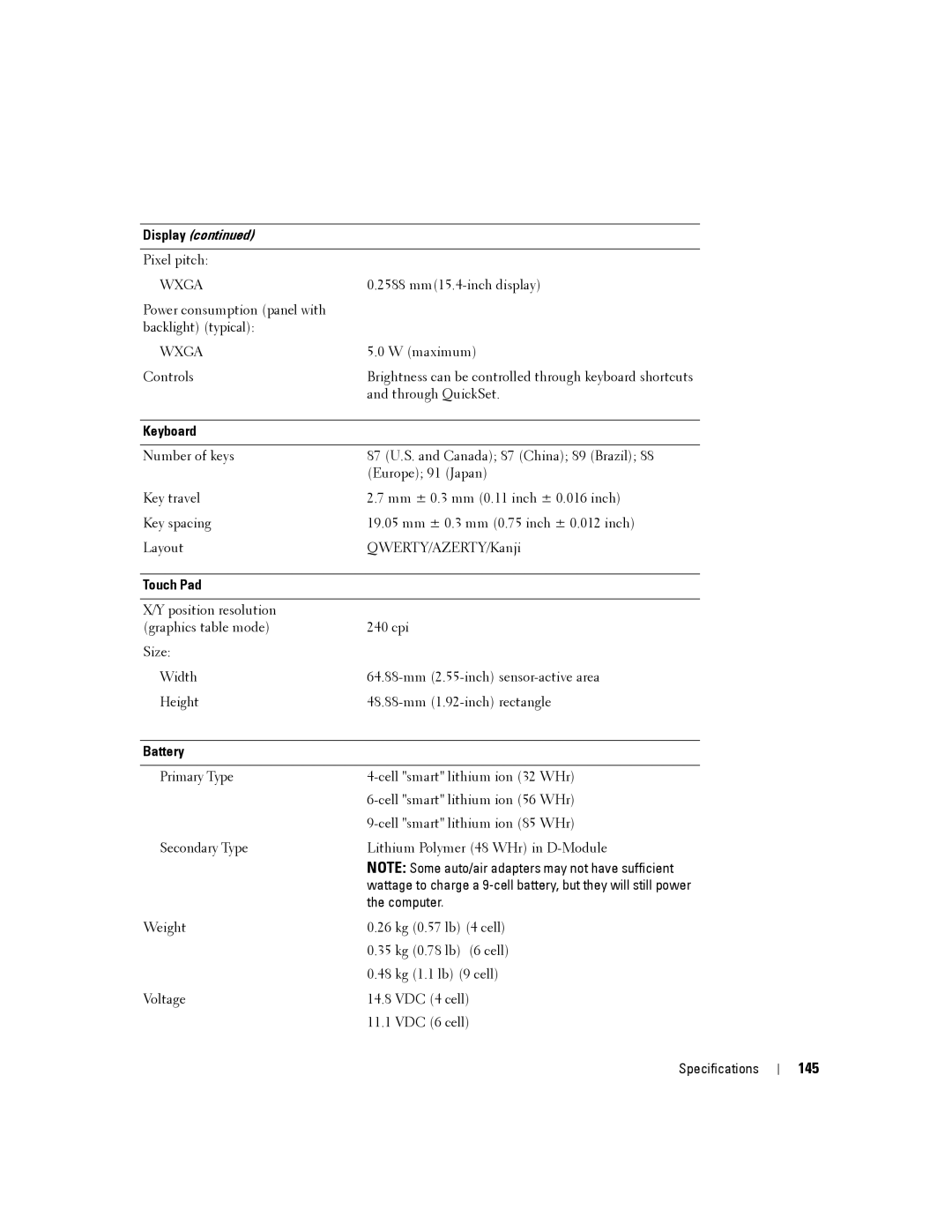
Display
145
146
Battery
Physical
147
148
FCC Notice U.S. Only
Appendix
FCC Class B
149
150
Macrovision Product Notice