4. Connecting network devices with coaxial cables
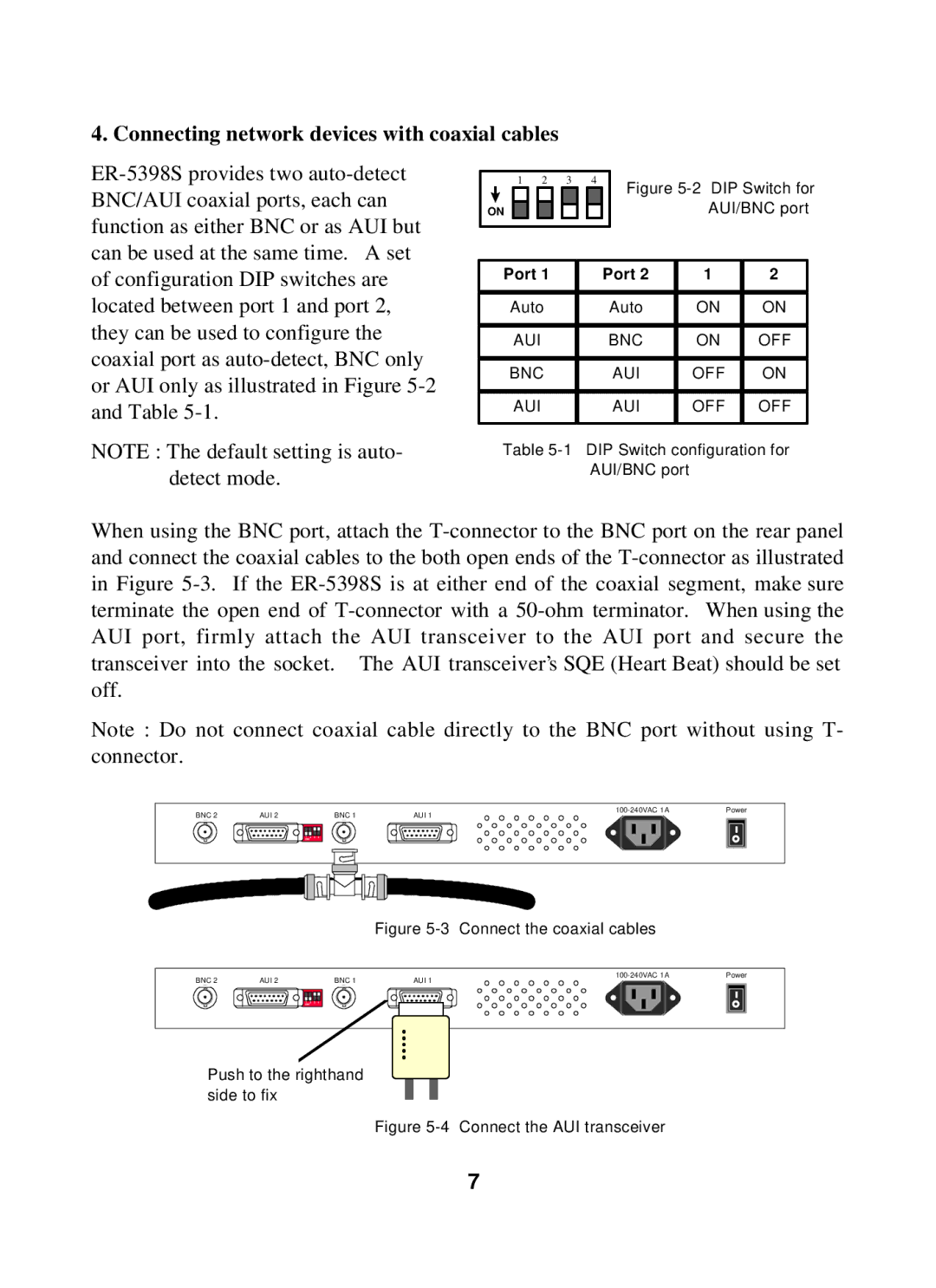
ER-5398S provides two auto-detect BNC/AUI coaxial ports, each can function as either BNC or as AUI but can be used at the same time. A set of configuration DIP switches are located between port 1 and port 2, they can be used to configure the coaxial port as auto-detect, BNC only or AUI only as illustrated in Figure 5-2 and Table 5-1.
NOTE : The default setting is auto- detect mode.
1 | | 2 | 3 | 4 | | Figure 5-2 DIP Switch for |
| | | | | | | | | |
ON | | | | | | | | | | AUI/BNC port |
| | | | | | | | | | | | | |
| | | | | | | | | |
| Port 1 | | | | | Port 2 | 1 | 2 | |
| | | | | | | | | | |
| Auto | | | | | | Auto | ON | ON | |
| | | | | | | | | | | |
| | AUI | | | | | | BNC | ON | OFF | |
| | | | | | | | | | |
| BNC | | | | | | AUI | OFF | ON | |
| | | | | | | | | | | | |
| | AUI | | | | | | | AUI | OFF | OFF | |
| | | | | | | | | | | | | |
Table 5-1 DIP Switch configuration for AUI/BNC port
When using the BNC port, attach the T-connector to the BNC port on the rear panel and connect the coaxial cables to the both open ends of the T-connector as illustrated in Figure 5-3. If the ER-5398S is at either end of the coaxial segment, make sure terminate the open end of T-connector with a 50-ohm terminator. When using the AUI port, firmly attach the AUI transceiver to the AUI port and secure the transceiver into the socket. The AUI transceiver’s SQE (Heart Beat) should be set off.
Note : Do not connect coaxial cable directly to the BNC port without using T- connector.
BNC 2 | AUI 2 | BNC 1 | 100-240VAC 1A | Power |
AUI 1 | |
Figure 5-3 Connect the coaxial cables
Push to the righthand side to fix
Figure 5-4 Connect the AUI transceiver