ENTER .
EXCELL PRECISION CO., LTD.
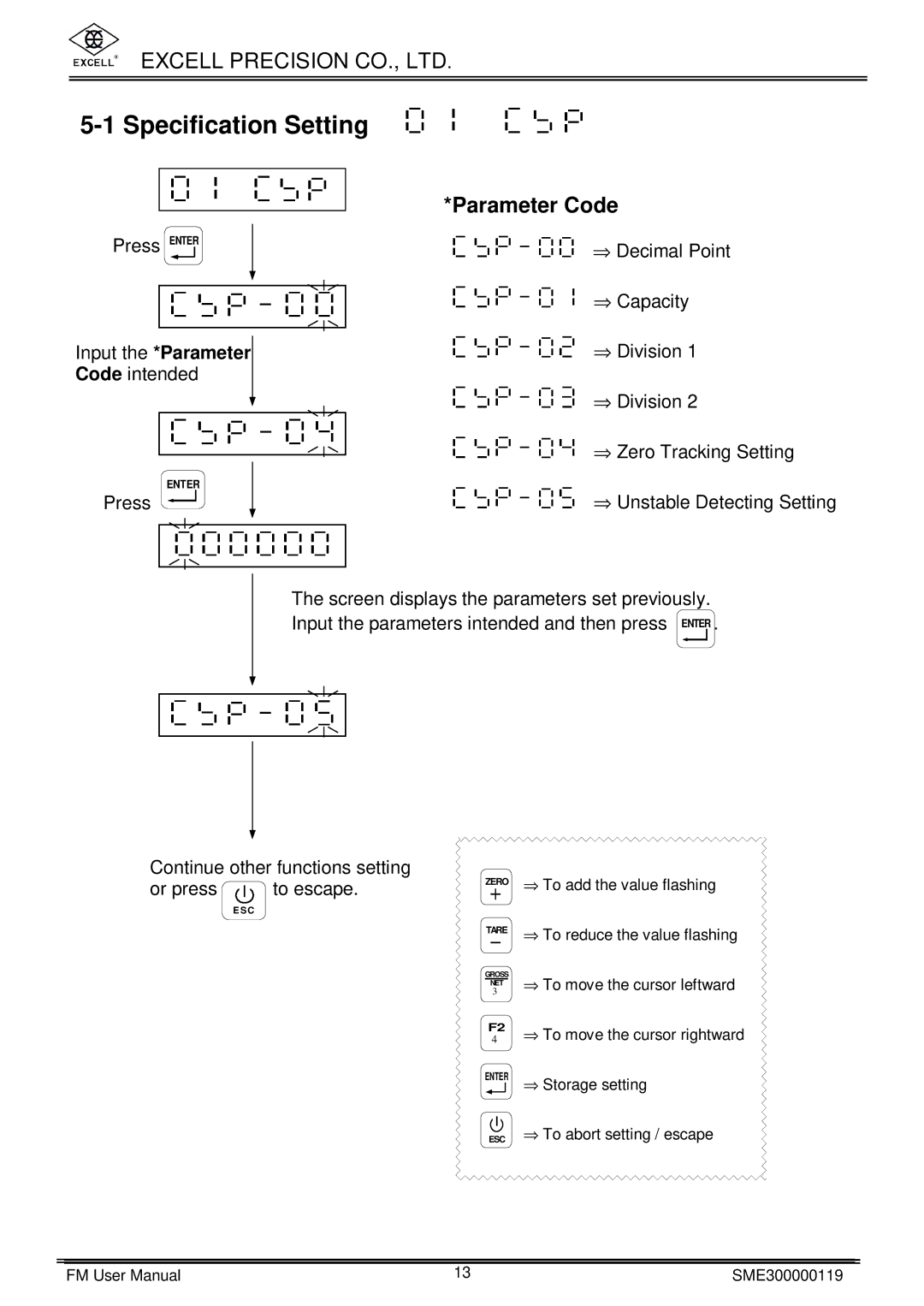
5-1 Specification Setting
| *Parameter Code |
Press ENTER | ⇒ Decimal Point |
| ⇒ Capacity |
Input the *Parameter | ⇒ Division 1 |
Code intended |
|
| ⇒ Division 2 |
| ⇒ Zero Tracking Setting |
ENTER | ⇒ Unstable Detecting Setting |
Press |
The screen displays the parameters set previously.
Input the parameters intended and then press
Continue other functions setting
or press  to escape.
E SC
ZERO | ⇒ To add the value flashing |
| |
TARE | ⇒ To reduce the value flashing |
| |
GROSS | ⇒ To move the cursor leftward |
3 | |
NET |
|
F2 | ⇒ To move the cursor rightward |
4 | |
ENTER | ⇒ Storage setting |
| |
ESC | ⇒ To abort setting / escape |
FM User Manual | 13 | SME300000119 |