VM9410
•Rear: AUX IN – “AUX IN” is the current playing source for the rear zone.
“Surround” is the current playback audio encoding system.
“DSP” indicates Digital Signal Processing.
VCD Playback Information
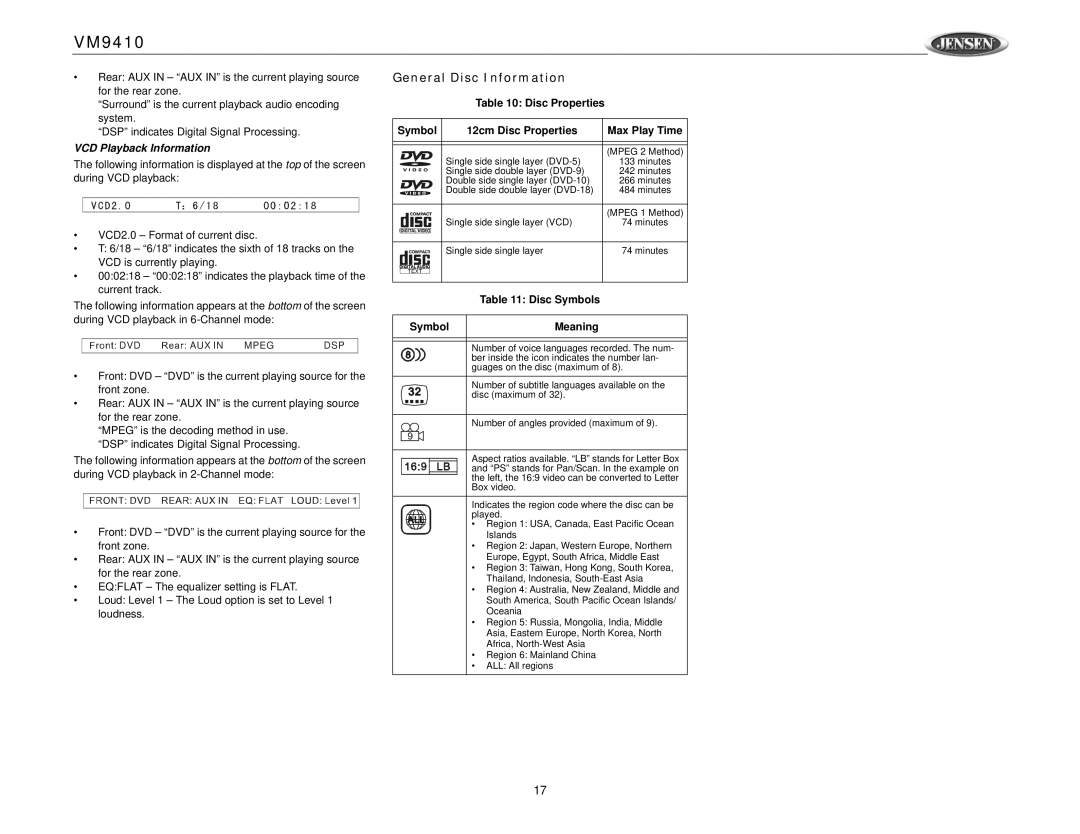
The following information is displayed at the top of the screen during VCD playback:
•VCD2.0 – Format of current disc.
•T: 6/18 – “6/18” indicates the sixth of 18 tracks on the VCD is currently playing.
•00:02:18 – “00:02:18” indicates the playback time of the current track.
The following information appears at the bottom of the screen during VCD playback in
DVD | AUX IN MPEG | DSP |
•Front: DVD – “DVD” is the current playing source for the front zone.
•Rear: AUX IN – “AUX IN” is the current playing source for the rear zone.
“MPEG” is the decoding method in use. “DSP” indicates Digital Signal Processing.
The following information appears at the bottom of the screen during VCD playback in
•Front: DVD – “DVD” is the current playing source for the front zone.
•Rear: AUX IN – “AUX IN” is the current playing source for the rear zone.
•EQ:FLAT – The equalizer setting is FLAT.
•Loud: Level 1 – The Loud option is set to Level 1 loudness.
General Disc Information
Table 10: Disc Properties
Symbol | 12cm Disc Properties | Max Play Time |
|
|
|
|
|
|
| Single side single layer | (MPEG 2 Method) |
| 133 minutes | |
| Single side double layer | 242 minutes |
| Double side single layer | 266 minutes |
| Double side double layer | 484 minutes |
|
|
|
| Single side single layer (VCD) | (MPEG 1 Method) |
| 74 minutes | |
|
|
|
| Single side single layer | 74 minutes |
|
|
|
| Table 11: Disc Symbols |
Symbol | Meaning |
| Number of voice languages recorded. The num- |
| ber inside the icon indicates the number lan- |
| guages on the disc (maximum of 8). |
| Number of subtitle languages available on the |
| disc (maximum of 32). |
| Number of angles provided (maximum of 9). |
| Aspect ratios available. “LB” stands for Letter Box |
| and “PS” stands for Pan/Scan. In the example on |
| the left, the 16:9 video can be converted to Letter |
| Box video. |
| Indicates the region code where the disc can be |
| played. |
•Region 1: USA, Canada, East Pacific Ocean Islands
•Region 2: Japan, Western Europe, Northern Europe, Egypt, South Africa, Middle East
•Region 3: Taiwan, Hong Kong, South Korea, Thailand, Indonesia,
•Region 4: Australia, New Zealand, Middle and South America, South Pacific Ocean Islands/ Oceania
•Region 5: Russia, Mongolia, India, Middle Asia, Eastern Europe, North Korea, North Africa,
•Region 6: Mainland China
•ALL: All regions
17